Add Allocation Rules for Components in Portfolio Financials
Legacy
This information is intended for accounts with Portfolio Financials product in Procore. Please reach out to your Procore point of contact for more information.
Cost Allocations allow you to allocate budgets, holds, contracts, schedule items, and change orders to sub-projects called components using percentage-based allocation rules. Each component acts as a sub-project to which you can allocate and track costs. Budgets, holds, contracts, schedule items, and change orders can all be assigned to components based on the percentage-based logic of the allocation rules assigned to them.
In order to allocate a percentage of each cost item to components, you must first add an allocation rule. After allocation rules are set, you can see rollups of costs for each component in the 'Components' tab.
Required User Permissions:
'Full Access' to the project or higher.
The components that you want to allocate costs for must be added for the project. See Add a Component to a Project in Portfolio Financials.
Vaya a la sección Componentes de la página del proyecto.
Haga clic en la pestaña Reglas de asignación.
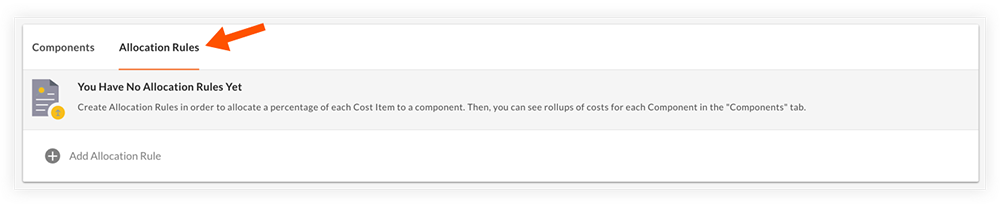
Haga clic en Añadir regla de asignación.
Introduzca un Nombre de regla y establezca la lógica de la regla introduciendo el porcentaje que se asignará a cada componente.
Nota: Los costes se pueden asignar entre componentes en cualquier combinación, pero se debe asignar el 100% de los costes para que se publique la regla.
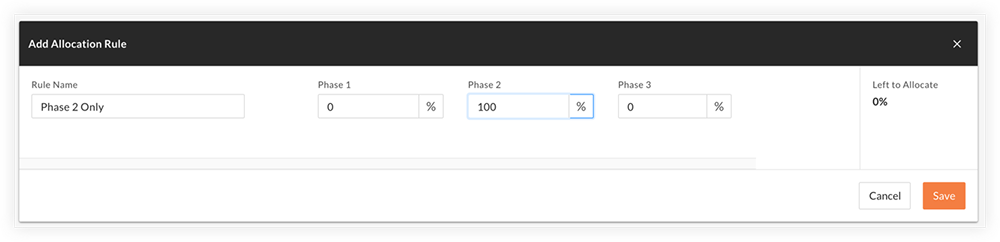
Haga clic en Guardar.
Loading related articles...