Finalize a Bluebeam Studio Session
Background
If your company uses Bluebeam Revu to review submittals, you can create a new Bluebeam Studio Session from Procore using the Procore + Bluebeam integration. After reviewing the submittal in Bluebeam Revu, you can then follow the steps below to finalize the Bluebeam Studio Session.
Things to Consider
Required User Permissions:
'Admin' level permission on the project's Submittals tool.
Session Access: You must be the Session Creator OR have 'Full Control' permissions granted within the specific Bluebeam Studio Session.
Licensing & Delegation: To assign 'Full Control' permissions to another user, the Session Creator must hold a Bluebeam Core or Bluebeam Complete license.
Note: If the Session Creator is using a free Bluebeam account, they will be the only individual capable of finalizing the session and pulling the markups back into Procore.
Requirements:
Bluebeam Revu 2015 or later
Bluebeam Studio Prime
Active Bluebeam login credentials
The Procore + Bluebeam integration must be enabled on your company's account.
Additional Information:
The Bluebeam Studio Sessions banners only display on submittals with at least one PDF attachment.
Prerequisites
Steps
Navigate to the project's Submittals tool.
Click View next to a submittal with a PDF attachment.
In the Bluebeam Studio Sessions banner, click Finalize Session.

This reveals the 'Finalize Bluebeam Studio Session' window.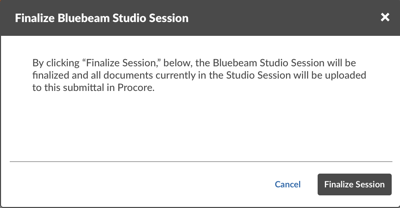
Click Finalize Session.
The system uploads the reviewed documents from Bluebeam and moves them into Procore.
See Also
Loading related articles...