Ajouter des éléments de segment « sous-projet » à un projet Procore
Background
Dans Procore, un sous-projet vous permet de compartimenter les coûts au sein d'un projet. Une fois qu'ils sont ajoutés à Procore (ou importés via un Dans Procore, le terme Système ERP intégré est utilisé pour désigner les applications logicielles de planification des ressources d'entreprise (Enterprise Resource Planning – ERP) qui peuvent être configurées pour échanger des données entre Procore et une application prise en charge utilisant l'outil Intégrations ERP au niveau Entreprise. Voir Quelles intégrations ERP sont prises en charge par Procore ?
After a sub job has been created, you can issue specific line items on the Une ventilation des coûts (VDC) est une liste de postes qui détaille tous les coûts convenus (main-d'œuvre, matériaux, etc.) sur un projet. Abrégée en VDC, elle détaille le montant du contrat en éléments de paiement individuels pour montrer comment la somme totale du contrat est allouée à l'ensemble du travail du projet. Une ventilation des coûts est également basée sur le budget approuvé du projet et est couramment utilisée pour déterminer les paiements échelonnés aux entrepreneurs. Un ordre de changement (OC) est l'enregistrement écrit d'une modification de contrat qui détaille tout ajout au périmètre des travaux de l'accord d'origine. La plupart des contrats de construction sont exécutés avec un périmètre des travaux clairement défini, de sorte que tout travail ajouté au périmètre du contrat d'origine, ou substitué ou supprimé de celui-ci (comme les changements apportés aux conceptions, aux conditions, aux plannings et/ou aux coûts d'un projet) nécessitera généralement un ordre de changement approuvé.
Éléments à prendre en compte
Required User Permissions:
One of the following:
'Admin' level permissions on the Project level Admin tool.
'Read-Only' or 'Standard' level permissions on the Project level Admin tool with the 'Manage Segment Items' granular permission enabled on your permissions template. Note: Your Procore Administrator must configure additional settings for you to edit or delete a custom segment. To learn more, see the "Notes" in Admin: Manage WBS Codes.
Informations complémentaires :
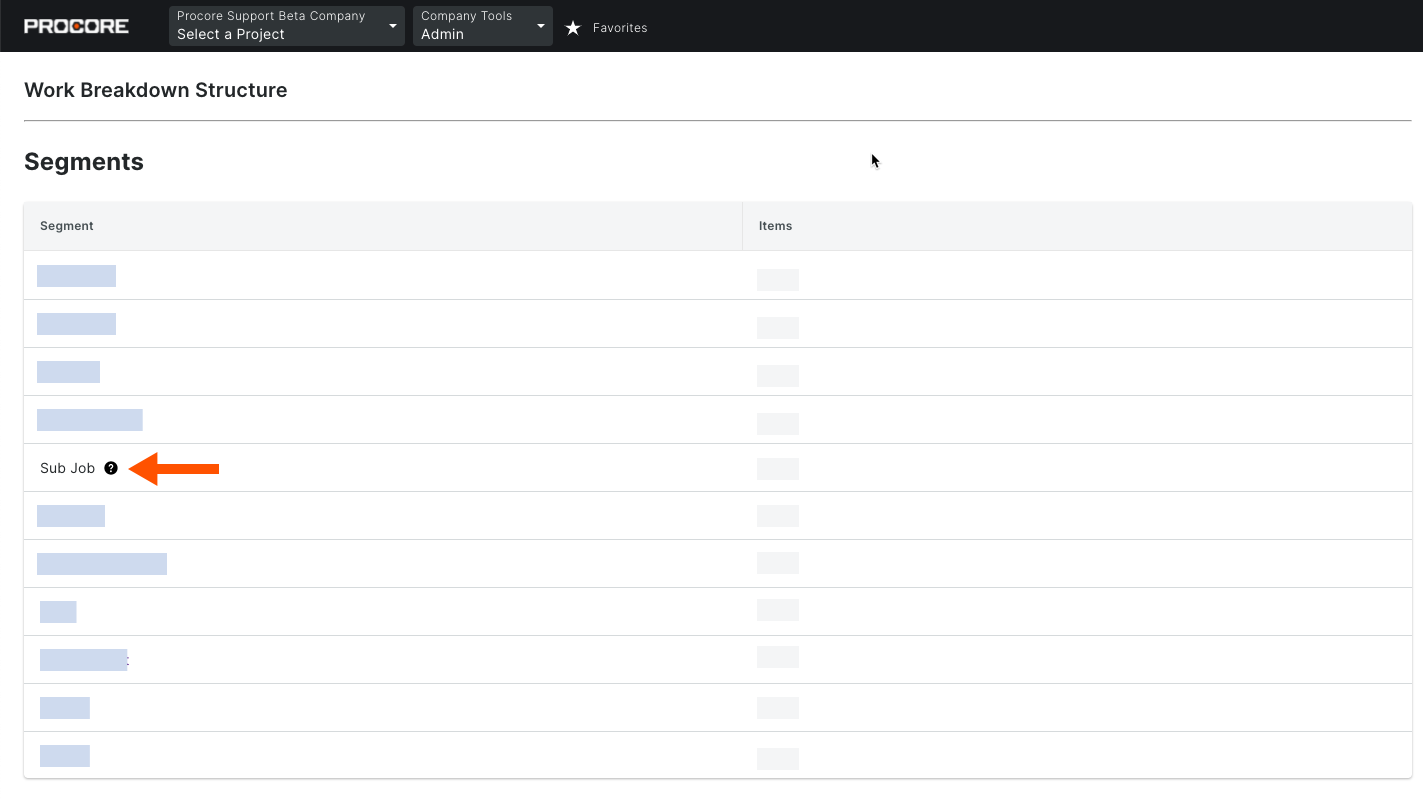
L’ajout de sous-projets à un projet les ajoute également à votre liste de segments au niveau entreprise. Le segment Sous-projets est compté comme l’un (1) des treize (13) segments disponibles.
Limitations:
For customers using the Company level ERP Integrations tool
The default segments in WBS are compatible with Procore's ERP Integrations tool. However, some integrations do NOT yet support custom segments.For customers who have independently developed or purchased a third-party solution to integrate with Procore
To take advantage of the custom segment capabilities associated with WBS, any existing API integrations that you have independently developed or purchased to interact with Procore must be updated to support Procore's new WBS API.
Conditions préalables
Steps
Navigate to the project's Admin tool.
Under 'Project Settings', click the Work Breakdown Structure link.
In the 'Segments' table, click the Sub Jobs link.
Notes
Si le lien Sous-projets n’est pas visible dans le tableau Segments, voir Activerles sous-projets sur les projets pour la SDP.
Avant de pouvoir ajouter un sous-projet à un projet, l’administrateur Procore de votre entreprise doit ajouter les codes de coût de votre entreprise. Voir Ajouter des codes de coût d’entreprise.
Pour les sous-projets, les codes de coût sont copiés à partir de la liste des codes de coût standard au niveau entreprise, et non de la liste des codes de coût au niveau projet.
Choose from these options:
If you are creating sub jobs for the first time, click the Add Segment Items button.
ORIf you are adding sub jobs to an existing list, click the Add Item button.
Enter the following information:
Code. Enter an alphanumeric code for the sub job.
Description. Enter a description for the new sub job.
Click anywhere outside the line item to save it. Procore displays the work 'Saved' in GREEN text.
Important
As shown below, after you add the 'Sub Job' segment to a project, it will automatically be added to the 'Segments' table in the Company level Admin tool with a tooltip beside it. Adding the 'Sub Job' to a project counts as using one (1) of your company's thirteen (13) available segments.