Copier les codes de coût de l’entreprise dans un projet
Arrière-plan
Un code de coût identifie un type spécifique de travail sur un projet pour suivre ses dépenses associées, telles que la main-d’œuvre, les matériaux et l’équipement.
Éléments à prendre en compte
Autorisations utilisateur requises :
Vous avez besoin de l’un des éléments suivants :
Autorisation de niveau « Admin » dans l’outil Admin au niveau projet.
Autorisations de niveau « Lecture seule » ou « Standard » dans l’outil Admin au niveau projet avec l’autorisation granulaire « Gérer les codes SDP » activée dans votre modèle d’autorisation.
Limitations:
Pour les clients utilisant l’outil Niveau entreprise Intégrations ERP
Les segments par défaut dans SDP sont compatibles avec l’outil Intégrations ERP de Procore. Cependant, certaines intégrations ne prennent PAS encore en charge les segments personnalisés.Pour les clients qui ont développé ou acheté indépendamment une solution tiers à intégrer à Procore
Pour tirer parti des fonctionnalités de segment personnalisé associées à SDP, toutes les intégrations d’API existantes que vous avez développées ou achetées indépendamment pour interagir avec Procore doivent être mettre à jour pour prendre en charge la nouvelle API SDP de Procore.
Conditions préalables
Escalier
Accédez à l’outil Admin au niveau projet.
Sous « Paramètres du projet », cliquez sur le lien Structure de découpage du projet.
Dans la liste Segments, cliquez sur le lien Codes de coût .
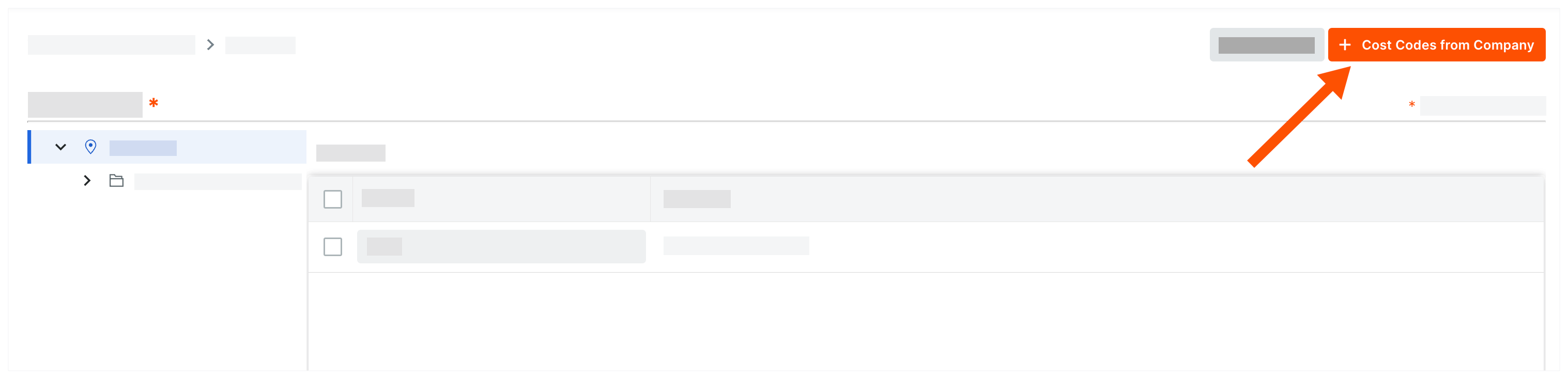
Cliquez sur Codes de coût de l’entreprise.
Dans la fenêtre « Ajouter des codes de coût à ce projet », choisissez parmi les options suivantes :
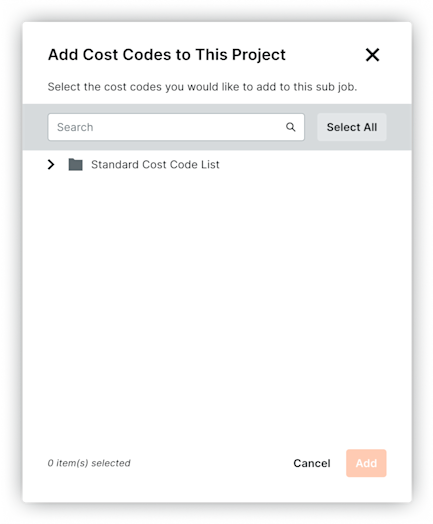
Pour copier tous les codes de coût de l’entreprise dans le projet, cliquez sur Sélectionner tout.
Pour sélectionner des codes de coût spécifiques, saisissez un code dans la zone Rechercher des codes de coût et mettez en surbrillance les codes à ajouter.
Pour choisir les codes de coût, développez les éléments de segment souhaités et mettez en surbrillance les éléments de segment à copier.
Cliquez sur Ajouter.