Reactivate a Contact in the Company Directory
Arrière-plan
Certains outils de projet de Procore offrent aux membres de votre équipe de projet la possibilité de créer un « contact ». Dans Procore, un contact est une personne dont le nom peut être requis dans le cadre d’une valeur d’entrée de données, mais qui n’a pas de compte utilisateur pour se connecter à Procore.
Exemples de contacts : artisans, intérimaires, saisonniers ou visiteurs de chantier sans affiliation à l’une des équipes du projet. Pour plus d’informations sur les contacts dans Procore, voir Qu’est-ce qu’un « contact » dans Procore et quels outils de projet prennent en charge ce concept ?
Éléments à prendre en compte
Les onglets « Contacts » et « Contacts inactifs » répertorient les contacts créés à partir d’un ou de plusieurs projets dans les outils pris en charge.
La réactivation d’un contact déplace l’enregistrement du contact désactivé vers les onglets « Contacts » dans l’outil Annuaire au niveau entreprise et dans tout outil Annuaire au niveau projet pour les projets auxquels le contact était associé avant d’être désactivé.
Escalier
Accédez à l’outil Annuaire au niveau entreprise.
Accédez à l’onglet Contacts inactifs .
Cochez la case en regard du ou des contacts inactifs que vous souhaitez réactiver.
Cliquez sur Actions par lot et sélectionnez Réactiver.
Dans la fenêtre « Réactiver les contacts », cliquez sur Réactiver.
Note: Cliquez sur la X à côté du nom d’un contact pour le supprimer de la liste des contacts à réactiver.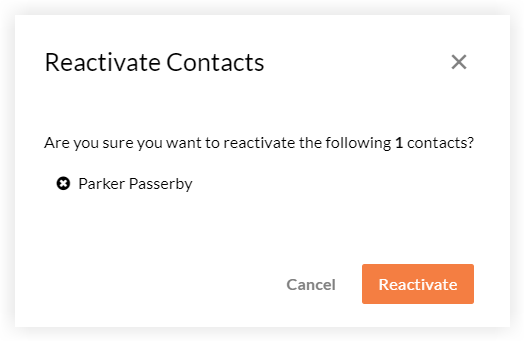
See Also
Loading related articles...