Mise à jour de l’assurance arrivant à expiration pour un fournisseur dans l’annuaire de l’entreprise
Arrière-plan
Procore vous Dans Procore, le terme Directeur d'assurance fait référence à un employé interne (ou à plusieurs employés) de votre entreprise qui sert de point de contact principal de votre organisation pour s'assurer que les polices d'assurance de vos entrepreneurs, sous-traitants et autres fournisseurs sont conformes aux exigences et que leurs politiques et certificats requis sont tenus à jour.
Éléments à prendre en compte
Si vous avez activé l’outil Intégrations ERP pour Sage 300 CRE, les champs d’assurance suivants dans un enregistrement d’entreprise Procore sont maintenant verrouillés lorsque les données de Procore sont synchronisées avec Sage 300 CRE. Vous devez effectuer ces mises à jour dans le système ERP intégré : Type d’assurance (par exemple, générale, automobile, responsabilité civile complémentaire et travailleur), Date d’entrée en vigueur, Date d’expiration, Limite, Nom et Numéro de police.
Conditions préalables
Escalier
Ajoutez d’abord un fournisseur d’assurance en tant qu’entreprise dans l’annuaire de votre entreprise. Voir Ajouter ou modifier un fournisseur/une entreprise dans l’annuaire de l’entreprise.
Dans votre client de messagerie, ouvrez l’e-mail « Assurance arrivant à expiration » de Procore.
Cliquez sur le lien Afficher l’assurance .
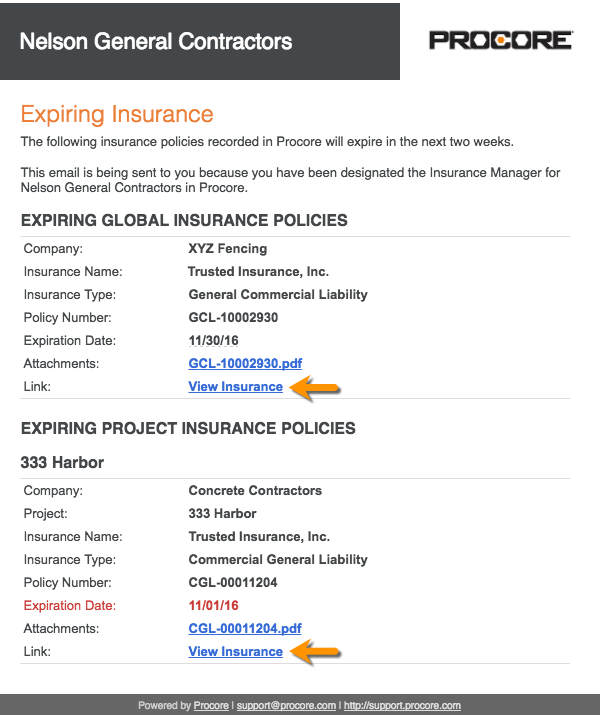
Si vous n’êtes pas connecté à Procore, connectez-vous.
Mettez à jour la valeur de n’importe quelle cellule portant un caret bleu.
OU
Cliquez sur Modifier pour modifier le statut, ajouter une pièce jointe ou saisir des notes d’assurance.Cliquez sur Enregistrer.