Afficher les plans (iOS)
Pointe
Une nouvelle mise en page à deux et trois colonnes est désormais disponible pour les iPads, ce qui facilite la navigation dans les différents outils. Appuyez sur l’icône de menu  pour afficher et masquer le menu des outils.
 .
. pour le jeu ou les plans que vous souhaitez afficher.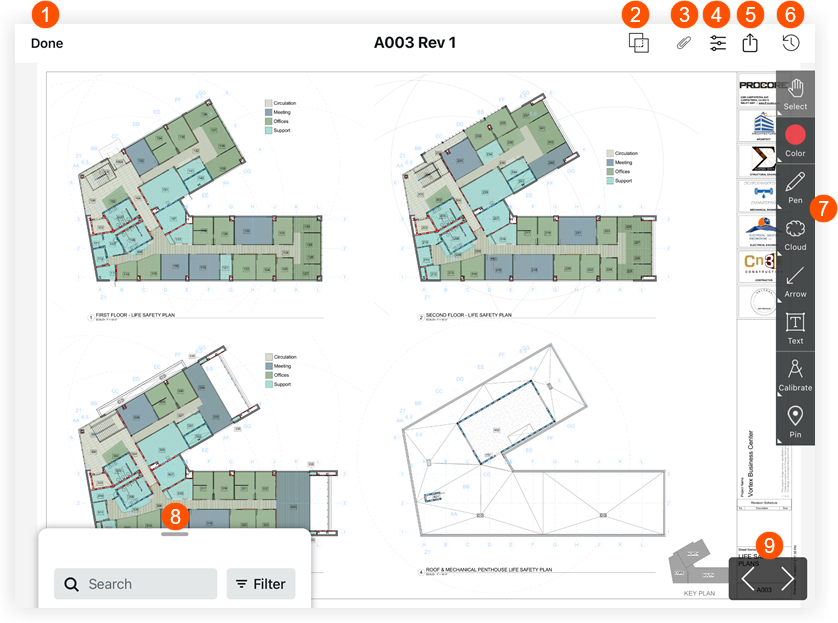
 Appuyez sur Terminé si vous souhaitez revenir au registre des plans.
 Appuyez sur Comparaison de plans pour afficher les différences entre deux révisions de plans. Voir
  Appuyez sur Pièces jointes pour afficher toutes les pièces jointes qui ont été ajoutées en tant que pièces jointes ou annotations au plan.
 Appuyez sur Filtres pour basculer entre les couches ou les annotations publiées et personnelles. Voir
  Appuyez sur Partager pour accéder aux options suivantes :
 Appuyez sur Récent pour afficher une liste des plans récemment consultés.
 Appuyez sur un outil dans la barre d’outils d’annotation pour annoter vos plans. Voir
  Appuyez sur la barre de recherche pour rechercher du texte qui apparaît sur les plans.
 Appuyez sur les flèches gauche ou droite pour passer à différents plans.