Ce site Web n'est pas encore complètement disponible dans votre langue
La seule page du site de support V2 disponible dans vos paramètres régionaux est celle de la bibliothèque vidéo. Le lancement complet du site Web arrivera prochainement.
Vous recherchez d'autres contenus ? Retournez sur le site de support V1.
Manuels de produits populaires
Les manuels de produits les plus utilisés sur le chantier
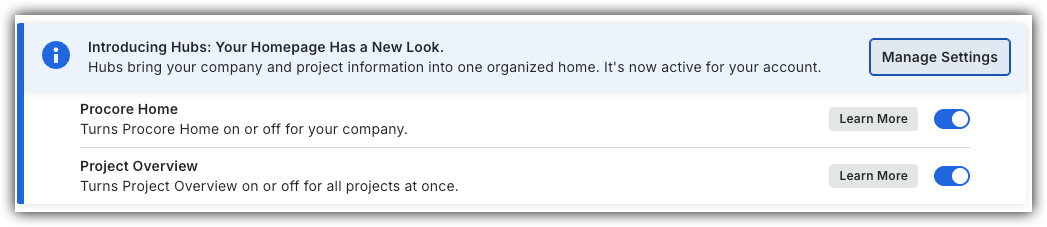
Pour revenir à l’ancien Accueil de projet, les administrateurs Procore peuvent accéder à l’outil Accueil entreprise Portefeuille / ProcoreAccueil, cliquer sur Gérer les paramètres et désactiver Aperçu du projetbascule.
Cependant, plus tard cette année, il sera au coucher du soleil et ne sera plus disponible. Si votre entreprise est revenue à l’ancienne expérience projet Accueil, les administrateurs Procore peuvent réactiver l’Aperçu du projet en activant Aperçu du projet bascule ACTIVÉ.
Fond
Vous pouvez activer ou désactiver l’affichage du widget Conditions météorologiques du projet dans la barre latérale de la page d’accueil du projet.
Éléments à prendre en compte
Autorisation utilisateur requise:
Autorisation de niveau « Admin » sur la page d’accueil du projet.
Escalier
Accédez à la vue d’ensemble du projet.
Cliquez sur les points de suspensionverticaux de l’onglet Vue d’ensemble .
Aligner les cartes
Cliquez sur Actions et sélectionnez Aligner les cartes pour supprimer les lacunes de mise en page dans la vue actuelle.
Ignorer les modifications
Cliquez sur Actions et sélectionnez Ignorer les modifications pour annuler toutes les mises à jour effectuées dans la session de modification en cours.
Retirer la carte
Cliquez sur l’icône Supprimer pour chaque carte que vous souhaitez supprimer.
Cliquez sur Retirer la carte pour confirmer.
Renommer l’onglet Vue d’ensemble
Cliquez sur les points de suspension verticaux de l’onglet Vue d’ensemble et cliquez sur Renommer.
Définir sur le modèle
Cliquez sur Actions et sélectionnez Définir comme modèle pour appliquer la dernière mise en page du modèle Procore à la vue d’ensemble du Aperçu du projet. Ainsi, les cartes supprimées apparaîtront à nouveau dans la mise en page du modèle.
Cliquez sur Enregistrer.
Escalier
Accueil du projet (Héritage)
Accédez à la Page d’accueil du projet.
Cliquez sur Configurer les paramètres.
Choisissez parmi ces options :
Pour afficher le widget Conditions météorologiques du projet sur la page d’accueil, cochez la case Afficher les conditions météorologiques actuelles .
Pour masquer le widget Conditions météorologiques du projet sur la page d’accueil, décochez la case.
 bascule.
 ACTIVÉ.
 verticaux de l’onglet Vue d’ensemble .
 pour chaque carte que vous souhaitez supprimer.
 .
.