Afficher les informations du projet
Arrière-plan
Les administrateurs d’entreprise et de projet peuvent consulter des informations à partir de la page de présentation du projet pour les aider à résoudre les problèmes liés aux données sous-utilisées dans leurs projets de construction.
Éléments à prendre en compte
Escalier
Accédez à un projet dans Procore.
Ouvrez votre panneau latéral Procore.
Cliquez sur l’icône Synthèse des données.

Cliquez sur les points de suspension
 verticaux de la renseignements de votre choix pour effectuer les opérations suivantes :
Enregistrer Renseignements au format PDF - Téléchargez les renseignements au format PDF pour les partager.
Favori : marquez le Renseignements comme favori pour l’ajouter à votre liste de favoris.
Centre de support - Consultez la zone de support produit de Procore.
Fournir des commentaires : fournissez des commentaires sur votre expérience.
Cliquez sur Accéder au rapport pour afficher un modèle de rapport prédéfini et obtenir plus de détails sur les renseignements données inclus dans les calculs du projet.
Cliquez sur Créer une saisie pour accéder à l’outil associé à vos informations.
Remarque : Les options affichées dépendent du type de renseignements que vous visualisez.
Fonctionnalités de la carte Synthèse des données de projet
Jours sans incident : Afficher/Masquer les fonctionnalités de Synthèse des données
Ces renseignements permettent de suivre le nombre de jours consécutifs pendant lesquels un projet spécifique a fonctionné sans incident de sécurité. Il aide les équipes de projet à surveiller leur bilan de sécurité, à rester informées des incidents en cours et à renforcer les comportements sécurisés sur le site.
Bonnes pratiques : Cette section contient une recommandation visant à reconnaître les équipes qui atteignent les jalons de la séquence de sécurité (p. ex., 30, 60 ou 90 jours).
Jours depuis le dernier incident à déclarer : affiche le nombre total de jours depuis que le dernier incident majeur à déclarer a été enregistré pour ce projet spécifique.
Nombre de jours depuis le dernier incident : Affiche le nombre de jours depuis qu’un type d’incident (y compris mineur) a été enregistré pour ce projet.
Incidents ouverts les plus récents : Tableau qui fournit un aperçu rapide des incidents ouverts les plus récents sur le projet. Il répertorie l’ID de l’incident, le danger et la date de l’événement, avec des liens vers chaque élément.
Pour afficher plus de données, cliquez sur Accéder au rapport. Pour gérer les incidents de ce projet, cliquez sur Afficher tous les incidents pour accéder directement à l’outil Incidents.

élément d'inspection taux de réussite - 6 derniers mois : Afficher/Masquer les fonctionnalités de Synthèse des données
Affiche le pourcentage de postes d’inspection qui réussissent la première inspection au cours des six derniers mois glissants. Les renseignements mesurent l’intégrité du contrôle qualité de votre projet.
Un taux de réussite élevé du premier coup signifie moins de retards, moins de coûts et moins de retouches. En comparant les performances avec les benchmarks de l’entreprise, vous pouvez rapidement repérer les schémas, résoudre les problèmes récurrents et améliorer la qualité des projets, ce qui vous permet de gagner du temps, de réduire les reprises et de maintenir vos projets sur la bonne voie.
Remarque: Pour accéder aux renseignements sur le taux de réussite de l’élément d'inspection au niveau Projet, les utilisateurs doivent disposer d’une autorisation granulaire « Afficher les renseignements d’inspection du projet » activée sur l’outil d’ inspection du projet.
Le taux de réussite de l’élément d'inspection au niveau Projet renseignements:
Affiche le pourcentage moyen de taux de réussite conforme à l’élément d’inspection lors de la première inspection pour un projet avec l’entreprise comme référence. Cela permet aux équipes de comparer leurs performances à celles de leurs pairs afin d’adopter les bonnes pratiques, de réduire les reprises et d’éviter les retards.
Fournit une vue des six derniers mois glissants pour mettre en évidence les tendances en matière d’éléments conformes par rapport aux éléments déficients .
Affiche un instantané avec Qualité ou Sécuritéy dans la section d’en-tête des renseignements en fonction de la répartition de votre outil de qualité ou de sécurité. Par exemple, Qualité : élément d'inspection taux de réussite - 6 derniers mois ou Sécurité : élément d'inspection taux de réussite - 6 derniers mois.
Permet de survoler les graphiques linéaires pour voir des statistiques mensuelles détaillées (total des postes, conforme, déficient, N/A). Par exemple, le nombre d’éléments d’inspection auxquels on n’a pas répondu ou qui ne répondent pas.
Met en évidence l’efficacité des processus d’inspection en révélant la fréquence à laquelle les inspections répondent aux exigences dès la première tentative au niveau Projet.
Permet de percer les éléments d’inspection avec le plus grand nombre de réponses déficientes. Cliquez sur Afficher les éléments d’inspection avec le plus grand nombre de réponses déficientes pour identifier les modèles ou les postes individuels qui échouent fréquemment afin de cibler les changements de formation ou de processus.
Pour accéder directement aux rapports, cliquez sur Accéder aux rapports. Pour afficher toutes les inspections, cliquez sur Réviser les inspectionsou accédez directement à l’outil Inspections du projet pour une analyse et un suivi plus approfondis. 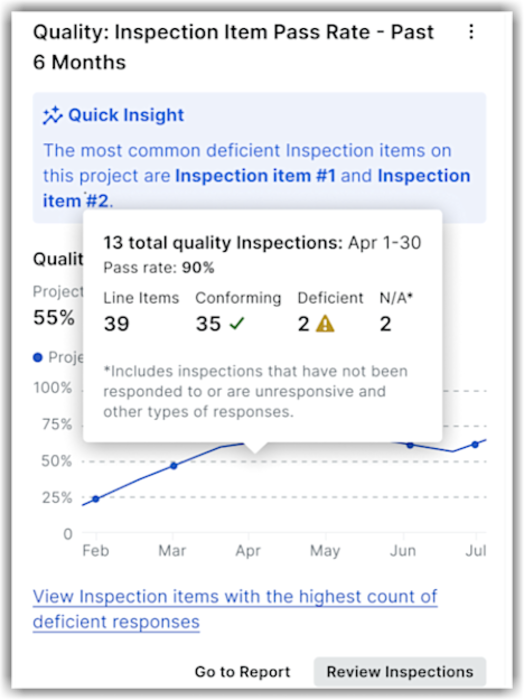
Livrables en attente et à risque : Afficher/Masquer les fonctionnalités de Synthèse des données
Les renseignements sur les livrables en attente et à risque sont conçus pour fournir une visibilité complète sur le statut des livrables au sein d’un projet. Cette fonctionnalité vous permet de suivre l’avancement de vos livrables en visualisant ceux qui sont conformes au Planning, ceux qui peuvent nécessiter une intervention et ceux qui sont à risque d’être en retard. Cet renseignements comprend deux sections clés : Livrables par étape et Nombre de livrables par date d’échéance.
« Livrables de ce projet par étape » permet aux utilisateurs de comprendre où en est actuellement chaque livrable dans son cycle de vie et d’identifier les goulots d’étranglement potentiels. Cette section comprend cinq étapes :
Ébauche - Livrables dont le flux de travail de révision n’a pas encore commencé.
Soumission en attente : Livrables qui sont entrés dans le flux de travail de révision et qui sont en attente d’action de la part du « Soumissionnaire ».
Révision externe : Livrables en cours de révision par un approbateur externe, tel qu’un architecte ou un ingénieur.
Révision interne : Livrables en cours de révision par un membre de l’équipe interne, tel qu’un chef de projet.
Fermé : Livrables qui ont terminé l’ensemble du flux de travail et qui sont marqués comme « Fermés ».
« Nombre de Livrables par date d’échéance » catégorise les livrables en fonction de leur date d'échéance statut, ce qui permet au vôtre de gérer efficacement les tâches urgentes. Les détails de la section sont les suivants :
Sur la bonne voie : la « date d’échéance de la dernière étape » est au plus tard la « date d’échéance finale », ce qui indique que le livrable progresse comme prévu.
Suspendu : le livrable a été rejeté par un approbateur et nécessite l’attention du gestionnaire des livrables pour continuer.
En retard : le livrable a dépassé sa date d’échéance finale et n’est toujours pas clôturé.
À partir de ces renseignements, vous pouvez afficher un modèle de rapport prérempli qui affiche des détails sur les livrables actuels, leurs étapes et la partie responsable. Vous pouvez également accéder directement à l’outil Livrables dans Procore pour prendre des mesures sur les éléments en attente ou effectuer des mises à jour pour faire passer les livrables à l’étape suivante.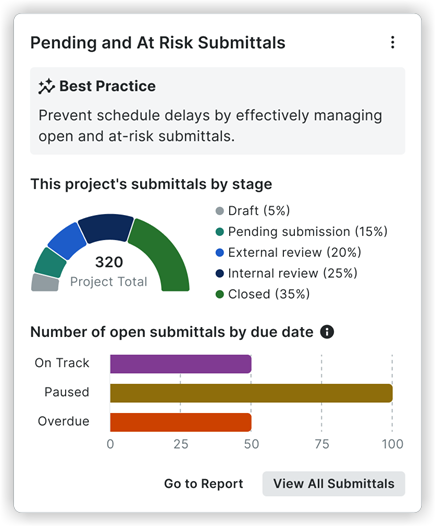
Prédictions des problèmes de qualité : Afficher/Masquer les fonctionnalités de Synthèse des données
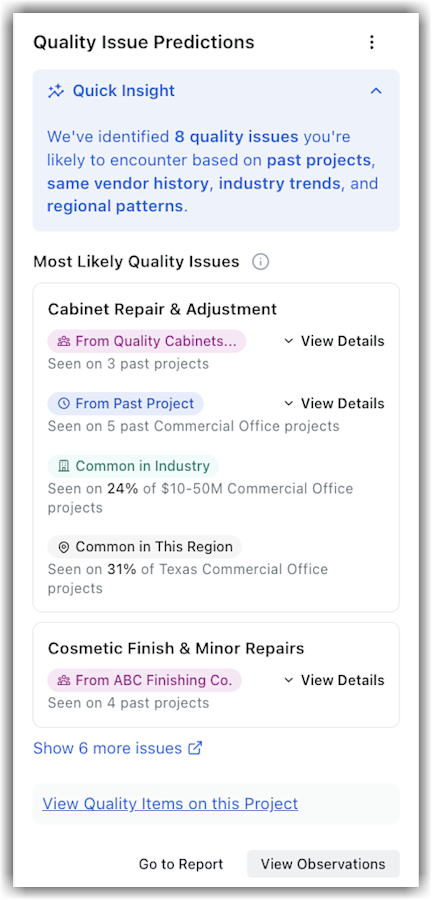
Affiche les problèmes de qualité prévus susceptibles de se produire sur un projet en fonction des données historiques du projet, des performances des métiers, des références de l’industrie et des schémas régionaux, avec des signaux et des exemples à l’appui. Ces nouveaux renseignements sont disponibles pour les entreprises inscrites qui ont accès aux outils Synthèse des données, Observations, Liste de réserves et Inspections.
Remarque: les utilisateurs disposant d’autorisations de niveau Admin sur les outils Observations ou Liste de réserves peuvent consulter ces renseignements. De plus, ceux qui disposent des autorisations granulaires « Afficher les renseignements d’observation du projet » ou « Afficher les renseignements sur les éléments de la liste de réserves du projet » y ont également accès.
Les renseignements sur les prédictions des problèmes de qualité mettent en évidence les huit principaux risques de qualité que vous êtes susceptible de rencontrer pour un projet. En analysant les projets historiques de votre organisation, les performances des fournisseurs, les tendances du secteur et les schémas régionaux, il identifie les superficies d’intérêt clés, ce qui permet aux responsables de projet et de la qualité d’aligner les équipes et les flux de travail avant que les problèmes ne s’aggravent. À l’aide de cette renseignements données, vous pouvez :
Bénéficiez d’une visibilité précoce sur les thèmes de qualité probables pour votre projet, en allant au-delà de ce qui a déjà été enregistré.
Comprenez pourquoi chaque sujet est important en analysant des signaux tels que les données de projet passées, les antécédents des fournisseurs et les tendances communes au sein de votre cohorte et de votre région.
Passez de l’renseignements à l’action grâce à des liens directs permettant d’explorer les qualité données et les rapports en contexte, tels que les rapports et les Observations, conformément à vos autorisations.
Remarque: les prévisions sont destinées à faciliter une planification éclairée et doivent être validées par rapport au périmètre des travaux, aux contrats et aux conditions actuelles de votre projet. Utilisez-les en complément de vos processus de qualité établis. Vous devez en vérifier l’exactitude avant de prendre des décisions opérationnelles ou contractuelles.
Pour afficher les informations de chaque problème, cliquez sur Afficher les détails dans la section correspondante. Cliquez sur Afficher les éléments de qualité de ce projet pour voir les détails des objets liés à la qualité.
Temps de réponse FQR : Afficher/Masquer les fonctionnalités de Synthèse des données
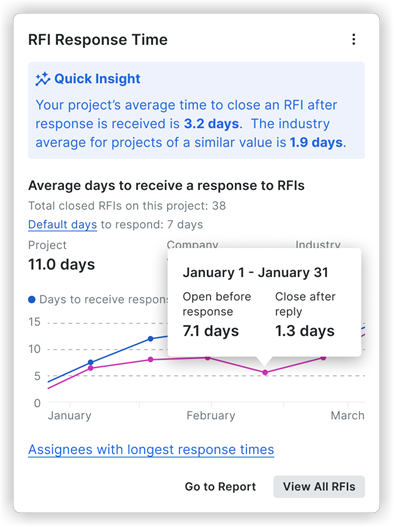
Cet renseignements montre le temps de réponse moyen du secteur pour les FQR, le temps de réponse moyen de votre entreprise aux FQR historiquement basé sur vos projets antérieurs et le temps de réponse moyen aux FQR de votre projet actuel. De plus, vous pouvez voir la répartition des personnes assignées et leur temps de réponse moyen, ainsi que les exigences actuelles de votre contrat en matière de temps de réponse aux FQR. Enfin, la Renseignements superficie rapide vous permet de voir les performances de votre projet par rapport au temps de réponse moyen du secteur. Voir Comment le temps de réponse moyen aux FQR est-il calculé ?
Tendances en matière de FQR : Afficher/Masquer les fonctionnalités de Synthèse des données
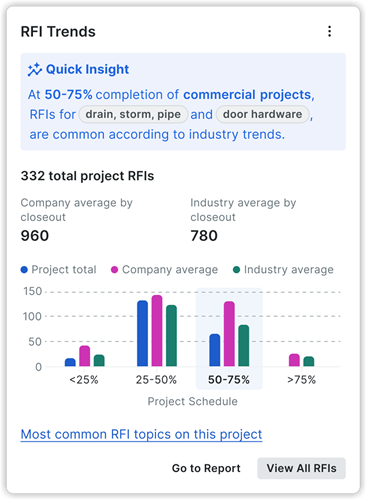
Cela offre une visibilité sur le nombre et les types de FQR attendus sur vos projets en fonction de la taille et du type de projet. En offrant des informations prédictives, cette fonctionnalité vous permet de prendre des mesures proactives avant que les problèmes ne surviennent, ce qui contribue à réduire les risques liés aux coûts et au planning. Vous serez invité à mettre à jour les détails clés du projet, tels que la date de début, la date d’achèvement, le type de projet et la valeur totale, afin de débloquer un accès complet aux renseignements. D’autres sections de cet renseignements sont les suivantes :
Renseignements rapides : affiche les deux rubriques de FQR les plus courantes du projet, en fonction du type de projet spécifique.
Valeurs par clôture : fournit une comparaison des FQR prévues pour le projet par clôture, le nombre moyen de FQR des projets antérieurs et les moyennes de l’industrie pour des projets similaires.
Affichage graphique : visualise les valeurs FQR prévues et réelles, ventilées en étapes d’achèvement du projet (incréments de 25 %). Vous pouvez passer la souris sur chaque étape pour afficher :
Étape terminée (25 %) : affiche les deux sujets de FQR les plus courants pour le projet.
Étape actuelle (25 %) : affiche à la fois les sujets de FQR réels et les sujets communs à l’ensemble de l’industrie pour des types de projets similaires.
Étapes à venir (25 % chacune) : révèle les sujets de FQR les plus courants dans l’industrie pour des types de projets similaires.
Sujets de FQR les plus courants : fournit un lien vers les cinq principaux sujets FQR du projet à ce jour, ainsi que le pourcentage du total des FQR et une courbe de tendance indiquant quand ces FQR ont été les plus courantes. Vous pouvez également cliquer sur « Afficher plus » pour voir toutes les rubriques de FQR et leurs indicateurs associés pour obtenir des renseignements plus approfondis.
Dépenser pour les conditions générales : Afficher/Masquer les fonctionnalités de Synthèse des données
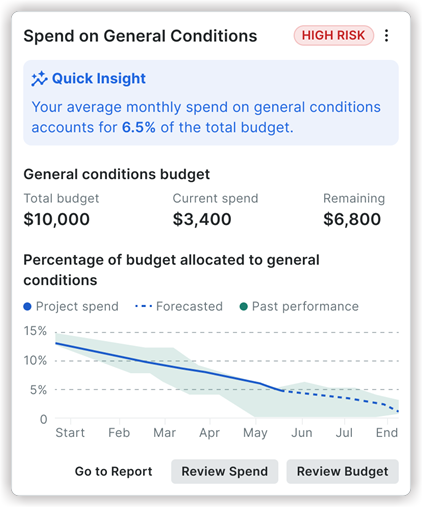
Ces Renseignements offrent une perspective plus large, permettant aux entreprises de comprendre les tendances de leurs conditions générales en matière de dépenses pour plusieurs projets.
Renseignements rapide : fournit un point de référence niveau Entreprise tel que : « Au cours des 4 derniers trimestres, les conditions générales ont représenté en moyenne 6,5 % du budget de chaque projet. »
Pourcentage du budget alloué aux conditions générales pour les projets actifs : Un graphique linéaire visualisant la tendance au cours des 4 derniers trimestres et à la même période l’année précédente. En les survolant, vous obtenez des indicateurs détaillés du projet et du budget pour des mois spécifiques.
Disponibilité des prévisions : Indique que des informations prédictives sont disponibles pour un sous-ensemble de projets.
Mesures à prendre :
Accéder au rapport: permet d’accéder à un rapport ou à un tableau de bord au niveau entreprise concernant les dépenses liées aux conditions générales.
Passer en revue les dépenses: accédez à une feuille détachable répertoriant les projets contenant des informations sur les risques financiers.
Balises de risque : Aide les utilisateurs à identifier et à hiérarchiser rapidement les superficies à haut risque au sein de leurs projets. En catégorisant les informations avec des niveaux de risque élevés, moyens ou faibles, les utilisateurs peuvent se concentrer sur les problèmes les plus critiques en un coup d’œil.
Soumettre des rapports journaliers : Afficher/Masquer les fonctionnalités de Synthèse des données
Ces renseignements fournissent une vue d’ensemble complète de la ponctualité et de l’achèvement des rapports journaliers de votre projet. À partir de cette fiche d’renseignements, vous pouvez accéder à un rapport sur le rapport journalier prédéfini ou accéder directement à l’outil Rapport journalier pour créer des saisies de rapport journalier. Une recommandation de bonnes pratiques basée sur les données est également incluse pour vous permettre de soumettre un rapport journalier chaque jour ouvrable afin de réduire les risques liés au projet. Voir Comment le renseignements Soumettre les rapports journaliers est-il calculé ?
Remarque: les conditions météorologiques, les photos et les entrées de pointage sont exclues de ces indicateurs.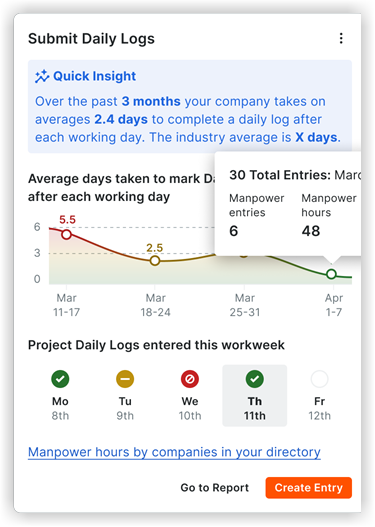
Temps de réponse du livrable : Afficher/Masquer les fonctionnalités de Synthèse des données
Cet renseignements vous indique le temps de réponse moyen du secteur pour les livrables en fonction du type et de la taille de votre projet, le temps de réponse moyen des livrables de l’entreprise historiquement basé sur vos projets et la moyenne de votre projet actuel Temps de réponse du livrable. De plus, vous pouvez voir la répartition des personnes assignées et leur temps de réponse moyen. Enfin, la Renseignements superficie rapide vous permet de voir les performances de votre projet par rapport au temps de réponse moyen du secteur. Voir Comment le temps de réponse du livrable est-il calculé ?

Temps nécessaire pour terminer les observations : Afficher/Masquer les fonctionnalités de Synthèse des données
Cet renseignements indique le temps moyen nécessaire à votre projet pour fermer un élément d’observation. Il est conçu pour aider les équipes au niveau projet à identifier les goulots d’étranglement dans leur processus et à comparer les performances de leur projet à la moyenne de l’entreprise et à l’industrie dans son ensemble.
Renseignements rapide: Cette section met en évidence le temps moyen de réalisation des observations de votre projet pour le mois en cours, et le compare au mois précédent et à la moyenne de l’industrie pour des projets similaires.
Nombre moyen de jours pour effectuer Observations: Cette section présente une comparaison à trois facteurs entre la moyenne de votre projet, la moyenne de votre entreprise et la moyenne de l’industrie, avec un graphique linéaire montrant la tendance au cours des six derniers mois.
Nombre médian de jours pour notifier et réviser: cette section décompose le temps moyen nécessaire pour que les observations du projet soient notifiées et le temps moyen qu’elles passent dans le statut « Prêt pour révision ».
Entreprises avec le plus d’Observations: un tableau qui répertorie les entreprises ou les fournisseurs du projet avec le plus grand volume d’Observations fermées. Il comprend des indicateurs tels que le nombre d’éléments fermés en moins de 10 minutes, le nombre de jours ouverts à fermés et le temps passé en révision.
À partir de ces renseignements, vous pouvez accéder à un rapport plus détaillé en cliquant sur Accéder au rapport ou accéder directement à l’outil Observations en cliquant sur Examiner les observations.

Ordres de service de l'engagement non financés (COO) : Afficher/Masquer les fonctionnalités de Synthèse des données
Fournit une visibilité sur les ordres de service de l'engagement non financés (COO) qui n’ont PAS été liés au financement du maître d'ouvrage (ordres de service au contrat général (PCCO)). Les renseignements se concentrent sur l’intégrité du projet individuel, ce qui permet aux équipes de projet de voir des ordres de service spécifiques qui risquent de devenir des coûts non remboursables. Il vous aide à repérer et à réduire les risques financiers liés aux directeurs de l’exploitation qui n’ont pas de source de financement.
Disponibilité et accès: pour maintenir données sécurité et pour que les droits d’accès au produit soient appropriés, la logique d’accès suivante s’applique :
Disponible pour les utilisateurs pour lesquels Procore Analytics et Synthèse des données (gestion des coûts) sont activés.
Nécessite l’autorisation granulaire « Afficher l’ordre de service du projet Synthèse des données» activée dans l’outil Synthèse des données du projet.
Disponible pour les administrateurs d’ordres de changement ou les utilisateurs pour lesquels l’autorisation granulaire « Afficher l’ordre de service du projet Synthèse des données» est activée.
Au niveau Projet, les ordres de service de l'engagement non financés renseignements :
Affiche une répartition visuelle de l’âge (0 à 30, 31 à 60 et 60+ jours) et un tableau granulaire mettant en évidence les OSE en circulation de la plus grande valeur et l’OSCG manquant.
Vous permet de suivre l’ancienneté et de voir exactement combien de temps les commandes non financées sont en attente.
Comble le fossé en liant automatiquement les engagements aux contrats principaux.
Vous permet de percer tous les OSE non financés pour voir les montants, l’ancienneté et les dates de création. Utilisez la section OSE non financés de la plus haute valeur pour établir l’ordre de priorité du suivi.
Fournit une vue de tous les OSE non financés et de leur impact sur un seul projet. Cliquez sur Afficher tous les OSE non financés pour afficher des informations supplémentaires sur tous les OSE non financés.
Aide à prévenir les travaux non remboursés et les pertes de revenus lorsque les OSE ne sont pas soutenus par le financement du maître d’ouvrage.
Donne aux équipes de projet et aux dirigeants la visibilité nécessaire pour protéger les marges et s’assurer que les sous-traitants sont payés.
Pour accéder à un rapport plus détaillé, cliquez sur Accéder au rapport. Pour afficher tous les ordres de service pour le projet, cliquez sur Afficher tous les ordres de service ou accédez directement à l’outil Engagements pour lier les OSE à l’OSCG et nettoyer l’exposition. 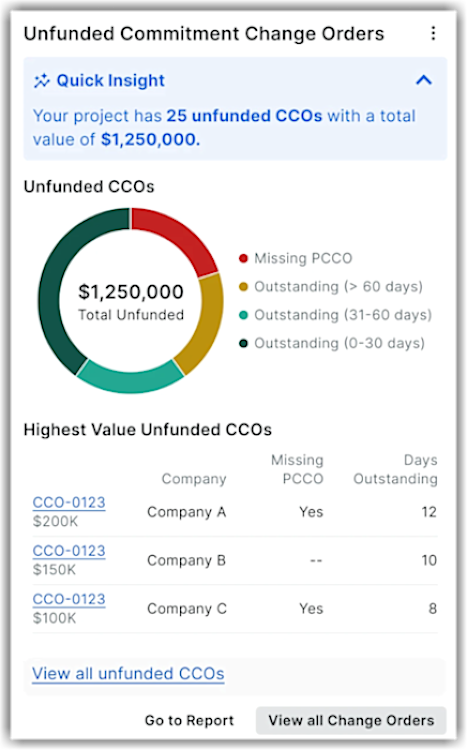
Engagement de l’utilisateur : Afficher/Masquer les fonctionnalités de Synthèse des données
Ces renseignements fournissent une visibilité sur l’activité des utilisateurs dans l’ensemble de vos projets, en mettant en évidence ceux qui sont les plus engagés. Il peut également identifier les utilisateurs peu engagés, ce qui peut révéler des lacunes dans les connaissances et des opportunités d’amélioration.
Renseignements rapides : résume l’activité des utilisateurs et des fournisseurs au sein du projet au cours des 30 derniers jours, en mettant en évidence le nombre d’utilisateurs actifs de votre entreprise et des fournisseurs actifs.
Activité au fil du temps : Ligne de tendance de l’activité totale des utilisateurs au cours des 6 dernières semaines. Ces données peuvent être filtrées par type d’utilisateur (tous les utilisateurs, utilisateurs de l’entreprise ou fournisseurs) et par appareil (Bureau et fournisseurs). Mobile, Bureau uniquement ou Mobile uniquement).
Moins actif et le plus actif : Affichez les utilisateurs par niveau d’activité. Si vous choisissez l’option La moins active, les utilisateurs qui ne se sont pas engagés récemment, ainsi que leur entreprise associée et la durée écoulée depuis leur dernière activité. À l’inverse, la sélection Les plus actifs révèle les utilisateurs les plus fréquents, leur entreprise et les outils Procore qu’ils utilisent le plus souvent.
Pour afficher un rapport complet sur l’activité des utilisateurs, cliquez sur Accéder au rapport. Pour afficher une liste complète de tous les utilisateurs du projet et de leurs niveaux d’activité, y compris les outils qu’ils utilisent, cliquez sur Afficher tous les utilisateurs. 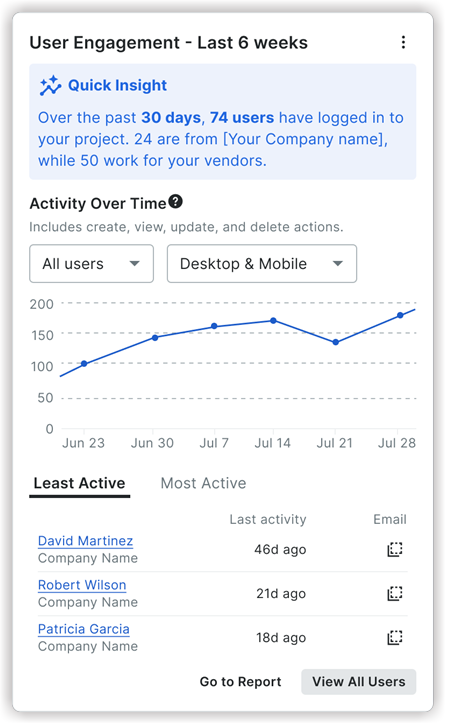
Voir aussi
Chargement des articles connexes...