À propos de la facturation par ligne de groupe sur les factures au maître d’ouvrage
En version bêta
Cette page décrit en détail la modernisation de l’expérience de facturation au maître d’ouvrage.
Cette page décrit en détail la modernisation de l’expérience de facturation au maître d’ouvrage.
Dans la ventilation des coûts d’une facture au maître d’ouvrage, vous pouvez utiliser les fonctions de « facturation par ligne de regroupement » pour mettre à jour les postes lorsque vous souhaitez :
Facturez un montant fixe en dollars ($) et répartissez-le entre les postes d’un groupe. Vous avez la possibilité de répartir proportionnellement ce montant entre les postes du groupe.
Facturez la ventilation des coûts initiale et les montants de la modification budgétaire en un seul poste. Au lieu de modifier les postes et les modifications budgétaires associées un par un, vous pouvez regrouper les postes pour mettre à jour tous les postes d’un groupe.
Pour mettre à jour les postes d’un groupe, vous pouvez saisir des valeurs dans ces champs sur la ligne Groupe ou Sous-total de la ventilation des coûts d’une facture au maître d’ouvrage
Travaux réalisés cette période ($)
Travaux réalisés cette période ( %)
Total des matériaux terminés et entreposés à ce jour ( %)
Lorsque vous souhaitez facturer jusqu’au montant de la valeur planifiée du groupe, saisissez un montant fixe dans le champ Travail terminé : cette période ($) qui se trouve sur la ligne Sous-total d’un groupe. Procore distribue proportionnellement ce montant fixe à chaque poste. Procore détermine la proportion à distribuer à chaque poste à l’aide des proportions de la colonne Solde jusqu’à la fin .
Dans cet exemple, un utilisateur souhaite distribuer 100 000 $ entre les postes du groupe. Avant la saisie des données, ce qui suit était vrai :
Poste 2.1.1 représentait 90 % de la valeur planifiée du groupe.
Poste 2.1.2 représentait 10 % de la valeur planifiée du groupe.
Le solde restant du groupe était de 250 000,00 $. Il s’agit de la valeur prévue (250 000 $) moins le montant de la application précédente ($) (0,00 $).
Pour distribuer 50 % du solde restant ( 100 000,00 $) Parmi les postes du groupe :
Saisissez 100 000,00 dans le champ Travail terminé : cette période ($) sur la ligne Sous-total du groupe.
Procore répartit le montant de 100 000,00 $ comme suit :
Le poste 2.1.1 est alloué à 90,00 % de ce montant, soit 90 000,00 $ pour cette période ($)..
Poste 2.1.2 10,00 % de ce montant, soit 10 000,00 $ pour cette période ($).
Procore met à jour les colonnes Total des matériaux terminés et entreposés comme suit :
Le total à ce jour ($) est maintenant de 90 000,00 $, soit 40,00 % de la valeur planifiée du poste.
Le total à ce jour ( %) est maintenant de 10 000,00 $, soit 40,00 % de la valeur planifiée du poste.
Le solde restant est maintenant de 100 000,00 $.
Après la saisie de données, la VDC ressemble à ceci :

Lorsqu’un ou plusieurs postes d’un groupe ont déjà été facturés pour 100 % de leur valeur de planning, saisissez un montant fixe ($) dans le champ Travaux terminés : cette période ($) situé sur la ligne Sous-total du groupe. Procore répartit proportionnellement ce montant entre les postes restants. Procore détermine la proportion à distribuer à chaque poste à l’aide des proportions de la colonne Solde jusqu’à la fin .
Dans cet exemple, l’utilisateur souhaite également distribuer 100 000 $ entre les postes du groupe. Cependant, avant la saisie des données, ce qui suit était vrai :
Le poste 3.2 était auparavant facturé à 100 % de sa valeur planifiée.
Le solde du groupe jusqu’à la fin était de 200 000,00 $, qui est la valeur prévue (1 100 000,00 $) moins les travaux terminés : de la application précédente (900 000,00 $).
Pour facturer 50 % du solde du groupe jusqu’à la fin (100 000,00 $):
Saisissez 100 000,00 dans la ligne Travail terminé : cette période ($) sur la ligne Sous-total du groupe.
Procore distribue le montant de 100 000,00 $ aux postes restants comme suit :
Le poste 3.1 reçoit 50 000,00 $ de ce montant pour cette période ($), soit 50,00 % de sa valeur prévue.
Le poste 3.2 reçoit 0,00 $ de ce montant pour cette période ($), soit 0,00 % de sa valeur prévue.
Le poste 3.3 est affecté à 12 500,00 $ de ce montant pour cette période ($), soit 50,00 % de sa valeur prévue.
Le poste 3.4 est affecté à 2 500,00 $ de ce montant pour cette période ($), soit 50,00 % de sa valeur prévue.
Le poste 3.5 se voit allouer 35 000,00 $ de ce montant pour cette période ($), soit 50,00 % de sa valeur prévue.
Procore met à jour les postes individuels dans les champs Total des matériaux terminés et entreposés. La ligne Sous-total du groupe est également mise à jour comme suit :
Le total à ce jour ($) est maintenant de 1 000 000,00 $, soit 90,91 % de la valeur programmée du groupe.
Le total à ce jour ( %) représente désormais 90,91 % de la valeur prévue du groupe.
Le solde restant est maintenant de 100 000 $.
Après la saisie des données, le planning des coûts ressemble à ceci :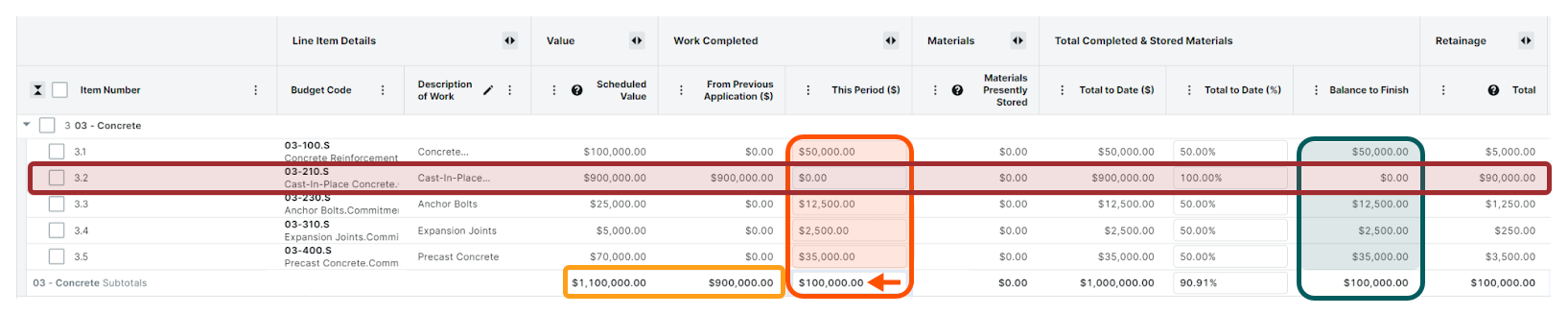
Lorsque tous les postes d’un groupe ont été facturés à 100 % de leur valeur d’échéancier, Procore ne base plus sa distribution proportionnelle sur l’équilibre jusqu’à l’achèvement. Pour déterminer les proportions à distribuer à chaque poste, Procore utilise les proportions des postes de la colonne Valeur planifiée .
Dans cet exemple, l’utilisateur souhaite surfacturer le poste d’un groupe pour 550 000,00 $. Avant la saisie des données, ce qui suit est vrai :
Tous les postes du groupe ont déjà été facturés à 100 % de leur valeur planifiée. Ceci est noté en comparant les montants de la valeur prévue avec les montants de l’application précédente ($).
Le solde restant sur tous les postes est de 0,00 $.
Pour surfacturer le groupe :
Saisissez 550 000,00 dans le champ Travail terminé : cette période ($) sur la ligne Sous-total du groupe.
Procore distribue le montant de 550 000,00 USD aux postes en utilisant les proportions de valeur planifiée . Il met également en évidence les montants surfacturés pour cette période ($) avec une icône d’information ROUGE et une bordure de cellule :
Le poste 3.1 est affecté à 50 000,00 $ de ce montant pour cette période ($), soit 150,00 % de sa valeur prévue.
Le poste 3.2 reçoit 450 000,00 $ de ce montant pour cette période ($), ce qui correspond à 150,00 % de sa valeur prévue.
Le poste 3.3 est affecté à 12 500,00 $ de ce montant pour cette période ($), soit 150,00 % de sa valeur prévue.
Le poste 3.4 est affecté à 2 500,00 $ de ce montant pour cette période ($), soit 150,00 % de sa valeur prévue.
Le poste 3.5 se voit allouer 35 000,00 $ de ce montant pour cette période ($), ce qui représente 150,00 % de sa valeur prévue.
Procore met à jour les postes individuels dans les champs Total des matériaux terminés et entreposés. La ligne Sous-total du groupe est également mise à jour comme suit :
Le total à ce jour ($) est maintenant de 1 650 000 000 $, soit 150 % de la valeur planifiée du groupe.
Le total à ce jour ( %) correspond désormais à 150,00 $ de la valeur prévue du groupe.
Le solde restant est maintenant de (550 000,00 $). Les parenthèses indiquent les montants surfacturés.
Après la saisie des données, le planning des coûts ressemble à ceci :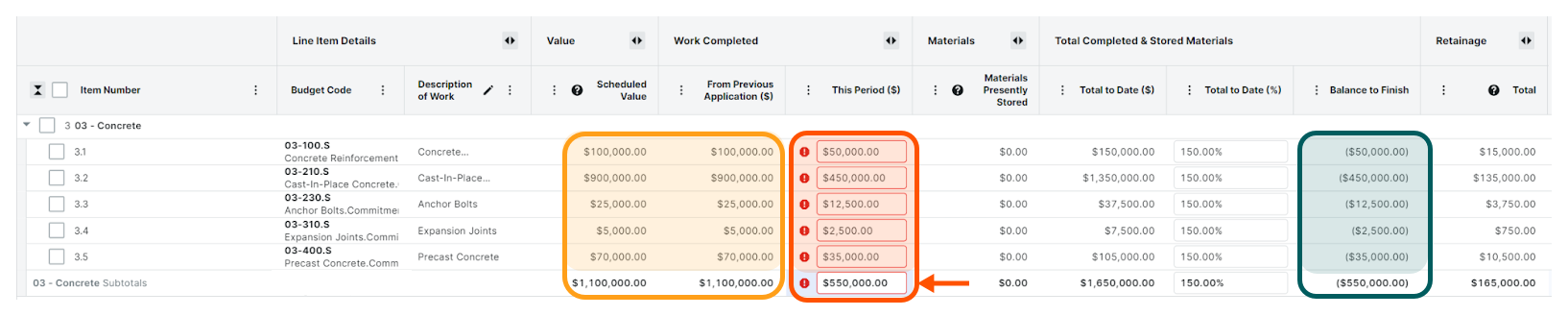
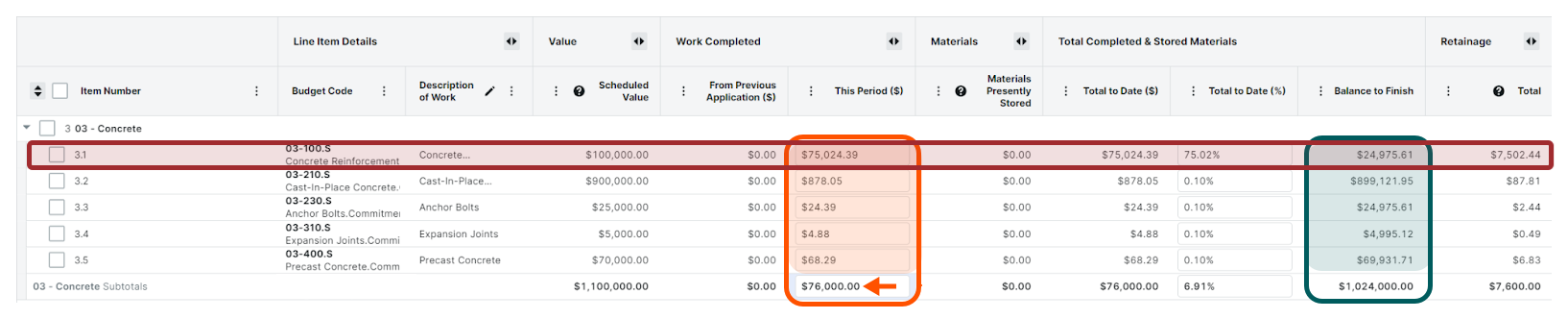
Lorsque les postes d’un groupe incluent des coûts préremplis provenant de factures de sous-traitants ou de coûts directs (voir Comment Procore complète-t-il automatiquement les montants sur une facture ascendante ?) et qu’un utilisateur met à jour le montant Travaux terminés : cette période ($) sur la ligne Sous-total d’un groupe, tous les montants préremplis des postes restent. Pour déterminer les proportions à distribuer à chaque poste, Procore compte le montant prérempli par rapport au poste approprié et utilise les proportions des postes de la colonne Solde jusqu’à la fin .
Dans cet exemple, l’utilisateur souhaite facturer 1 000,00 USD de plus que les coûts préremplis d’une facture de sous-traitant. Avant la saisie des données, ce qui suit était vrai :
Le poste 3.1 a été prérempli avec 75 000,00 $ provenant d’une facture de sous-traitant.
Pour facturer un montant différent de celui qui a été prérempli sur la facture au maître d’ouvrage :
Saisissez une nouvelle valeur à la place de la valeur existante dans le champ Travail terminé : cette période ($) sur la ligne Sous-total du groupe.
Remarque : Dans cet exemple, nous avons ajouté 1 000,00 $ au montant prérempli de 75 000,00 $ en saisissant : 76 000,00
Procore répartit le montant supplémentaire de 1 000,00 $ en fonction de ses proportions de l’équilibre jusqu’à la fin comme suit :
Le poste 3.1 se voit allouer 75 024,39 $ dans le champ Cette période ($), soit 75,02 % de sa valeur prévue. Il s’agit du montant prérempli de 75 000,00 $, plus un montant supplémentaire de 24,39 $ pour les 1 000,00 $ distribués.
Le poste 3.2 est alloué 878,05 $ sur 1 000,00 $ pour cette période ($), soit 0,10 % de sa valeur prévue.
Le poste 3.3 est alloué 24,39 $ de 1 000,00 $ pour cette période ($), soit 0,10 % de sa valeur prévue.
Le poste 3.4 est alloué 4,88 $ de 1 000,00 $ pour cette période ($), soit 0,10 % de sa valeur prévue.
Le poste 3.5 reçoit 68,29 $ de 1 000,00 $ pour cette période ($), soit 0,10 % de sa valeur prévue.
Procore met à jour les postes individuels dans les champs Total des matériaux terminés et entreposés. La ligne Sous-total du groupe est également mise à jour comme suit :
Le total à ce jour ($) est maintenant de 76 000,00 $, soit 6,91 % de la valeur programmée du groupe.
Le total à ce jour ( %) représente désormais 6,91 % de la valeur planifiée du groupe.
Le solde restant est maintenant de 1 024 000,00 $.
Après la saisie des données, le planning des coûts ressemble à ceci :
Une entrée de pourcentage ( %) dans la colonne Travaux terminés : Cette période ( %) calcule automatiquement le montant en dollars ($) dans la colonne Travaux terminés : cette période ($ ). Comme décrit dans Facturation « Travaux terminés : cette période ($) », un utilisateur peut saisir un pourcentage ( %) dans Travaux terminés : cette période ( %) sur la ligne Sous-total d’un groupe. Pour déterminer les proportions à distribuer à chaque poste, Procore utilise les proportions des postes de la colonne Équilibrer jusqu’à la fin .
Vous souhaitez facturer un montant cohérent pour tous les postes d’un groupe ? Pour facturer le même pourcentage ( %) sur tous les postes d’un groupe (quelle que soit la proportion utilisée lors de la facturation précédente), cochez les cases à cocher des postes et modifiez les valeurs. Dans le panneau qui apparaît, entrez la valeur de pourcentage souhaitée dans la zone Travail terminé : cette période ( %).
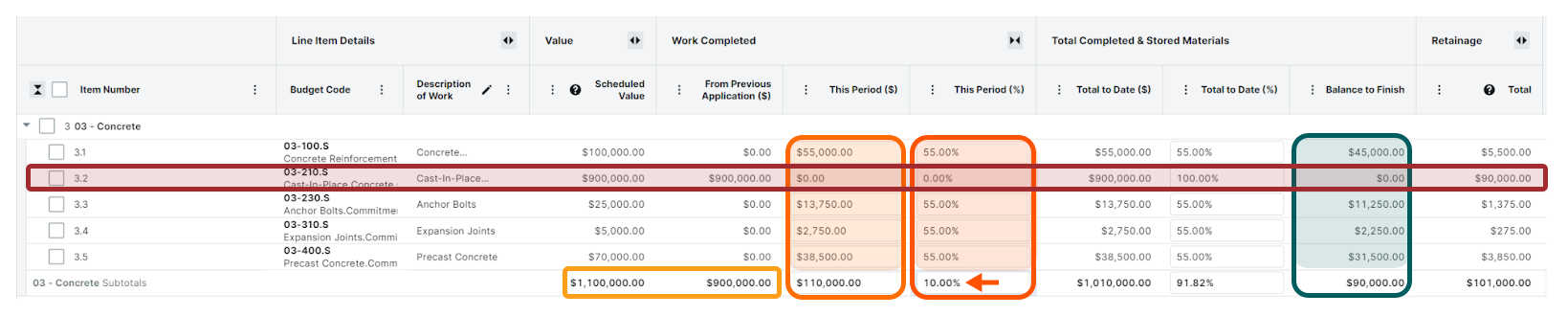
Dans cet exemple, l’utilisateur souhaite facturer 10,00 % de la valeur planifiée du groupe. Avant la saisie des données, ce qui suit était vrai :
Le poste 3.2 était auparavant facturé à 100 % de sa valeur planifiée.
Le solde du groupe jusqu’à la fin était de 200 000,00 $, qui est la valeur prévue (1 100 000,00 $) moins les travaux terminés : de la application précédente (900 000,00 $).
Pour facturer 10 % de la valeur planifiée de chaque poste groupé :
Saisissez 10 dans le champ Travail terminé : cette période ( %) sur la ligne Sous-total du groupe.
Procore distribue les 10 % (110 000,00 $) aux postes comme suit :
Le poste 3.1 est alloué 55 000,00 $ du montant pour cette période ($), soit 55,00 % de sa valeur prévue.
Le poste 3.2 se voit allouer 0,00 $ du montant de cette période ($)0,00 % de sa valeur prévue.
Le poste 3.3 est alloué 13 750,00 $ du montant pour cette période ($), soit 55,00 % de sa valeur prévue.
Le poste 3.4 est alloué 2 750,00 $ du montant de cette période ($), soit 55,00 % de sa valeur prévue.
Le poste 3.5 est alloué 38 500,00 $ du montant de cette période ($), soit 55,00 % de sa valeur prévue.
Procore met à jour les postes individuels dans les champs Total des matériaux terminés et entreposés. La ligne Sous-total du groupe est également mise à jour comme suit :
Le total à ce jour ($) est maintenant de 1 010 000,00 $, soit 91,82 % de la valeur programmée du groupe.
Le total à ce jour ( %) représente désormais 91,82 % de la valeur planifiée du groupe.
Le solde restant est maintenant de 90 000,00 $.
Après la saisie des données, le planning des coûts ressemble à ceci :
Une entrée de pourcentage ( %) dans la colonne Total des matériaux terminés et entreposés : Total à ce jour ( %) calcule automatiquement le montant en dollars ($) dans la colonne Total des matériaux terminés et entreposés : cette période ($ ). Comme décrit dans Facturation « Travaux terminés : cette période ($) », un utilisateur peut saisir un pourcentage ( %) dans cette période ( %) sur la ligne Sous-total d’un groupe. Pour déterminer les proportions à distribuer à chaque poste, Procore utilise les proportions des postes de la colonne Équilibrer jusqu’à la fin .
Vous souhaitez facturer un montant cohérent pour tous les postes d’un groupe ? Pour facturer le même pourcentage ( %) sur tous les postes d’un groupe (quelle que soit la proportion utilisée lors de la facturation précédente), cochez les cases à cocher des postes et modifiez les valeurs. Dans le panneau qui apparaît, entrez la valeur de pourcentage souhaitée dans la zone Total des matériaux terminés et entreposés : cette période ( %).
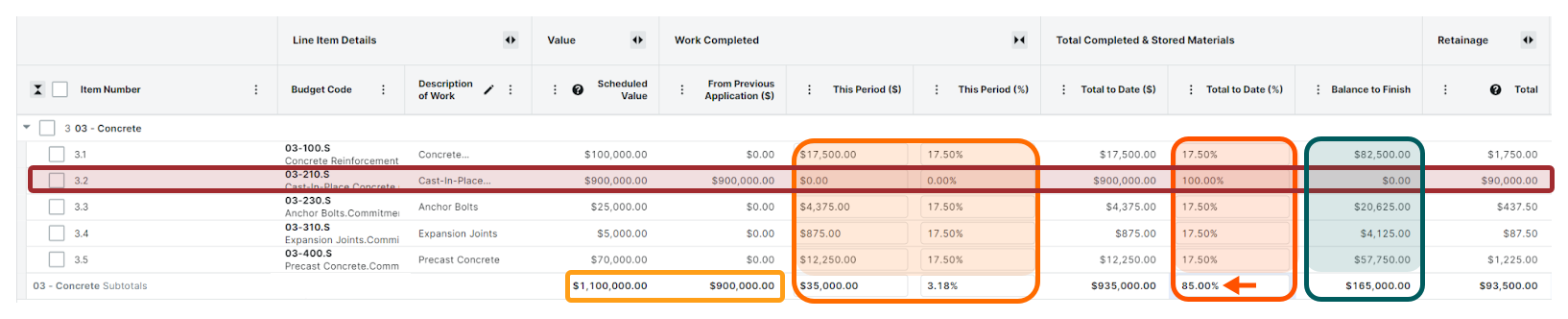
Dans cet exemple, l’utilisateur souhaite facturer 85,00 % de la valeur planifiée du groupe. Avant la saisie des données, ce qui suit était vrai :
Le poste 3.2 était auparavant facturé à 100 % de sa valeur planifiée.
Le solde du groupe jusqu’à la fin était de 200 000,00 $, qui est la valeur prévue (1 100 000,00 $) moins les travaux terminés : de la application précédente (900 000,00 $).
Pour facturer 85 % de la valeur planifiée de chaque poste groupé :
Saisissez 85 dans le champ Total des matériaux terminés et entreposés : Total à ce jour ( %) sur la ligne Sous-total du groupe.
Procore distribue 35 000,00 $ au prorata des postes des colonnes Travaux terminés : cette période ($) et Cette période ( %) comme suit :
Le poste 3.1 est alloué à 17,50 % de la valeur prévue, soit 17 500,00 $ pour cette période ($).
Le poste 3.2 est alloué à 0,00 % de la valeur prévue, soit 0,00 $ pour cette période ($).
Le poste 3.3 est alloué à 17,50 % de la valeur prévue, soit 4 375,00 $ pour cette période ($).
Le poste 3.4 est alloué 17,50 % de la valeur prévue, soit 875,00 $ pour cette période ($).
Le poste 3.5 est alloué 17,50 % de la valeur prévue, soit 12 250,00 $ pour cette période ($).
Procore met à jour les postes individuels dans les champs Total des matériaux terminés et entreposés. La ligne Sous-total du groupe est également mise à jour comme suit :
Le total à ce jour ($) est maintenant de 935 000,00 $, soit 85,00 % de la valeur programmée du groupe.
Le total à ce jour ( %) représente désormais 85,00 % de la valeur planifiée du groupe.
Le solde restant est maintenant de 165 000,00 $.
Après la saisie des données, le planning des coûts ressemble à ceci :
Pour calculer et mettre à jour les postes des groupes, l’algorithme de l’outil Facturation nécessite une valeur planifiée supérieure à 0,00 $. Pour facturer tous les postes lorsque la valeur planifiée est égale à 0,00 USD, Procore recommande de cocher toutes les cases des postes du groupe, de cliquer sur le bouton Modifier les valeurs et d’effectuer une mise à jour par lot dans le panneau latéral.
Tous les montants qui ne peuvent pas être répartis entre tous les postes d’un groupe sont alloués à un (1) poste du groupe.
Chargement des articles connexes...