Afficher l’historique budgétaire publié pour un projet dans Gestion financière du portefeuille

 Legacy

This information is intended for accounts with the Portfolio Financials and Capital Planning products in Procore. Please reach out to your Procore point of contact for more information.

Fond

L’onglet Budget du suivi des coûts vous permet de créer des budgets de projet avec les écarts et les coûts anticipés. Il existe deux méthodes de budgétisation différentes que vous pouvez utiliser dans Gestion financière du portefeuille : un budget décomposé, qui vous permet d’affecter des budgets à des éléments de coût individuels via le suivi des coûts, et un budget global (somme forfaitaire), où vous disposez d’un montant pour l’ensemble du projet. Les budgets doivent être publiés pour s’afficher dans le suivi des coûts et dans la fenêtre Historique du budget publié.

Éléments à prendre en compte

  • Autorisations utilisateur requises:

    • « Accès complet » au projet ou supérieur.

Steps

  1. Navigate to the Cost Tracker section of the Project Page.

  2. Click the Budget tab.

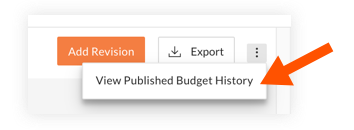
  3. Click the vertical ellipsis icon-ellipsis-vertical.png icon and select View Published Budget History.

    view-published-budget-history.png

  4. The Published Budget History window lists all published revisions of the project's budget, along with the total amounts and dates they were published.

  5. When you are finished reviewing the published budget history, click Close.

See Also

Loading related articles...