Customize the Payment Controls for Your Active Projects

 General Availability in Select Markets (United States)

flag-us.png Procore Pay is available in the United States. It is designed for General Contractors and Owner-Builders who act as their own General Contractors on a job. Procore Pay extends the Invoice Management functionality in the Procore web application to handle the payment process between general and specialty contractors.

Fond

Avec Procore Pay, un administrateur des paiements peut personnaliser les contrôles de paiement de vos projets Procore existants à l’aide de la page Contrôles du projet. Vous pouvez utiliser le bouton Modifier la rémunération pour définir un compte de financement par défaut pour vos projets. Vous pouvez également activer et désactiver les fonctionnalités de paiement sur les projets actifs dans votre environnement Procore Pay.

Éléments à prendre en compte

Conditions préalables

Steps

  1. Navigate to the Company level Payments tool.

  2. Click the Payments Settings icon-settings-gear-android.png icon.
    This opens the Payments Settings page. The Funding Accounts page is active by default.

  3. Click Project Controls.

  4. In the table, do the following:

    • To select one or more projects, mark the checkbox(es) to the desired projects.
      OR

    • To select all projects, mark the checkbox in the Project column header.

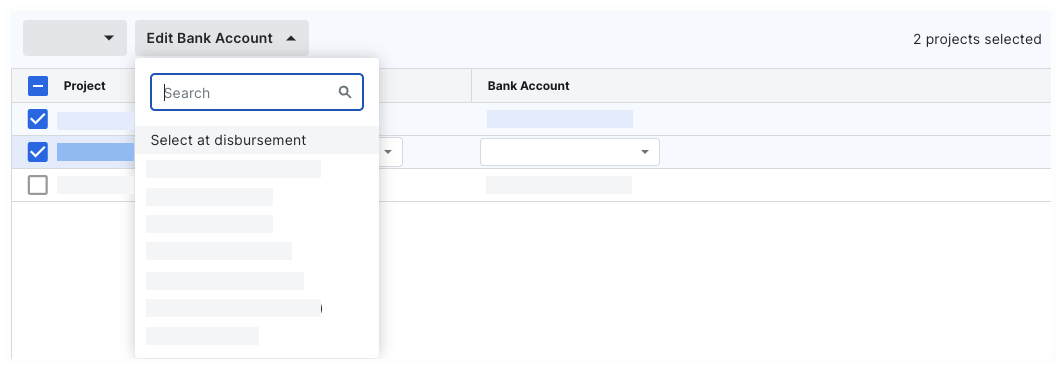
  5. Click Edit Bank Account and choose an option from the drop-down list.

     Conseils
    • Vous êtes à la recherche d’un compte spécifique ? Commencez à taper le surnom du compte dans la zone de recherche pour restreindre les comptes dans la liste.

    • Vous souhaitez modifier le statut « Payer » sélectionné ? Vous pouvez modifier les deux paramètres dans la même action. Pour en savoir plus, consultez Activer ou désactiver Procore Pay sur vos projets.

    edit-bank-account-with-options.png

    • Select at disbursement. Choose this option to force your Payments Disbursers to select the funding account. A funding account is the verified bank account from which a drawdown request for funds is made to complete the payments in a disbursement. To learn more, see Create Disbursements.

    • One of your existing accounts. Choose one of your company's existing funding accounts from the drop-down list. To learn how to add an account to the list, see Add Funding Accounts.

Cliquez sur Étape suivante.

See Also

Loading related articles...