Configurer Procore Pay en tant que bénéficiaire

 Disponibilité générale sur certains marchés (États-Unis)

Flag Us Procore Pay est disponible aux États-Unis. Il est conçu pour les entreprises générales et les constructeurs-propriétaires qui agissent comme leurs propres entreprises générales sur un projet. Procore Pay étend la fonctionnalité de gestion des factures de l’application Web Procore pour gérer le processus de paiement entre les entrepreneurs généraux et spécialisés.

Version limitée

Les comptes Procore gratuits sont actuellement disponibles en anglais au Canada et aux États-Unis.
Contexte

Les entrepreneurs généraux peuvent utiliser Procore Pay pour payer les sous-traitants facturés via Procore. En tant que sous-traitant, vous pouvez être invité par une entreprise générale à recevoir des paiements via Procore Pay. Vous pouvez également demander à être payé via Procore Pay par les sous-traitants généraux qui utilisent l’outil. Une fois que vous avez été invité ou que vous avez fait votre demande, vous devez ouvrir un compte bancaire pour recevoir des paiements pour votre entreprise.

Éléments à prendre en compte

  • Autorisations utilisateur requises:

    • Vous devez être un .

Steps

  1. Navigate to the project's Commitments tool.

  2. Under the Contracts tab, locate your commitment contract. Then, click the number link to open it.

  3. In the commitment contract, click the Invoices tab.

  4. Locate the invoice and click the invoice number link.

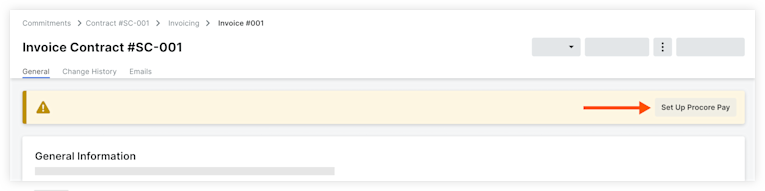
  5. Click Set Up Procore Pay in the banner.
    Note: The banner is only visible if the general contractor is able to make payments through Procore Pay.
    Clipboard Ee55aa981ecb5525804de287b8dbbae0c

  6. To receive payments through Procore, your company must have its own Procore Company Account. You will be prompted to log in with your existing log in credentials to identify whether you are marked as an employee on an existing free or paid company account. See How can I tell if I have a free or paid Procore company account?
    Depending on your account, the following will happen:

    • No Company Account

    • Paid Company Account

      • If your company has its own paid account and you are marked as an employee, users with 'Company Admin' permissions at your company will receive an email inviting them finish setting up the Payments tool and link a bank account.

    • Free Company Account

      • If your company has its own free account and you are listed on their Team page, users with 'System Administrator' permissions at your company will receive an email inviting them finish setting up the Payments tool and link a bank account.

         Important

        Paiement Les administrateurs peuvent accéder à l’outil Paiements et disposer autorisation effectuer toutes les actions qui s’y déroulent. L’utilisateur qui configure l’outil Paiements pour la première fois pour un entreprise bénéficiaire, soit en configurant Procore Pay invitation, soit en acceptant une invitation Procore Pay, se voit automatiquement attribuer des autorisations Paiement Administrateur.

        Une fois la configuration initiale, les autorisations Paiement Administrateur sont gérées uniquement dans l’outil Paiements.


Prochaine étape

Voir aussi

Chargement des articles connexes...