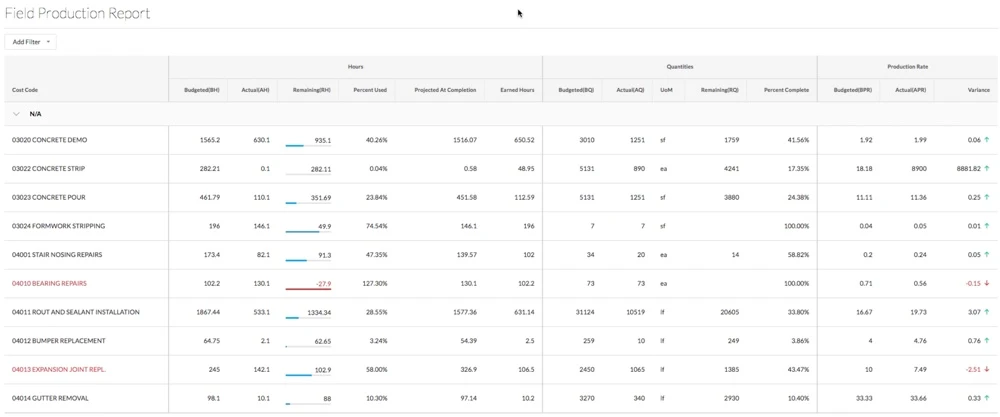
Afficher un rapport de production du chantier
Arrière-plan
Les quantités produites sont une quantité mesurable de travail sur un projet de construction. Par exemple, des yards cubes de béton, le nombre de luminaires ou de pieds linéaires de tuyauterie. Dans Procore, il existe deux types de quantités produites :
Les quantités produites budgétées se réfèrent au montant mesurable qu’une équipe prévoit d’installer sur un projet.
Les quantités produites installées font référence à la quantité réelle installée sur un projet à un moment donné.
Le rapport de production du chantier compare les quantités produites budgétées d’un projet de construction aux quantités produites installées.
Éléments à prendre en compte
Si vous utilisez les outils Suivi des ressources et Finances de Procore, la saisie des heures et des quantités produites dans les ordres de service de votre projet met automatiquement à jour les données dans ces fonctionnalités Procore, lorsque les ordres de service sont placés dans l’onglet « Approuvé » Statut :
Vue du budget Coût de la productivité de la main-d'œuvre Procore.
Le rapport de production du chantier. Voir Quelles sont les colonnes de données dans un rapport de production du chantier ?