Important Notice for ERP Integrated Customers:

The erpsupport@procore.com email address will be retired on April 8, 2026. We recommend using our enhanced Webform, Phone, or Chat for faster support on new requests.

  • Produkty
  • Przewodniki po procesach
  • Certyfikaty

    Uzyskaj bezpłatny certyfikat Procore dzięki kursom szkoleniowym online przeznaczonym dla różnych stanowisk

    Biblioteka z filmami szkoleniowymi

    Przeszukaj naszą bibliotekę filmów szkoleniowych

    Słowniczek terminów
    Status systemu

    Zobacz status aplikacji

    Społeczność

    Zadawaj pytania, przeglądaj pomysły i artykuły oraz kontaktuj się z innymi

    Aktualizacje produktów

    Zapoznaj się z najnowszymi funkcjami, aby dowiedzieć się, co nowego pojawi się na platformie

    Deweloperzy

    Twórz aplikacje na platformie Procore

  • Informacje o wersji
  • Produkty
  • Przewodniki po procesach
    • Certyfikaty
    • Biblioteka z filmami szkoleniowymi
    • Słowniczek terminów
    • Status systemu
    • Społeczność
    • Aktualizacje produktów
    • Deweloperzy
  • Informacje o wersji
Australia (English)
Brasil (Português)
Canada (English)
Canada (Français)
Deutschland (Deutsch)
España (Español)
France (Français)
Latinoamérica (Español)
Polska (Polski)
United Kingdom (English)
United States (English)
新加坡 (中文)
日本 (日本語)
  • Australia (English)
  • Brasil (Português)
  • Canada (English)
  • Canada (Français)
  • Deutschland (Deutsch)
  • España (Español)
  • France (Français)
  • Latinoamérica (Español)
  • Polska (Polski)
  • United Kingdom (English)
  • United States (English)
  • 新加坡 (中文)
  • 日本 (日本語)
  1. Support Home
  2. Payments Admin Guide
  3. What is Pay?

Payments Admin Guide

  • Welcome
    • Get Started as a Payments Admin
    • What is Pay?
    • How do funds flow?
    • What is a Payments Admin?
  • Multi-Factor Authentication (MFA)
    • How does MFA work with Procore Pay?
    • Set Up MFA for Procore Pay
    • Log in to Procore Pay with MFA
    • Complete the Transactional MFA Challenge
  • Funding Accounts
    • About Bank Accounts
    • Add Funding Accounts
    • Edit Funding Accounts
    • Set a Default Funding Account
    • Deactivate a Funding Account
    • View Funding Accounts
  • Payments Permissions
    • Add or Remove Payments Admins
    • Add Payments Disbursers
    • Add Payments Beneficiary Approvers
    • Remove Payments Disbursers
    • Remove Payments Beneficiary Approvers
    • View Payment Permissions
  • Project Controls
    • Enable or Disable Pay on Projects
    • Update Project Controls in Bulk
    • Update Bank Accounts on Projects
  • Workflow Settings
    • Best Practices
    • Configure Workflow Settings
    • Assign a Default Template
  • Advanced Settings
    • Enable Disbursements
    • Disable Disbursements
  • View Change History
  • Lien Waivers & Templates
    • Enable Lien Waivers
    • Create Templates
    • Edit Templates
    • Delete Templates
  • Sub-Tier Waivers
    • About the Sub-Tiers Card on a Subcontractor Invoice
    • Enable Sub-Tier Waivers on Projects
  • Payment Requirements
    • Configure Company Requirements
    • View Payment Requirements
  • Subcontractor Invoices
    • About the Subcontractor Invoices Tab
    • Apply Search & Filter Options
    • Manage Rows & Columns
    • Export a List of Invoices
    • Create Disbursements
  • About the Disbursements Tab
  • Beneficiaries
    • About the Beneficiaries Tab
    • Approve Beneficiary Accounts
  • Welcome
    • Get Started as a Payments Admin
    • What is Pay?
    • How do funds flow?
    • What is a Payments Admin?
  • Multi-Factor Authentication (MFA)
    • How does MFA work with Procore Pay?
    • Set Up MFA for Procore Pay
    • Log in to Procore Pay with MFA
    • Complete the Transactional MFA Challenge
  • Funding Accounts
    • About Bank Accounts
    • Add Funding Accounts
    • Edit Funding Accounts
    • Set a Default Funding Account
    • Deactivate a Funding Account
    • View Funding Accounts
  • Payments Permissions
    • Add or Remove Payments Admins
    • Add Payments Disbursers
    • Add Payments Beneficiary Approvers
    • Remove Payments Disbursers
    • Remove Payments Beneficiary Approvers
    • View Payment Permissions
  • Project Controls
    • Enable or Disable Pay on Projects
    • Update Project Controls in Bulk
    • Update Bank Accounts on Projects
  • Workflow Settings
    • Best Practices
    • Configure Workflow Settings
    • Assign a Default Template
  • Advanced Settings
    • Enable Disbursements
    • Disable Disbursements
  • View Change History
  • Lien Waivers & Templates
    • Enable Lien Waivers
    • Create Templates
    • Edit Templates
    • Delete Templates
  • Sub-Tier Waivers
    • About the Sub-Tiers Card on a Subcontractor Invoice
    • Enable Sub-Tier Waivers on Projects
  • Payment Requirements
    • Configure Company Requirements
    • View Payment Requirements
  • Subcontractor Invoices
    • About the Subcontractor Invoices Tab
    • Apply Search & Filter Options
    • Manage Rows & Columns
    • Export a List of Invoices
    • Create Disbursements
  • About the Disbursements Tab
  • Beneficiaries
    • About the Beneficiaries Tab
    • Approve Beneficiary Accounts

What is Pay?

Pay builds on the existing Project Financials and Invoice Management tools in Procore to streamline the subcontractor invoice payment process and automate the lien waiver exchange.
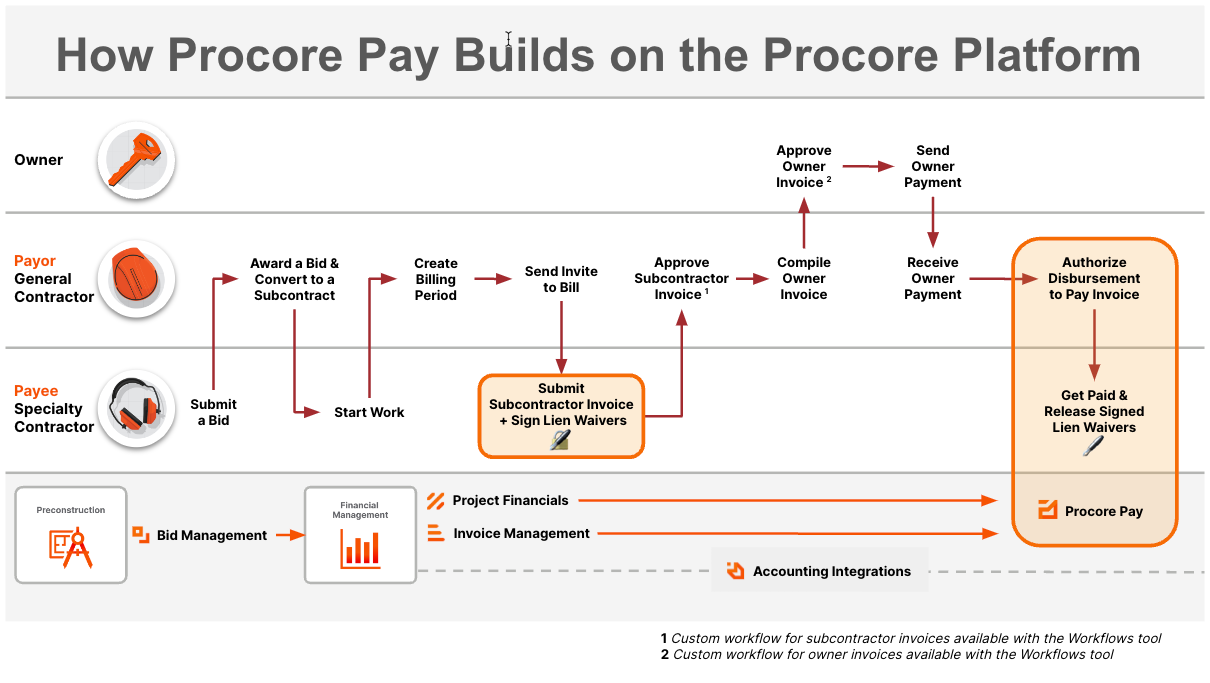
How Procore Pay Builds On The Procore Platform

Get Started as a Payments Admin
How do funds flow?

Firma Procore angażuje się w rozwój branży budowlanej, poprawiając jakość życia osób pracujących w budownictwie, napędzając innowacje technologiczne i budując globalną społeczność liderów. Nasza zintegrowana globalna platforma budowlana daje wszystkim interesariuszom projektu nieograniczony dostęp do wsparcia i model biznesowy zaprojektowany specjalnie dla branży budowlanej.

Twitter Youtube Facebook LinkedIn Instagram

O Procore

  • Witryna
  • Status systemu
  • Sklep z aplikacjami
  • Skontaktuj się z zespołem wsparcia

Pobrane

  • Apple App Store
  • Sklep Google Play

© 2026 Procore Technologies, Inc.