Grant Accounting Approver Privileges
Background
Designating specific team members as an In Procore, an Accounting Approver is an individual with the authority to accept and reject Procore data for export to an integrated ERP system. Accounting approvers can unlink several item types, such as commitments, commitment change orders, prime contract change orders, and subcontractor invoices, that have been synced between Procore and an integrated ERP system. See Which ERP Integrations are supported by Procore?
Things to Consider
Required User Permissions on the Company level Directory tool.
Additional Information:
Users with 'Admin' permissions on the Company Directory tool and the 'Can push to accounting' privilege can grant import and export access for all item types to anyone, including themselves.
For users with 'Standard' permissions or lower, you can customize these import and export capabilities by specific item type. While this granular option appears for all user levels, it only applies to non-Admin users.
It is recommended you leave the Subscribe to ERP Digest Emails checkbox marked for all accounting approvers.
The ERP Digest Email provides accounting approvers with a daily summary email that alerts the approver that data from Procore tools are awaiting an accept or reject response from the approver.
Steps
Navigate to the Company level Directory tool.
Locate the relevant user.
Click Edit.
Scroll to the Can Push to Accounting field.
Select the checkbox next to 'Can push to accounting'.
Select or clear the checkbox for 'Subscribe to ERP digest emails'.
In the 'ERP Permissions' section, select or clear the checkboxes in the Can Import? and Can Export? columns for more granular control.
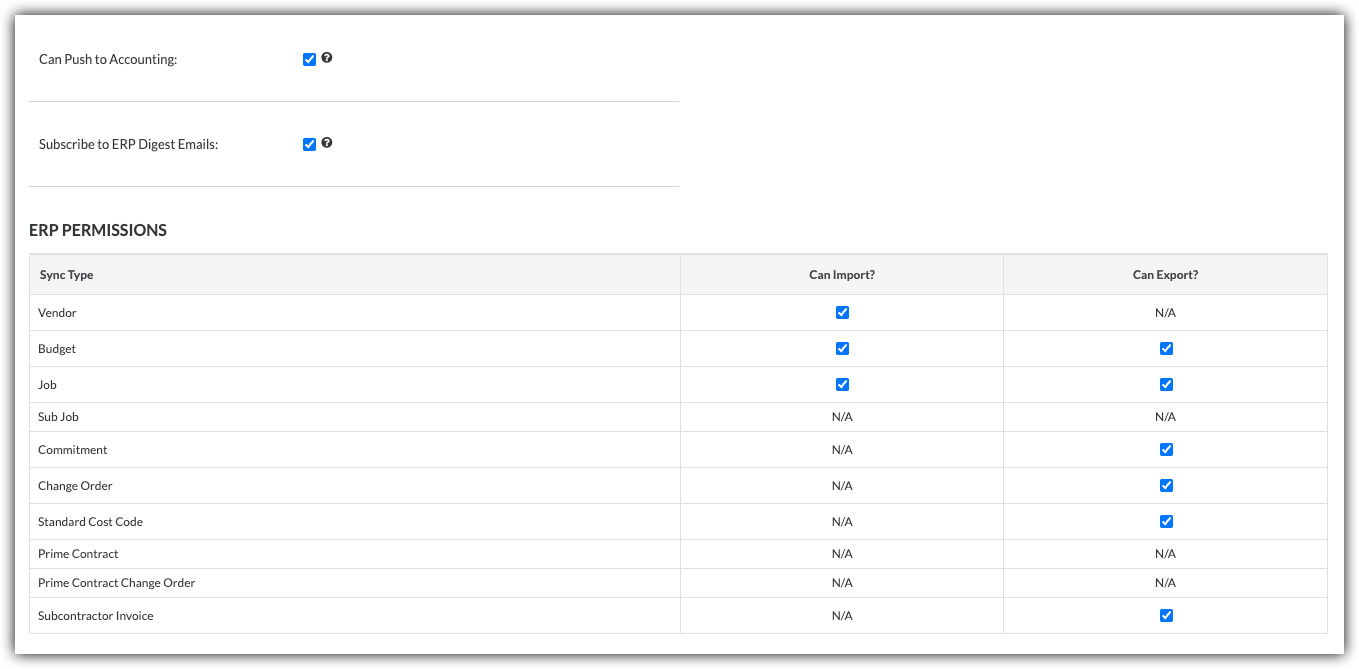
Note: The available checkboxes depend on your selected integration.
Scroll down and click Save.

See Also
Loading related articles...