What is the Procore Notification Center?
Beta
The upgraded Procore Notification Center (Beta) is currently available for the select tools listed below. Access will be expanded to additional tools on a rolling basis.
The upgraded Procore Notification Center (Beta) is currently available for the select tools listed below. Access will be expanded to additional tools on a rolling basis.
The Procore Notification Center is an in-app experience that allows you to receive notifications directly within Procore. Instead of relying only on email, it provides a single location to track what needs your attention and what has changed.
Located under the bell icon in the Procore navigation bar, the upgraded Procore Notification Center replaces the legacy 'What's New' feed, which previously served as a one-way channel for Procore announcements.
The Notification Center organizes your alerts into interactive cards so you can easily manage your tasks and communications. To access the Notification Center, click the bell icon in top right corner of the Procore navigation bar.

Notifications are color-coded to indicate their type:
Action Required: You must complete a task.
Mentions: Someone @mentioned you in a comment.
Informational: A Procore item was updated.
How do you find unread messages? Move the Only Show Unread toggle to the right.
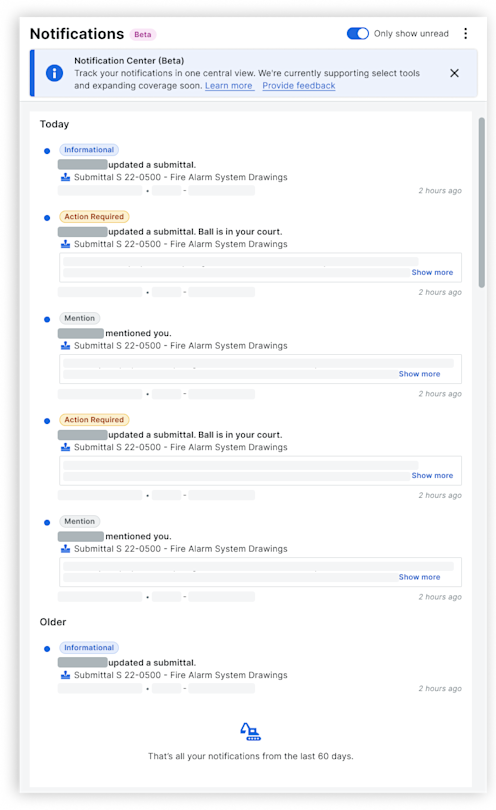
Each notification card includes:
Trigger: The action in Procore that triggered it.
Link: A direct link to the relevant item in Procore.
Context: Any other important details.
Hover over the dot on the left of a card to mark the notification as read or unread:
Blue dot. Unread.
White dot. Read.
To manage your notifications, click the More menu  for these options:
Mark All as Read: Marks all notifications as read simultaneously.
Provide Feedback: Sends your suggestions about the Notification Center to Procore.
Learn More: Opens additional information about the Notification Center.
You can also toggle your view to show only unread notifications.
Support for the Notification Center is rolling out tool by tool. Currently, the supported tools include:
Daily Hazard Analysis (DHA) Tool (Closed Beta)
RFI
Submittals
Loading related articles...