What is a budget code in Procore's WBS?

解答

在 Procore 的 WBS 中, 用于Procore 的项目财务管理工具,你可以跟踪财务明细项中建设工程项目的成本和收入。

  • Procore 的 WBS 中预算编号的组成部分是什么?

  • 预算编号是什么样的?

  • WBS 中的细分如何分隔?

  • 如何创建预算编号?

  • 什么时候可以开始在项目财务管理中创建预算编号?

  • 哪些项目财务管理工具具有"创建预算编号"按钮?

  • 是否需要任何其他权限才能在项目财务管理中创建预算编号?

  • 为什么我不能将新的预算编号导入 Procore?

Procore 的 WBS 中预算编号的组成部分是什么?

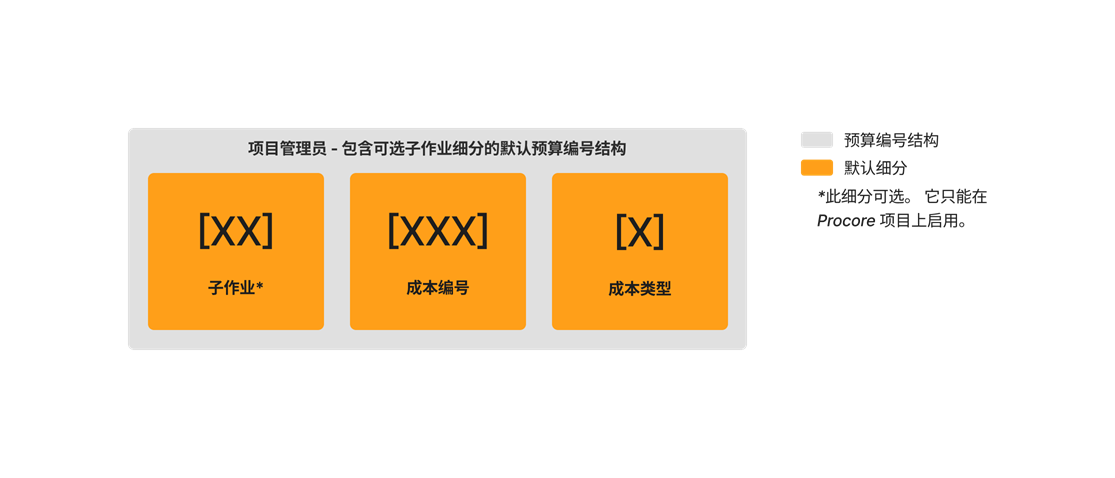
在 Procore 的 WBS 中,预算编号的组成部分称为细分。请参阅什么是细分和细分项?使用管理员工具,贵公司的 Procore 管理员可以通过首先定义哪些细分是预算编号的一部分预算编号结构在公司或项目级别使用。默认情况下,有两(2)个必填细分:成本编号成本 类型。这些细分在公司和项目级别都是必填的。还有一(1)个可选的项目级别细分:子作业。子作业细分只能在项目级别启用。请参阅在项目上为 WBS 启用子作业

Example

Diagram Wbs Default Budget Code Structure With Sub Job

预算编号是什么样的?

借助 Procore 的 WBS,你的预算编号可以简单或复杂,具体取决于你的公司或项目 级别 预算 编号 结构所需的细分数。这实际上取决于你希望团队为组织和组织的施工项目捕获和跟踪的财务信息类型。要了解有关细分项的更多信息,请参阅什么是细分和细分项?

Example

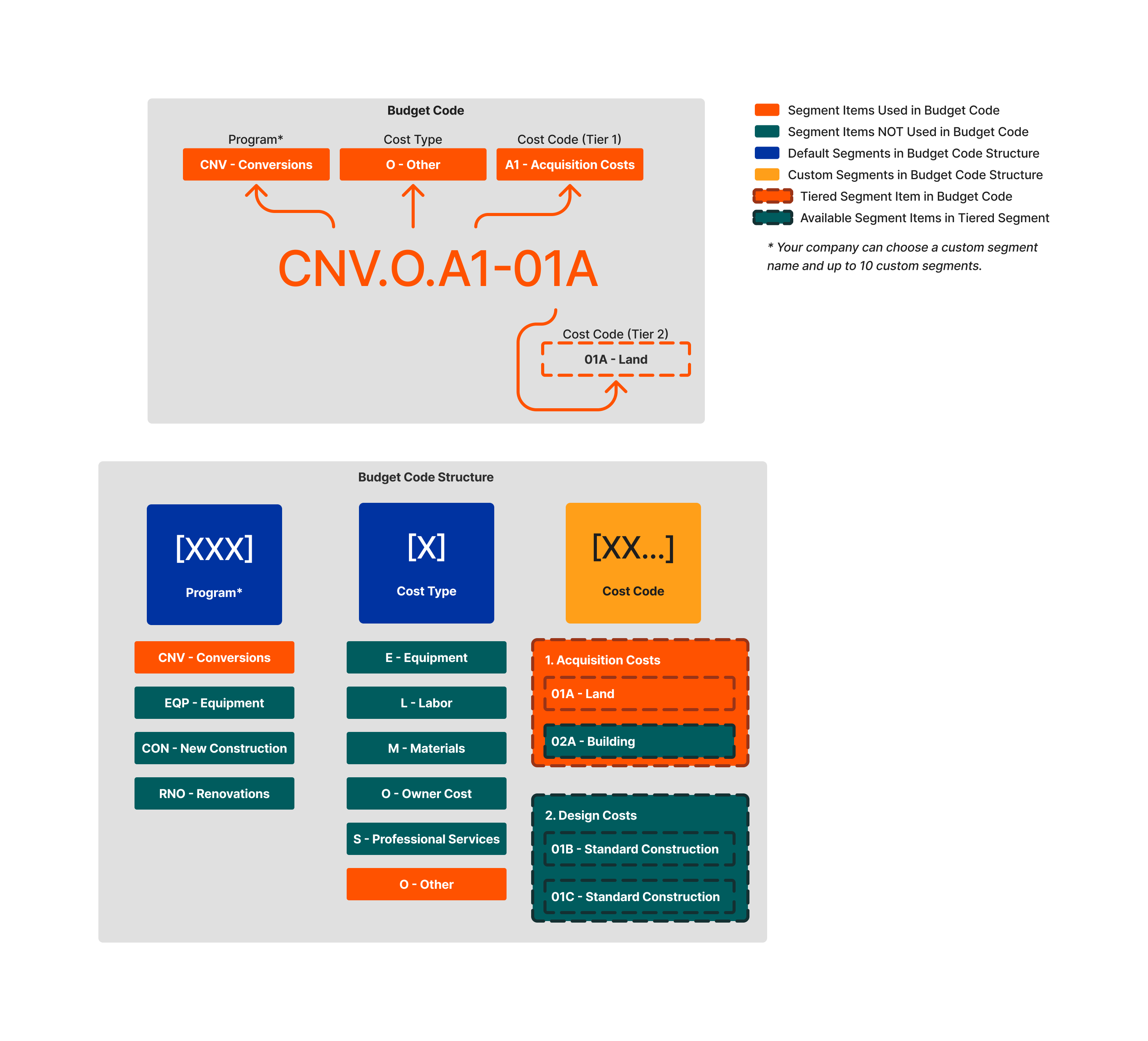
The example below shows you a budget code structure with three (3) segments. Note that the cost code tier is a tiered segment.

Diagram Wbs Flat And Tiered Budget Code Structure

WBS 中的细分如何分隔?

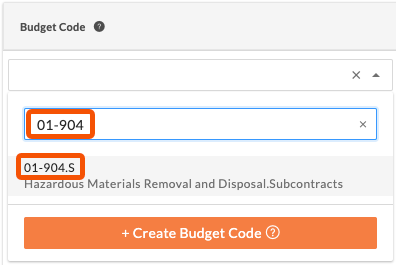
创建预算编号时,还需要注意在 Procore Web 应用程序的用户界面中,分层细分由破折号(-)分隔,细分由句点(.)分隔。在下面的示例中,分层"成本编号"细分为 01-904,每一层都由破折号(-)分隔。预算编号结构中的下一个细分是"成本类型",句点(.)用作分隔符将其与成本编号分开。

示例预算编号在项目财务管理工具中

成本编号分层细分

成本类型平面细分

Budget Code

01-904

S=分包合同

如何创建预算编号?

 Important

First, your company's Procore Administrator must define your company's budget code structure. See Create Your Company's Default Work Breakdown Structure. Next, you must define your budget code structure (you can use your company's default structure or customize one to be project-specific). This step can be performed by a user with 'Admin' level permissions on the Project level Admin tool. See Create Your Project's Work Breakdown Structure.

创建项目 WBS 后,具有适当权限的用户便可以在 Procore 的项目财务管理工具中创建预算编号。有关说明,请参阅在 Procore 的项目财务管理工具中为 WBS 创建预算编号

什么时候可以开始在项目财务管理中创建预算编号?

首先,你公司的 Procore 管理员必须定义贵公司的预算编号结构。接下来,项目管理员定义项目的预算编号结构。定义了项目预算编号结构后,便可以开始使用 Procore 的项目财务管理工具为项目的财务明细项创建预算编号。请参阅在 Procore 的项目财务管理工具中为 WBS 创建预算编号

哪些 Procore 工具具有"创建预算编号"按钮?

Procore 的项目财务管理工具支持"创建预算编号"按钮。在项目财务工具中创建的预算编号必须使用可用的最低层细分,在主合同工具中创建的预算编号除外。

Procore Project Financials Tools

Tutorials

Budget
In the Budget tool when creating or editing a budget line item.

Add a Budget Line Item

Change Events
In the General tab when adding or editing a change event line item.

Create a Change Event

Change Orders
In the Schedule of Values on a Commitment Change Order, a Prime Contract Change Order, a Commitment Potential Change Order, or a Prime Contract Change Order.

Create a Commitment Change Order Create a Prime Contract Change Order Create a Potential Change Order for a Prime Contract

Client Contracts 1
In the Schedule of Values of a client contract.

Create Client Contracts

Commitments
In the Schedule of Values and Subcontractor Schedule of Values on a purchase order or subcontract.

Create a Purchase Order Create a Subcontract

Direct Costs
In the Line Items section when creating or editing a direct cost.

Create a Direct Cost

Funding 2
In the Schedule of Values of a funding.

Create Fundings

Prime Contracts In the Schedule of Values of a prime contract.

Create Prime Contracts

是否需要任何其他权限才能在项目财务管理中创建预算编号?

否。要创建预算编号,只需具有使用相应项目财务管理工具创建或编辑项的权限即可。例如,要在将明细项添加到直接成本的同时创建预算编号,你需要具有创建直接成本的权限。请参阅创建直接成本。要在更新主合同分项价格表的同时创建预算编号,需要具有创建主合同的权限。请参阅创建主合同

 Important

While you can create new budget codes on the fly, the segment items that are part of the budget code must exist in the company level budget code structure. You cannot add new segment items on the fly. Only a Procore Administrator can create a company level budget code structure and only a project administrator can create a project level budget code structure (and only if your company's Procore Administrator has enabled the 'Project Level Actions' settings. See Create Your Company's Default Work Breakdown Structure and Create Your Project's Work Breakdown Structure.

为什么我不能将新的预算编号导入 Procore?

对于工作分解结构,a 其中包括一个必须存在于在公司级别 。你公司的 Procore 管理员没有将新的预算编号导入 Procore,而是使用 Procore Imports 应用程序将新的细分项(例如,成本编号、成本类型、子作业和自定义细分)导入公司或项目级别的工作分解结构。

See Also

Loading related articles...