Create Budget Codes in Procore's Project Financials Tools

Background

You can create budget codes on-the-fly using the 'Create Budget Code' button in Procore's Project Financials tools.

Things to Consider

  • Required User Permissions:

    • To create a budget code, you must have the ability to add or edit line items on the Procore Project Financials tool that you are using.

       Note

先决条件

  • 你的公司必须获得 Procore 项目财务工具的许可。

  • 要用于创建预算编号的细分和细分项必须存在于项目的 WBS 中。要了解更多信息,请参阅关于工作分解结构(WBS)

步骤

要即时创建预算编号,请执行以下操作:

  1. 导航到以下项目财务管理工具中的任何一(1)个:

    • 预算

    • 变更事件

    • 变更通知单

    • 客户合同

    • 承诺

    • 直接成本

    • 资金

    • 主合同

       Note

      You can create a budget code when adding or editing any financial line item. For example, you can use the steps below to create a new budget code when creating a new budget line item or editing an existing budget line item.

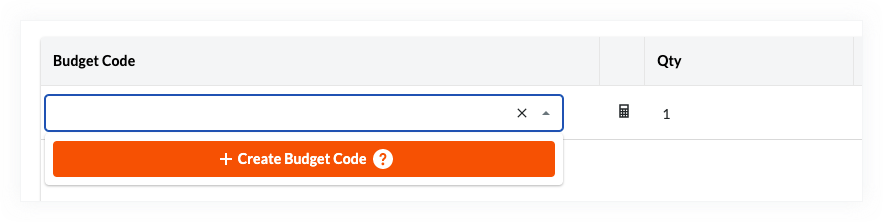
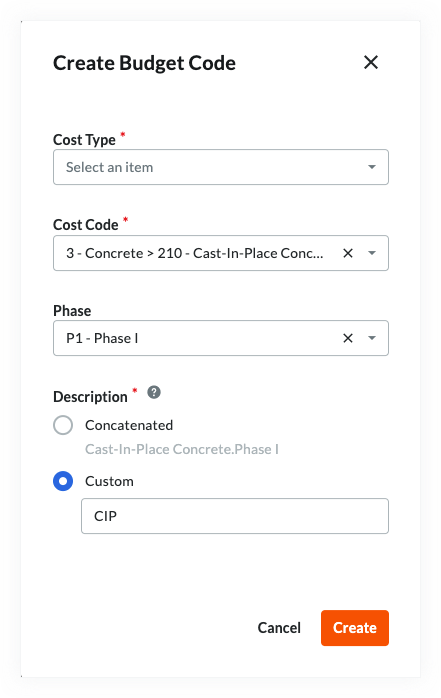
  2. 在明细项区域或"分项价格表"明细项中,点击预算编号单元格,然后点击创建预算编号按钮。 Wbs Create Budget Code Button这将打开以下对话框: Wbs Custom Budget Code Description

  3. 从下拉列表中选择所需细分。你有以下选择:

     Note

    The segments and items that you can select on your Procore project are unique to your project's specific WBS. Contact your company's Procore Administrator if you require assistance with creating a budget code for your environment.

    • 段。根据项目的 WBS,你将有两(2)个或最多十三(13)个“细分”下拉列表。从每个下拉列表中选择细分项以定义预算编号。

    • 描述。在"描述"部分下,选择以下选项按钮中的一(1)个:

      • 串联。选择此选项按钮可对预算编号使用 Procore 的默认串联方法。此方法使用句点(.)作为分隔符连接每个细分项的描述。

      • 自定义。如果要定义自定义描述,请选择此选项按钮。如果你有许多细分并希望创建自定义描述以提高环境中的可读性,此操作非常有用。要了解有关可能的用例的更多信息,请参阅为什么为 Procore 的项目财务管理工具创建自定义预算编号描述?

  4. 点击创建

See Also

Loading related articles...