Project Status Report
Summary
The Project Status Report is part of the Procore Analytics Project Management Report. The scope for the data is set by the selection in the Project drop-down list. Your Procore user account must be added to the appropriate Project level Directory in order to see a project's data reflected in this page. By applying the Project filter, you can expand the scope for an overview of all proejcts or narrow the data in view to a specific project. It also shows your company's overall Project Health Score and a donut chart summary of your company's Projects By Stage, with a count of the project(s) in each stage of construction.
The Project Details area shows item status across your company's projects in a pie chart format. For each item, it also shows a count of the late items and summarizes the average number of days for those late items.
The Financial Details area includes a Budget Summary table that shows budget amounts for the selected project(s) and lists totals by 'Division.'
提示
为什么 Procore 中没有"分部"概念?在 Procore 的 WBS 中,"成本编号"细分是分层细分,并没有"分部"的概念。相反,"分部"被视为分层细分中的某一层级。细分内的层始终由破折号(-)分隔。Procore 的默认 成本 编号列表有两(2)层。但是,你的环境可能具有一层、两层或多层。要了解更多信息,请参阅工作分解结构常见问题。
我能否获得一份默认 成本 编号列表的副本?要下载默认 成本 编号名称的副本以供参考,请点击Procore_默认_Cost_Codes.csv 。注意:此CSV文件仅供参考,其格式未经格式化以导入 Procore。
The Budget vs. Committed area plots the budgeted values and committed values on your projects using a two-sided bar graph for easy reading.
Sample Report Page
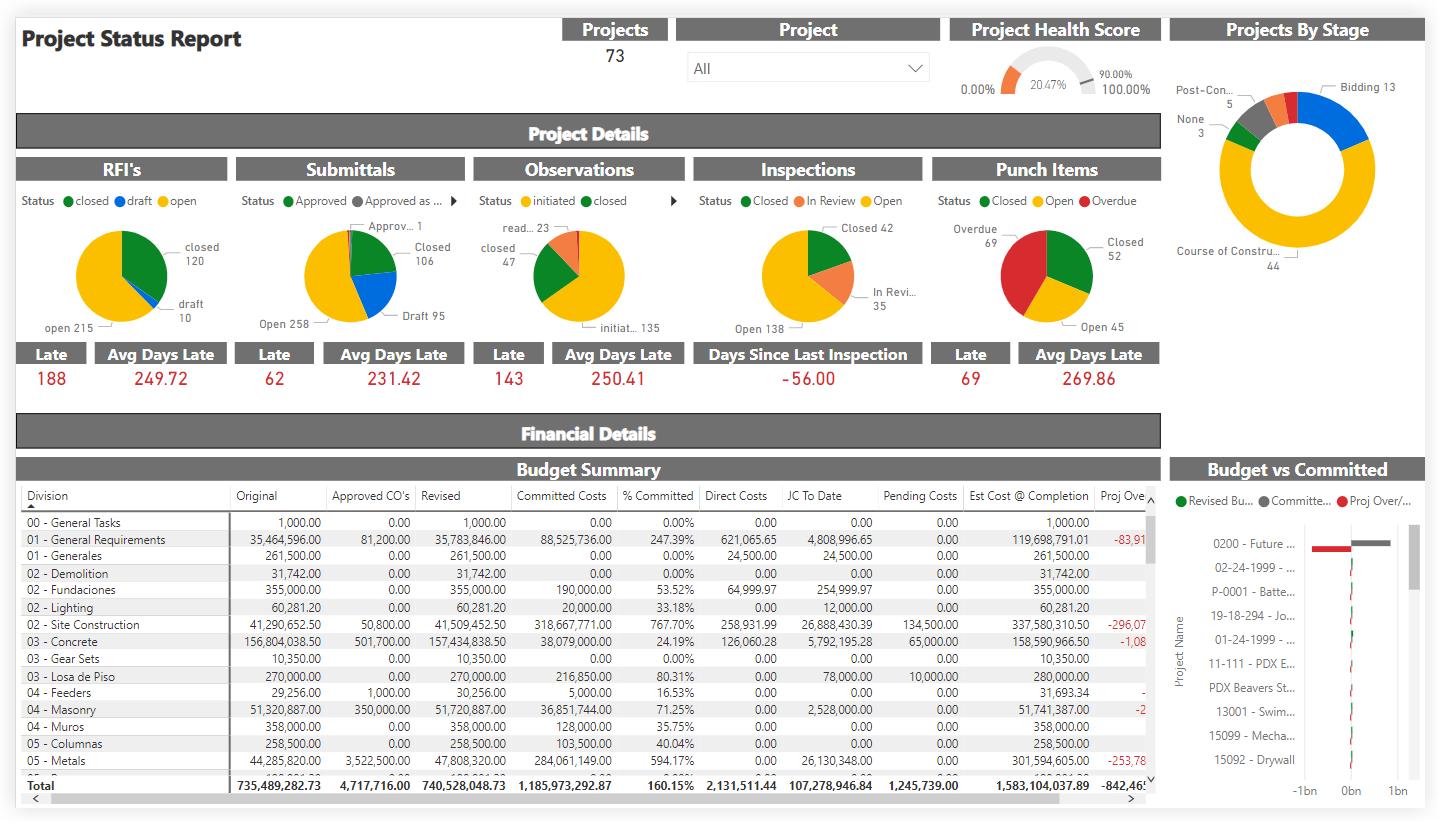
This sample report page was created using mock data for demonstration purposes only.