View the Change History of a Project
Background
Review the change history of a project in the Project Admin tool to track edits made to project settings, custom fields, and configurations. Viewing this log provides full transparency into who modified a field, when the change occurred, and the values before and after the edit. Accessing these details helps maintain data integrity and streamline compliance auditing across project records.
Things to Consider
Required User Permissions on the project's Admin tool.
Additional Information:
Change history logs track updates exclusively made within the Project Admin tool.
Changes made to tool level items outside of project settings are not included, but can be found in each project's change history.
Timestamps display in your local time zone.
Log entries specify whether a change occurred through the Procore web interface, an integrated application, or an automated bulk import.
Steps
Navigate to the Project level Admin tool.
Under 'Project Settings', click General.
Click the Change History tab.
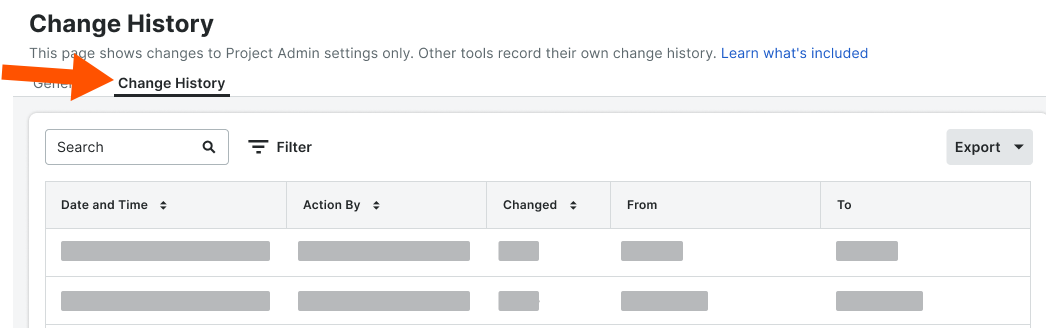

Project Admin → Change History Data Mapping
Fields Visible in Project Admin and Tracked in Change History
Project Admin Field | Change History Label |
|---|---|
Project Name | Project Name |
Project Number | Project Number |
Accounting Project Number | Accounting Project ID/Number |
Stage | Stage |
Description | Description |
Estimated Budget | Estimated Budget |
Priority | Priority |
Work Scope | Work Scope |
Sector | Sector |
Delivery Method | Delivery Method |
Square Feet | Square Feet |
Total Value | Total Value |
Code | Code |
Language - Country | Locale |
Type | Type |
Bid Type | Bid Type |
Program | Program |
Parent Project | Parent Project |
Owner Type | Owner Type |
Flag | Flag |
Active | Active |
Country | Country |
Address | Address |
City | City |
State | State Code |
ZIP | ZIP |
County | County |
Time Zone | Timezone |
Latitude Note: Latitude is tracked only when populated through auto-geocoding. | Latitude |
Longitude Note: Longitude is tracked only when populated through auto-geocoding. | Longitude |
Phone | Phone |
Fax | Fax |
Region | Region |
Office | Office |
Store Number | Store |
Designated Market Area | Designated Market Area |
ERP Sync This Project | ERP integrated |
Enable ERP Job Cost Transaction Syncing | Enable ERP Job Cost Transaction Syncing |
Departments | Departments |
Default Tax Code | Default Tax Code |
QuickBooks Customer | QuickBooks Customer |
Enable DocuSign | Enable DocuSign Integration |
Prevent Overbilling on this Project | Allow Overbilling Of Requisition |
Non-Commitment Costs | Change Event Noncommitted Enabled |
Demo Project | Demo |
Labor Productivity (Budget/CE/CO) | Productivity tracking enabled |
Start Date | Start Date |
Actual Start Date | Actual Start Date |
Completion Date | Completion Date |
Projected Finish Date | Projected Finish Date |
Warranty Start Date | Warranty Start Date |
Warranty End Date | Warranty End Date |
Additional Dates | Date's display name |
Custom Fields | Custom field label |
Fields Shown in Project Admin That Are Not Tracked in Change History
Project Admin Field |
|---|
Project ID |
Logo |
Project Photo |
Currency |
Project Template |
ERP Job ID |
Copy Contracts From |
Copy Directory From |
Fields Excluded from Project Admin That Appear in Change History
Change History Label |
|---|
County Override Enabled |
Public notes |
Sandbox |
Use Tax Codes |
Enable RFQs |
Enable Sub Jobs |
Enable Change Order Associations |
Enable Commitment Change Orders At The Bottom Of Payapps |
Enable Prime Change Orders At The Bottom Of Payapps |
Direct Cost Subcontractor Invoice Feature Enabled |
Documents Private By Default |
Inbound Email Access Level |
Show Milestones |
Show Schedule |
Show Weather |
Punch Item Response Will Be Due |
Lat Long Override Enabled |
Override start date check |
Override end date check |
See Also
Loading related articles...