权限

New Version Available

The Project Overview has replaced the legacy Project Home page and is enabled by default. Learn more about the difference between the legacy Project Home page and the new Project Overview.

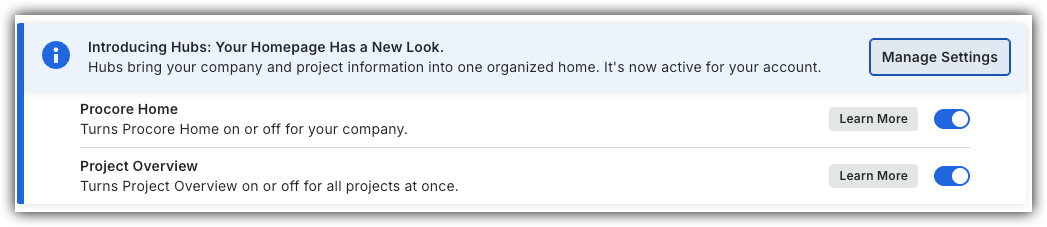
To return to the legacy Project Home, Company Administrators can navigate to the Company Portfolio / Procore Home tool, click Manage Settings and toggle Project Overview Icon Toggle OffOFF.

Procore Hubs announcement banner with Manage Settings button and toggles for Procore Home and Project Overview features.


However, later this year it will be sunset and will no longer be available. If your company reverted to the legacy Project Home experience, Company Administrators can re-enable the Project Overview by switching Project Overview toggle Icon Toggle On ON.

了解执行此工具中描述的操作需要哪些用户权限。

重要提示

Some actions that impact this tool are done in other Procore tools.
#0261 #12261995 该操作在 Procore 的 Web、iOS 和/或 Android 应用程序上可用。点击查看文章。

Icon Mindtouch Table Check用户可以使用此权限级别执行操作。

Icon Mindtouch Table Check Gp用户可以在满足此权限级别以及一项或多项附加要求的情况下执行此操作,例如细分权限

Note

Users with 'Admin' permission to the project's Home tool can send announcements from Procore's mobile app on iOS and Android. See Announcements.

Project Home Tutorials

Action

None

Read Only

Standard

Admin

Notes

Add a Project Photo to the Home
Web

Icon Mindtouch Table Check

Users need 'Admin' level permissions to the project's Photos tool.

Add Favorites to the Project Tools Menu
Web

Icon Mindtouch Table Check

Icon Mindtouch Table Check

Icon Mindtouch Table Check

Change the Project Address
Web

Icon Mindtouch Table Check

Users need one of the following permissions to the project's Admin tool:

  • 'Admin'
    OR

  • 'Read Only' or 'Standard' level permissions with the 'Update General Settings' granular permission.

Change Your Login ID Email Address for Your Procore User Account
Web

Icon Mindtouch Table Check

Icon Mindtouch Table Check

Icon Mindtouch Table Check

Configure Advanced Settings: Project Home
Web

Icon Mindtouch Table Check

Manage Project Dates for the Project Home Page
Web

Icon Mindtouch Table Check

Manage Project Links on the Project Home Page
Web

Icon Mindtouch Table Check

Manage the Project Message for the Project Home Page
Web

Icon Mindtouch Table Check

Manage the Project Team Roles for the Project Home Page
Web

Icon Mindtouch Table Check Gp

Icon Mindtouch Table Check Gp

Icon Mindtouch Table Check Gp

Users must also have one of the following permissions to the Project Directory tool:

  • 'Admin'

  • 'Read Only' or 'Standard' with the Assign Project Roles granular permission

Show or Hide Project Weather on the Project Home Page
Web

Icon Mindtouch Table Check

View the Home Page
Web

Icon Mindtouch Table Check

Icon Mindtouch Table Check

Icon Mindtouch Table Check

View My Open Items from the Project Overview in the Project's Home page
Web

Icon Mindtouch Table Check

Icon Mindtouch Table Check

Icon Mindtouch Table Check

View Project Weather on the Home Page
Web

Icon Mindtouch Table Check

Icon Mindtouch Table Check

Icon Mindtouch Table Check

View Recently Changed Items on a Project
Web

Icon Mindtouch Table Check

Icon Mindtouch Table Check

Icon Mindtouch Table Check