• Produkte
  • Prozessanleitungen
  • Zertifizierungen

    Kostenlose rollenbasierte Online-Trainingskurse zur Procore-Zertifizierung

    Schulungsvideobibliothek

    Unsere Mediathek mit Trainingsvideos durchsuchen

    Begriffsglossar
    Systemstatus

    Den App-Status ansehen

    Community

    Fragen stellen, Inspirationen und Artikel finden und mit anderen vernetzen

    Produktaktualisierungen

    Informationen zu den neuesten und kommenden Features für die Plattform

    Entwickler

    Anwendungen auf der Procore-Plattform erstellen

  • Versionshinweise
  • Produkte
  • Prozessanleitungen
    • Zertifizierungen
    • Schulungsvideobibliothek
    • Begriffsglossar
    • Systemstatus
    • Community
    • Produktaktualisierungen
    • Entwickler
  • Versionshinweise
Australia (English)
Brasil (Português)
Canada (English)
Canada (Français)
Deutschland (Deutsch)
España (Español)
France (Français)
Latinoamérica (Español)
Polska (Polski)
United Kingdom (English)
United States (English)
新加坡 (中文)
日本 (日本語)
  • Australia (English)
  • Brasil (Português)
  • Canada (English)
  • Canada (Français)
  • Deutschland (Deutsch)
  • España (Español)
  • France (Français)
  • Latinoamérica (Español)
  • Polska (Polski)
  • United Kingdom (English)
  • United States (English)
  • 新加坡 (中文)
  • 日本 (日本語)
  1. Support Home
  2. Payments Admin Guide
  3. Was ist Bezahlung?

Payments Admin Guide

  • Welcome
    • Get Started as a Payments Admin
    • Was ist Bezahlung?
    • How do funds flow?
    • What is a Payments Admin?
  • Multi-Factor Authentication (MFA)
    • How does MFA work with Procore Pay?
    • Set Up MFA for Procore Pay
    • Log in to Procore Pay with MFA
    • Complete the Transactional MFA Challenge
  • Funding Accounts
    • About Bank Accounts
    • Add Funding Accounts
    • Edit Funding Accounts
    • Set a Default Funding Account
    • Deactivate a Funding Account
    • View Funding Accounts
  • Payments Permissions
    • Add or Remove Payments Admins
    • Add Payments Disbursers
    • Add Payments Beneficiary Approvers
    • Remove Payments Disbursers
    • Remove Payments Beneficiary Approvers
    • View Payment Permissions
  • Project Controls
    • Enable or Disable Pay on Projects
    • Update Project Controls in Bulk
    • Update Bank Accounts on Projects
  • Workflow Settings
    • Best Practices
    • Configure Workflow Settings
    • Assign a Default Template
  • Advanced Settings
    • Enable Disbursements
    • Disable Disbursements
  • View Change History
  • Lien Waivers & Templates
    • Enable Lien Waivers
    • Create Templates
    • Edit Templates
    • Delete Templates
  • Sub-Tier Waivers
    • About the Sub-Tiers Card on a Subcontractor Invoice
    • Enable Sub-Tier Waivers on Projects
  • Payment Requirements
    • Configure Company Requirements
    • View Payment Requirements
  • Subcontractor Invoices
    • About the Subcontractor Invoices Tab
    • Apply Search & Filter Options
    • Manage Rows & Columns
    • Export a List of Invoices
    • Create Disbursements
  • About the Disbursements Tab
  • Beneficiaries
    • About the Beneficiaries Tab
    • Approve Beneficiary Accounts
  • Welcome
    • Get Started as a Payments Admin
    • Was ist Bezahlung?
    • How do funds flow?
    • What is a Payments Admin?
  • Multi-Factor Authentication (MFA)
    • How does MFA work with Procore Pay?
    • Set Up MFA for Procore Pay
    • Log in to Procore Pay with MFA
    • Complete the Transactional MFA Challenge
  • Funding Accounts
    • About Bank Accounts
    • Add Funding Accounts
    • Edit Funding Accounts
    • Set a Default Funding Account
    • Deactivate a Funding Account
    • View Funding Accounts
  • Payments Permissions
    • Add or Remove Payments Admins
    • Add Payments Disbursers
    • Add Payments Beneficiary Approvers
    • Remove Payments Disbursers
    • Remove Payments Beneficiary Approvers
    • View Payment Permissions
  • Project Controls
    • Enable or Disable Pay on Projects
    • Update Project Controls in Bulk
    • Update Bank Accounts on Projects
  • Workflow Settings
    • Best Practices
    • Configure Workflow Settings
    • Assign a Default Template
  • Advanced Settings
    • Enable Disbursements
    • Disable Disbursements
  • View Change History
  • Lien Waivers & Templates
    • Enable Lien Waivers
    • Create Templates
    • Edit Templates
    • Delete Templates
  • Sub-Tier Waivers
    • About the Sub-Tiers Card on a Subcontractor Invoice
    • Enable Sub-Tier Waivers on Projects
  • Payment Requirements
    • Configure Company Requirements
    • View Payment Requirements
  • Subcontractor Invoices
    • About the Subcontractor Invoices Tab
    • Apply Search & Filter Options
    • Manage Rows & Columns
    • Export a List of Invoices
    • Create Disbursements
  • About the Disbursements Tab
  • Beneficiaries
    • About the Beneficiaries Tab
    • Approve Beneficiary Accounts

Was ist Bezahlung?

Pay builds on the existing Project Financials and Invoice Management tools in Procore to streamline the subcontractor invoice payment process and automate the lien waiver exchange.
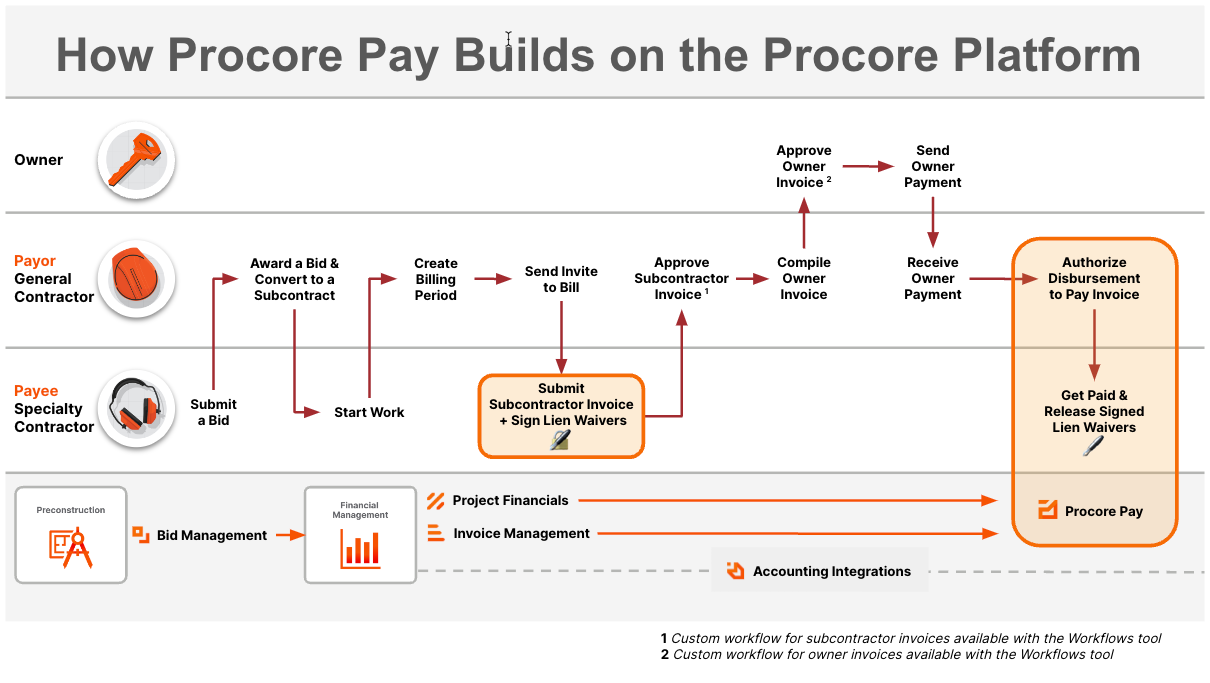
how-procore-pay-builds-on-the-procore-platform.png

Get Started as a Payments Admin
How do funds flow?

Procore engagiert sich für Fortschritte in der Bauindustrie, indem es das Leben der Arbeiter im Baugewerbe verbessert, technologische Innovationen vorantreibt und eine globale Gemeinschaft von Wegbereitern aufbaut. Unsere vernetzte globale Bauplattform vereint alle Stakeholder eines Projekts mit unbegrenztem Zugang zu Support und einem Geschäftsmodell, das speziell für die Bauindustrie entwickelt wurde.

Twitter Youtube Facebook LinkedIn Instagram

Über Procore

  • Website
  • Systemstatus
  • App Marketplace
  • Support kontaktieren

Downloads

  • Apple App Store
  • Google Play Store

© 2025 Procore Technologies, Inc.