Accept or Decline an 'Invite to Bill' as an Invoice Contact

Using Owner or Specialty Contractor Terminology?

Procore can be configured to use terminology specific to General Contractors, Owners, or Specialty Contractors. Learn how to apply the dictionary options.
  • To learn the differences: Show/Hide

    • This table shows the differences in tool names (bold) and terms across the point-of-view dictionaries for Project Financials.

      Generalunternehmer
      Englisch (Vereinigte Staaten) - Standard

      Besitzer
      Englisch (Terminologie für Eigentümer v2)

      Fachunternehmer
      Englisch (Terminologie für Fachunternehmer)

      Fakturierung

      Fakturierung

      Teilabrechnungen

      Eigentümer

      Finanzierung

      Eigentümer

      Auftraggeber/Kunde

      Auftraggeber/Kunde

      GC/Kunde

      Nachtrag zum Debitorenvertrag

      Nachtrag zur Finanzierung

      Nachtrag zum Debitorenvertrag

      Debitorenverträge

      Finanzierung

      Kundenverträge

      Einnahme

      Finanzierung

      Einnahme

      Untervertrag

      Vertrag

      Untervertrag

      Subunternehmer

      Unternehmer

      Subunternehmer

      Leistungsverzeichnis für Subunternehmer (Sub-LV)

      Leistungsverzeichnis für Auftragnehmer (CSOV)

      Leistungsverzeichnis für Subunternehmer (Sub-LV)

      About These Dictionaries
      • Default Setting: The 'General Contractor' dictionary is enabled by default for all accounts.

      • Availability: These alternate dictionaries in italics are available in US English only.

      How to Switch Your Dictionary

      To change your company's terminology to the Owner or Specialty Contractor dictionary, contact your company's . They will work with your Procore Point of Contact to make the change.

Background

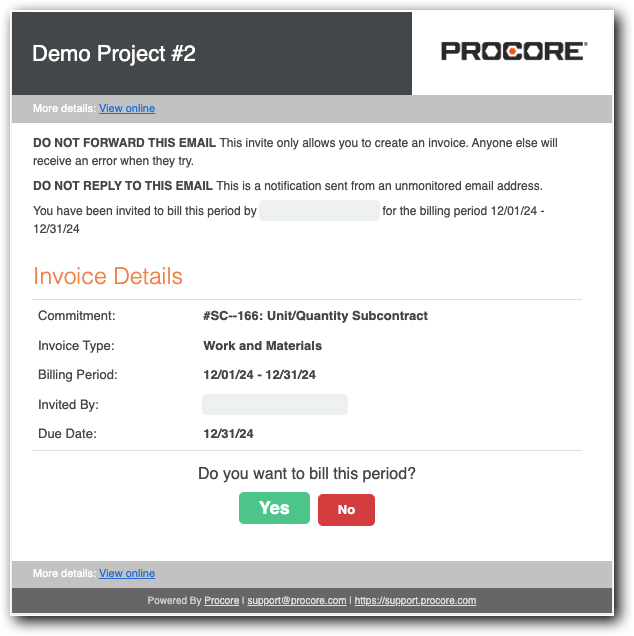
After creating a new billing period, an invoice administrator can send an 'Invite to Bill to the invoice contact on a commitment. The invite reminds the contact to submit their invoice by the Open billing period's due date. The subject line reads "Project Name: User Name has invited you to bill." Invoice contacts can then accept or decline the invite.

 Tip

Missing your 'Invite to Bill'? Invoice contacts can create new invoices in Procore. See Create a Subcontractor Invoice.

Things to Consider

Prerequisites

Steps

  1. Open your email Inbox.

  2. Look for the email message with the subject line, " "Project Name: User Name has invited you to bill."

  3. Open the 'Invite to Bill'.
    invite-to-bill.png

  4. Review the Invoice Details:

    • Commitment. Shows the commitment number and name.

    • Invoice Type. Shows the invoice type. See Configure Settings: Invoicing.

    • Billing Period. The date range for the Open billing period.

    • Invited By. The first and last name of the sender. Typically, this is the invoice administrator.

    • Due Date. The date your invoice is due. Invoice contacts cannot create or submit an invoice in the Procore project after this date.

  5. Click one of these buttons to respond to the Do you want to bill this period? prompt:

    • Yes. Accept the invite and submit an invoice. This changes the invoice status to Accepted. Continue with the steps in Submit a New Invoice as an Invoice Contact.

    • No. Decline the invite if you don't want to submit an invoice for the Open billing period. This changes the invoice status to Declined.

Next Step

See Also

Loading related articles...