This website has not been fully launched in your preferred locale yet

The only operational page on the V2 Support Site in your preferred locale is the video library page. The full website launch is coming soon.

Looking to find any other content? Return to the V1 Support Site.

  • Top product manuals

    The most used product manuals across the site

    Procore Imports
    Procore Drive
    Portfolio (Company)
    Submittals (Project)
    Home (Project)
    Featured product manuals

    Highlights of newly released product manuals

    Scheduling
    MFA
    See all product manuals
    Developer portal
  • Process guides
  • Certifications

    Get Procore certified for free with role-based, online training courses

    Training video library

    Search our library of training videos

    Permissions matrix
    Glossary of terms
    System status

    View the status of the app

    Community

    Ask questions, find ideas and articles, and connect with others

    Product updates

    Learn about the newest features to see what's coming to the platform

    Developers

    Build applications on the Procore platform

  • Release notes
    • Top product manuals
      • Procore Imports
      • Procore Drive
      • Portfolio (Company)
      • Submittals (Project)
      • Home (Project)
    • Featured product manuals
      • Scheduling
      • MFA
    • See all product manuals
    • Developer portal
  • Process guides
    • Certifications
    • Training video library
    • Permissions matrix
    • Glossary of terms
    • System status
    • Community
    • Product updates
    • Developers
  • Release notes
Australia (English)
Brasil (Português)
Canada (English)
Canada (Français)
Deutschland (Deutsch)
España (Español)
France (Français)
Latinoamérica (Español)
Polska (Polski)
United Kingdom (English)
United States (English)
新加坡 (中文)
日本 (日本語)
  • Australia (English)
  • Brasil (Português)
  • Canada (English)
  • Canada (Français)
  • Deutschland (Deutsch)
  • España (Español)
  • France (Français)
  • Latinoamérica (Español)
  • Polska (Polski)
  • United Kingdom (English)
  • United States (English)
  • 新加坡 (中文)
  • 日本 (日本語)
  1. Support Home
  2. Home (Project) (Legacy)
  3. Tutorials

Home (Project) (Legacy)

  • Overview
  • Tutorials
  • FAQ/Troubleshooting
  • Videos
  • Permissions
  • Overview
  • Tutorials
  • FAQ/Troubleshooting
  • Videos
  • Permissions

Tutorials

New Version Available

The Project Overview has replaced the legacy Project Home page and is enabled by default. Learn more about the difference between the legacy Project Home page and the new Project Overview.

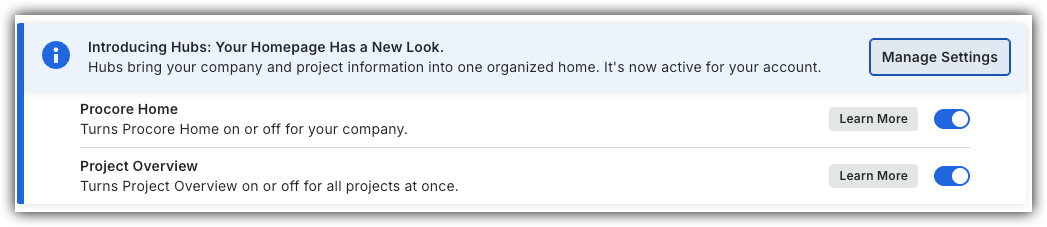
To return to the legacy Project Home, Company Administrators can navigate to the Company Portfolio / Procore Home tool, click Manage Settings and toggle Project Overview Icon Toggle OffOFF.

Procore Hubs announcement banner with Manage Settings button and toggles for Procore Home and Project Overview features.


However, later this year it will be sunset and will no longer be available. If your company reverted to the legacy Project Home experience, Company Administrators can re-enable the Project Overview by switching Project Overview toggle Icon Toggle On ON.

  • About the Project Home Page
  • Add Favorites to the Project Tools Menu
  • Add Project Milestones to the Project Home Page (Legacy)
  • Change the Project Address
  • Change Your Account Language in 'My Profile Settings'
  • Configure Advanced Settings: Project Home (Legacy)
  • Create an App Configuration in a Project
  • Launch an Embedded App in a Project
  • Manage 'My Profile Settings'
  • Manage Project Dates for the Project Home Page
  • Manage Project Links on the Project Home Page
  • Manage the Project Message for the Project Home Page
  • Manage the Project Team Roles for the Project Home Page
  • Search for Items Within a Project Using Procore Search
  • Set a Project Photo
  • Show or Hide Project Weather on the Project Home Page
  • View API Request Metrics in a Project
  • View My Open Items in the Project's Home Page
  • View Project Weather on the Home Page
  • View Recently Changed Items on a Project (Legacy)

Procore is committed to advancing the construction industry by improving the lives of people working in construction, driving technology innovation and building a global community of groundbreakers. Our connected global construction platform unites all stakeholders on a project with unlimited access to support and a business model designed for the construction industry.

TwitterYoutubeFacebookLinkedInInstagram

About Procore

  • Website
  • System status
  • App Marketplace
  • Contact support

Downloads

  • Apple App Store
  • Google Play Store

    © 2026 Procore Technologies, Inc.