How do I set and release retention on a subcontractor payment application in Procore?

Using owner or specialty contractor terminology?

Procore can be configured to use terminology specific to main contractors, owners or specialty contractors. Learn how to apply the dictionary options.

  • To learn the differences: Show/Hide

    • This table shows the differences in tool names (bold) and terms across the point-of-view dictionaries for Project Financials.

      Main Contractors
      English (United States) - Default

      Owners
      English (Owner Terminology V2)

      Speciality Contractors
      English (Speciality Contractor Terminology)

      Payment applications

      Payment applications

      Progress Billings

      Owner

      Funding

      Owner

      Owner/Client

      Owner/Client

      MC/Client

      Main Contract Variation

      Funding Variation

      Client Contract Variation

      Main Contracts

      Funding

      Client Contracts

      Revenue

      Funding

      Revenue

      Subcontract

      Contract

      Subcontract

      Subcontractor

      Contractor

      Subcontractor

      Subcontractor Bill of Quantities (SBOQ)

      Contractor Bill of Quantities (CBOQ)

      Subcontractor Bill of Quantities (SBOQ)

      About these dictionaries
      • Default setting: The 'main contractor' dictionary is enabled by default for all accounts.

      • Availability: These alternate dictionaries in italics are available in US English only.

      How to switch your dictionary

      To change your company's terminology to the owner or specialty contractor dictionary, contact your company's . They will work with your Procore point of contact to make the change.

Background

In Procore, the term retention refers to the practice of withholding a portion of a contract amount until the work is deemed satisfactorily complete. The withheld amount is specified in an agreement between the contracting party (the party paying for the work) and a contracted party (the person or company performing the work). A common practice is to withhold 5–10% of a contract’s total value until a milestone has been reached. Then, the withheld amount can be released as a progress payment. When work is substantially complete, the withheld amount can be released as a final payment.

Answer

The practice of setting and releasing retention on payment applications protects contractors from potential losses and helps to ensure quality work by subcontractors. To set or release retention on a subcontractor payment application, you must be a payment application administrator.

Set retention

To set retention on one (1) or more line items in a subcontractor payment application's bill of quantities:

  1. Navigate to the Payment Applications tool.

  2. Click the Subcontractor tab.

  3. Find the subcontractor payment application to edit.

  4. Click the payment application # link to open it.

     Tip

    Alternatively, you can navigate to the commitment tool, open the desired commitment and then click the payment applications tab. Then, click the payment application # link to open it.

  5. Scroll to the payment application's Bill of Quantities.

  6. Click Edit.

  7. Mark one (1) or more line item tickboxes and click the Edit values button.
    This opens the Edit values panel.

  8. Enter a value in the Work retention this period (%) box to set the amount to withhold on the selected line items.

  9. Click Apply.

Example

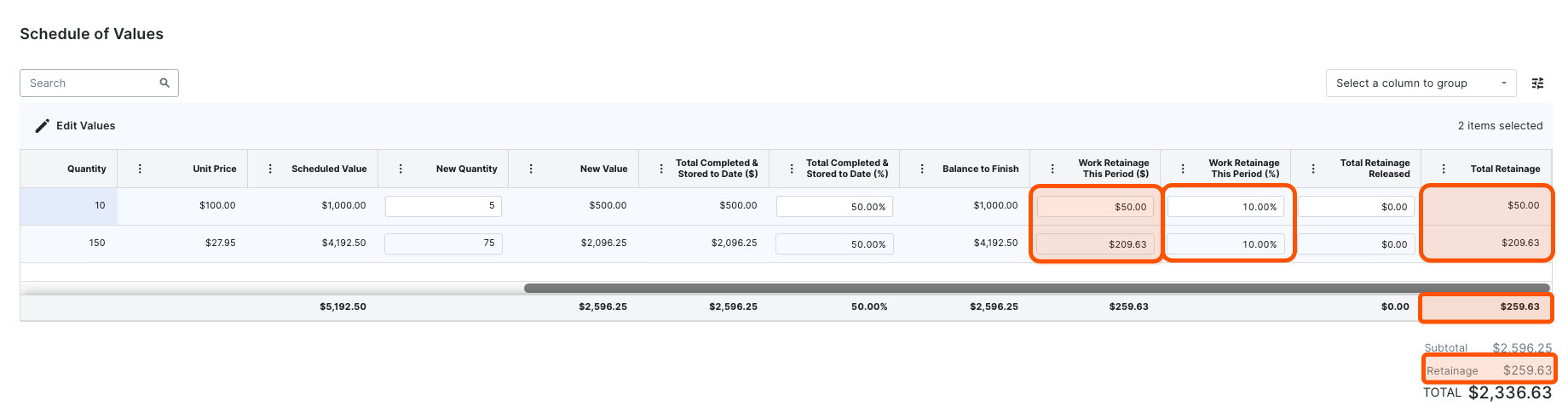
For example, to withhold 10% retention on the first payment application's selected line item, type 10 in the Work retention this period (%) box in the Edit values panel. After clicking Apply:

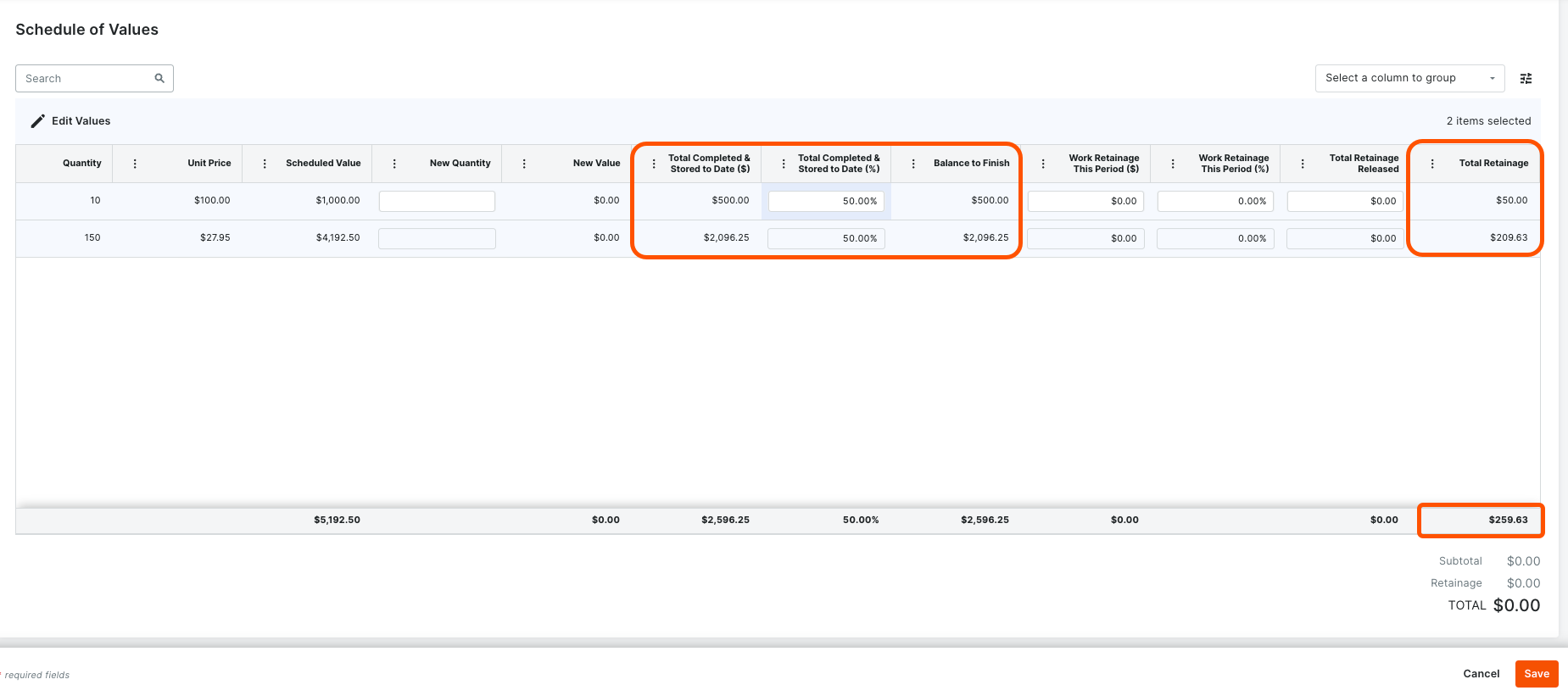
  • The first line item has a Total completed & stored to date value (£) of £500.00 USD. Procore calculates the amount to withhold to update the Work retention this period (£) value to £50.00 USD.

  • The second line item has a Total completed & stored to date value (£) of £2,096.25 USD. Procore calculates the amount to withhold to update the Work retention this period (£) value as £209.63 USD.

    First Invoice Set Retainage

Procore update the Total retention column on the far right of each line item to show the total retention amount the line item on this payment application. The system also update the Total retention column's subtotal row, as well as the Retention total the bottom of the payment application. In this example, the amounts withheld for each line item are £50.00 USD and £209.63 USD for a Retention total of £259.63 USD on the payment application.

Release retention

To release retention on one (1) or more line items in a subcontractor payment application's bill of quantities:

  1. Navigate to the Payment Applications tool.

  2. Click the Subcontractor tab.

  3. Find the subcontractor payment application to edit.

  4. Click the payment application # link to open it.

  5. Scroll to the payment application's Bill of Quantities.

  6. Click Edit.

  7. Mark one (1) or more line item tickboxes and click the Edit values button.

  8. Enter a value in the Retention released (%) box to set the amount of retention to release for the selected line items.

  9. Click Apply.

Example

When creating a new payment application for the commitment in the next valuation period, note that Procore automatically inputs some of the previous payment application's data on the new payment application.
From Previous Invoice

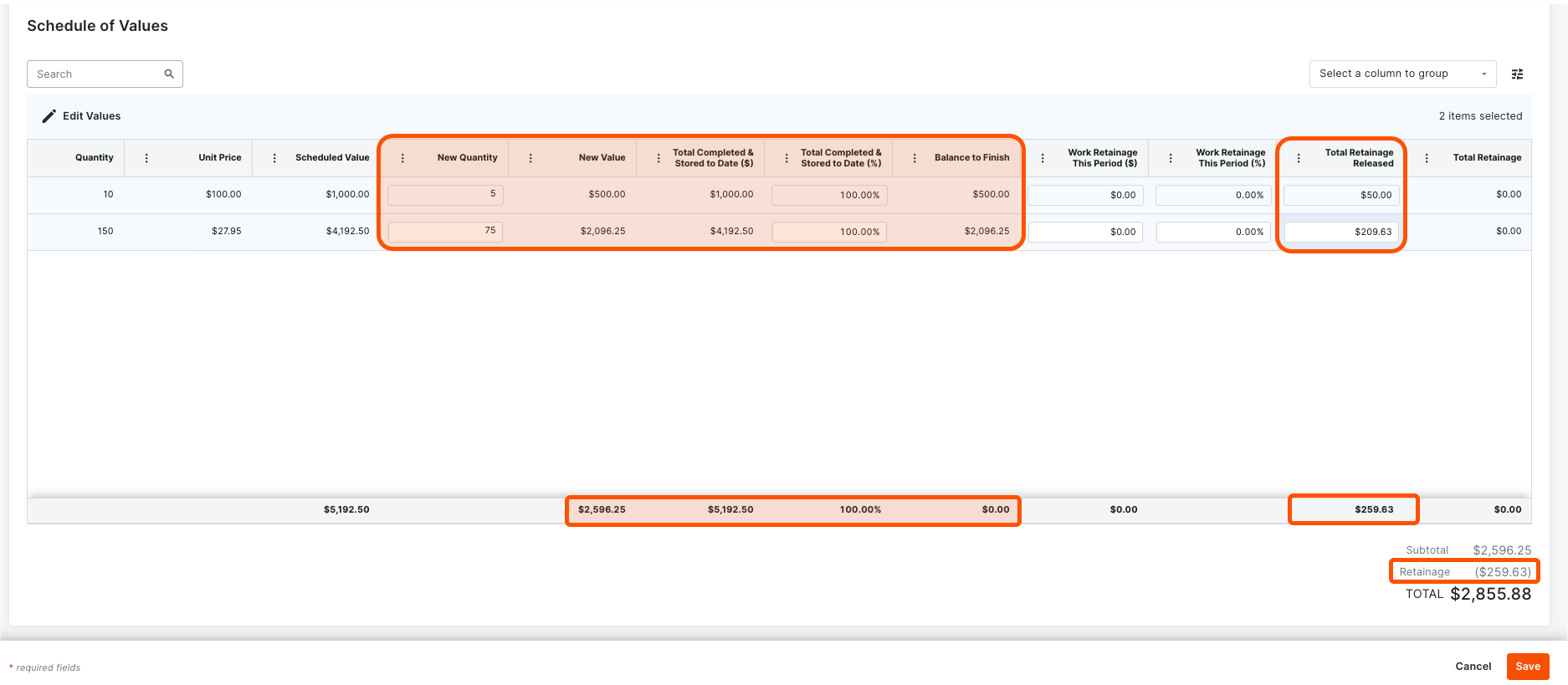
For this example, the subcontractor has completed 100% of their work, so 100% of the retention withheld on the previous payment application will be released. To release 100% of the retention, type 100 in the Total completed & stored to date (%) box in the Edit values panel. After clicking Apply, Procore update the highlighted values to release 100% of the retention withheld on the previous payment application or £259.63 USD.
Release Retainage Values

See Also

Loading related articles...