What are the default status for Procore payment applications?
Answer
In Procore, there are two types of payment applications: an upstream payment application and a downstream payment application. Both can be placed in different status that represent a particular state—from a draft state to being submitted for review, to being rejected or to being approved for payment.
To learn more, see the information below:
Upstream payment applications
Downstream payment applications
Upstream payment applications
The table below details the different status that you'll see when managing your upstream payment applications. In Procore, upstream payment applications include:
MC/Client Payment Applications for the client contracts and Progress Billings tools.
Funding payment applications for the funding and Payment Applications tools.
Main contract payment applications for the main contracts and Payment Applications tools.
Status | Description |
|---|---|
Draft | The payment application is currently in the 'draft' state. |
Under review | The payment application was submitted to a payment application administrator for review. |
Revise & resubmit | The payment application was rejected as submitted by a payment application administrator. The payment application contact must re-submit the payment application. Costs are NOT reflected in the Budget. |
Approved | The payment application was approved by a payment application administrator. |
Downstream payment applications
The tables below detail the different status and additional status information that is available for your downstream payment applications. If you are a main contractor or specialty contractor, this includes the subcontractor payment applications that bill against a project's commitments. If you are an owner, this includes the contractor payment applications that bill against a project's commitments.
Status
Additional status info
Status
The table below lists the available status and meanings of each status. The table also details who can edit parts of the payment application while a payment application is in a particular status. It also shows how the status of a payment application affects Procore's ability to reflect cost in the project's Budget tool.
Status & description | Who can edit the General information card on a payment application? | Who can add attachments to a payment application? | Who can edit the bill of quantities on a payment application? | Who can review BOQ line item on a payment application? | Can send a payment application to the Procore + DocuSign integration? | Is cost reflected in the project's Budget tool? |
|---|---|---|---|---|---|---|
Draft 1 The payment application is currently in the 'draft' state. |
|
|
|
| No | No |
Under review A downstream payment application contact has submitted the payment application to the upstream payment application administrator for review. |
|
|
|
| No | No |
Revise & resubmit 1The payment application has been returned to the downstream payment application contact by the upstream payment application administrator. |
|
|
|
| No | No |
Approved The payment application has been approved for payment by the upstream payment application administrator. |
|
|
|
| Yes | Yes 2 |
Approved as noted The payment application has been approved for payment by the upstream payment application administrator with the noted exceptions. |
|
|
|
| Yes | Yes 2 |
Pending owner approval The payment application has been submitted by the upstream payment application administrator to the upstream project owner or funding source for review. |
|
|
|
| Yes | No |
1 Users with the appropriate permission can delete subcontractor payment applications in the 'draft' and 'Revise and resubmit' statuses. See Delete a subcontractor payment application. Procore also sends an email notification to the payment application contact when the status changes to 'Revise and resubmit'.
2 If the 'job to date cost's column is included on the budget view being applied to your data, the payment application amounts are reflected in the 'job to date costs' column. See What are Procore's standard budget views? and What are Procore's standard budget views for ERP integrations?
Additional status info
In the Subcontractor tab, you will also see additional status information reflected in the counts that appear at the top of the project's Payment Applications tool on the Subcontractor tab and/or in the 'status' column of the payment application table.
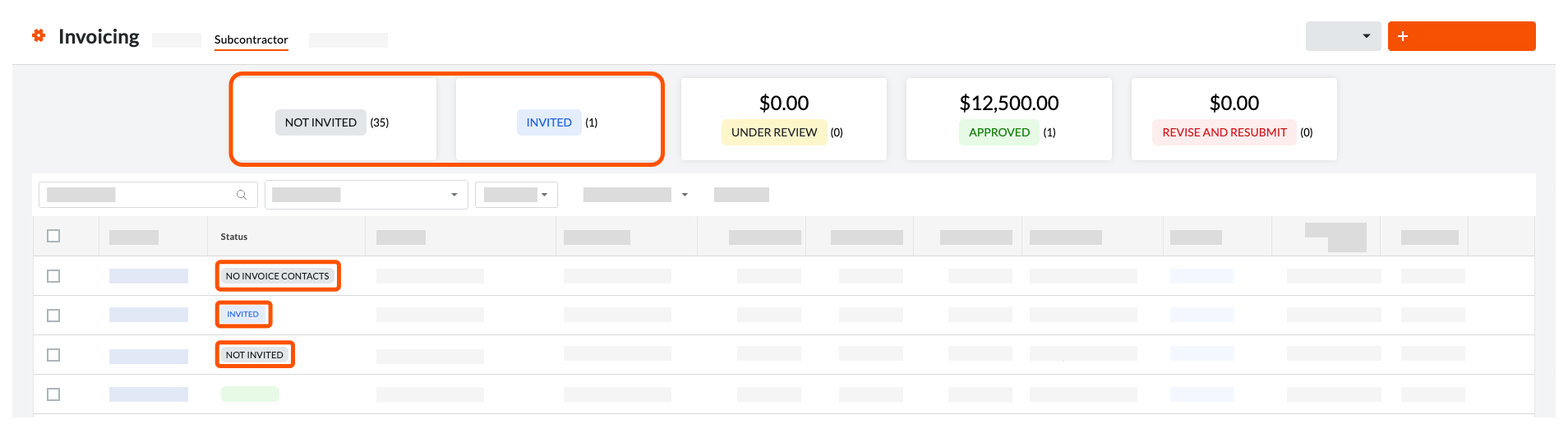
Additional status info | Description |
|---|---|
Invited | The payment application contact has been sent an 'Invite to bill'. |
No payment application contacts | An payment application contact has NOT been assigned to the contract. |
Subcontractor bills of quantities not approved | The subcontractor BOQ (Subcontractor Bill of Quantities) has not been approved. |
Not invited | The payment application contact has NOT been sent an 'Invite to Bill'. |
Accepted | The payment application contact has accepted the invitation to bill but has not yet created payment application. |
Declined | The payment application contact has declined the invitation to bill. |
See Also
Loading related articles...