What fields are in an estimate and how are they calculated?

Background

After adding takeoff for the project, you can view project estimates, set labour cost and profit margins and generate downloadable proposals. You can also manually enter information on an estimate without takeoff. Each section on the Estimating page displays the appropriate elements of the project’s proposals, such as material quantity and cost, labour and labour cost, inclusions and exclusions and an overall summary of the proposal. See What fields are in an estimate and how are they calculated?

Answer

Data in an estimate typically flows left to right and then into the summary section.

There are two different ways that you can show labour in an estimate.

  • Individual labour rate - When using labour rates, you set the labour rate as the cost per hour/minute and then indicate how many minutes or hours are needed. You can also include a 'difficulty' multiplier that indicates how many people are needed to perform the work.

  • Unit cost pricing for labour - When using unit cost pricing for labour, labour is set at a flat rate. It calculates labour as quantity x labour cost.

Based on your setting, you will see different fields in the estimate.

 Tip

The default setting for how you show labour is configured in your tool's setting:

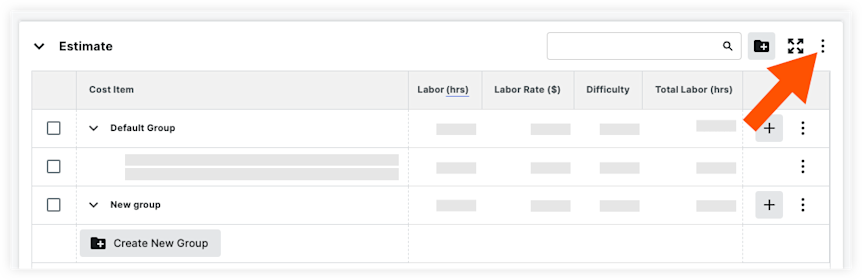
You can also update the setting for a specific project by clicking vertical ellipsis Icon Ellipsis Vertical for the estimate and turning the "Use 'unit cost' pricing for labour" toggle Icon Toggle On ON or Icon Toggle Off OFF.Clipboard Ef72e5906b9b656762a889be584abadea

Labour rate

Show/Hide field descriptions and calculations

Estimate section

Column name

Column type

Override?

Description

Budget Code

Source

Yes

A budget code combination of cost code, cost type, sub job and custom segments, that creates corresponding line item in your Budget. Default setting for an item or assembly are configured in your cost catalogue.

Quantity

Source

Yes

The quantity of the item as calculated in the takeoff. The default quantity is equal to 2D takeoff quantity + 3D takeoff quantity.

Unit cost (£)

Source

Yes

The cost of a single item. Default cost setting for the item are configured in your cost catalogue.

Waste (%)

Source

Yes

A percentage of material over the actual estimated quantity. The default setting is set in the 'Summary' section of the estimate of the estimate, under 'Lost Time & Waste'.

Subtotal item cost (£)

Calculated

Yes*

The subtotal cost of an item's materials, Equipment or other, as determined by the cost item type in the cost catalogue. Subtotal item cost is equal to quantity x (1+ Waste %) x item cost. *Total cost can be overridden on group level.

Margin/markup (%)

Source

Yes

Your profit margin for the item cost, as a percent for the item. Margin is based on the sales price. Markup is calculated based on the cost of the item. The default setting for Material, Equipment, Subcontractor, Travel is set in the 'Summary' section of the estimate.

Sales price (£)

Calculated

No

Sales price is equal to: total cost x ( 1 + markup) OR total cost / (1 - margin).

Subtotal item sales (£)

Calculated

No

Subtotal item sales is equal to sales price x quantity.

Profit (£)

Calculated

No

Profit is equal to total sales - total cost.

Unit labour (mins, hrs)

Source

Yes

Labour time needed for a single item. The default labour setting for an item or assembly are configured in your cost catalogue.

Labour rate

Source

Yes

How much one (1) hour of labour cost. The default rate is set in the 'Summary' section of the estimate.

Difficulty

Source

Yes

The difficulty factor to account for job complexity. The default difficulty is set in the 'Summary' section of the estimate.

Total labour (hrs)

Calculated

No

Total labour is equal to quantity x labour (hrs) x difficulty.

Total labour cost (£)

Calculated

No

Total labour cost is equal to Total labour x labour rate.

Labour margin/markup (%)

Source

Yes

Your profit margin/markup for labour. Margin is based on the sales price. Markup is calculated based on the cost of the labour. The default is set in the 'Summary' section of the estimate.

Total labour sales (£)

Calculated

No

Total labour sales is equal to: Total labour cost x ( 1 + labour markup) OR Total labour cost / (1 - labour margin).

Total cost (£)

Calculated

No

Total cost (£) is equal to: subtotal item cost + total labour cost (£)

Total cost /Sq Ft

Calculated

No

Total cost / sq ft is equal to: Total cost (£) + Project Square feet (This number is entered in the project admin tool - Project information)

Total cost (%)

Calculated

No

Total cost (%) is equal to: a percentage of Total cost (£) over the Total sales (£).

Total sales (£)

Calculated

No

Total sales (£) is equal to: subtotal item sales (£) + total labour sales (£)

Notes

Standard

Yes

Notes may be typed into this column for each item. Notes are NOT private and will be visible to other users with permissions to view the estimate.

Tax

Source

Yes

Turn on or off material tax for individual items. All other items are considered taxable. Default settings for an item or assembly are configured in your cost catalogue.

Summary section

Global rates

Column name

Column type

Override?

Description

Global labour cost

Standard

Yes

The default cost of labour per hour. When set, this update the 'Labour rate' column for all rows in the estimate with the labour item cost type.

Global labour sales rate

Calculated

No

This is equal to global labour cost + labour margin/markup that is set in the 'Summary' section.

Labour and materials

 Note

The following are available for each cost item type (material, labour, Equipment, subcontractor and travel), defined in your cost catalog. See How do cost catalog item types relate to cost types in Procore?

These do NOT currently reflect cost types incorporated into budget codes or your work breakdown structure.

Column name

Column type

Override?

Description

Total labour

Calculated

No

Total labour is equal to the sum of labour hours for all rows in the estimate with the labour item cost type.

Difficulty

Standard

Yes

The difficulty facto to account for job complexity. When set, this update the 'Difficulty' for all rows in the estimate with the Labour item cost type.

Lost time & waste %

Standard

Yes

The default percentage per cost type, based on the item type from the cost catalogue. When set, this update the percentage Lost Time & Waste for all rows in the estimate with that cost type.

Total cost (£)

Calculated

No

For Labour, this is equal to quantity x difficulty x labour rate, for all rows in the estimate with the labour item cost type. For all other cost types, total cost is equal to the sum of cost x quantity for all rows in the estimate for that cost type.

Profit markup/margin %

Standard

Yes

The default markup/margin for the cost type. When set, this update the percentage markup/margin for all rows in the estimate with that cost type. Margin is based on the sales price. Markup is calculated based on the cost of the item.

Total sales

Calculated

Yes

Total sales is equal to the sum of Total cost x ( 1 + markup) OR Total cost / (1 - margin) for all rows in the estimate for that cost type.

Total profit £

Calculated

No

Total profit is equal to total sales - total cost for each cost type.

Additional adjustments

Column name

Column type

Override?

Description

(Legacy) overhead

Calculated

No

Overhead is equal to Overhead % x Total Sales.

(Legacy) discount

Calculated

No

Discount is equal to (Total Sales + Overhead £) x -Discount %.

Custom

-

-

Add adjustments to an estimate

Total adjustments

Calculated

Yes

Total adjustments is equal to Overhead £ + Discount £.

Taxes

 Note

The following are available for each cost item type (material, labour, Equipment, subcontractor and travel), defined in your cost catalog. See How do cost catalog item types relate to cost types in Procore?

These do NOT currently reflect cost types incorporated into budget codes or your work breakdown structure.

Column name

Column type

Override?

Description

Labour tax %

Standard

Yes

The percent at which to apply tax to labour.

Labour tax £

Calculated

No

Labour tax is equal to (Total labour sales + Overhead) x labour tax %.

Material tax %

Standard

Yes

The percent at which you want to apply tax to materials.

Material tax £

Calculated

No

Material tax is equal to Total material sales x materials tax %.

[Other taxes]

Based on what other cost types you have, you will see additional taxes. Other taxes is equal to Total [type] Sales x [type] Tax.

Total taxes

Calculated

No

Total taxes is equal to Labour Tax + Material Tax + [Other Tax].

Others

Column name

Column type

Override?

Description

Bonding

Standard

Yes

How much insurance percentage you pay based on Total Sales, Adjustments and Taxes. Bonding is equal to (Total Sales + Total Adjustments + Taxes) x Bonding %.

[Custom adjustments]

Standard

Yes

Additional adjustments added. The amount is equal to (Total Sales + Total Adjustments + Taxes) x [custom Adjustment %].

Total other

Calculated

No

Total Others is equal to the sum of all adjustment amounts in this section.

Total

Column name

Column type

Override?

Description

Total

Calculated

No

The Total Sales Price + Total Adjustments + Total Taxes + Total Other.

Unit cost pricing for labour

Show/Hide field descriptions and calculations

Estimate section

Column name

Column type

Override?

Description

Budget Code

Source

Yes

A budget code combination of cost code, cost type, sub job and custom segments, that creates corresponding line item in your Budget. Default setting for an item or assembly are configured in your cost catalogue.

Quantity

Source

Yes

The quantity of the item as calculated in the takeoff. The default quantity is equal to 2D takeoff quantity + 3D takeoff quantity.

Unit cost (£)

Source

Yes

The cost of a single item. Default cost setting for the item are configured in your cost catalogue.

Waste (%)

Source

Yes

A percentage of material over the actual estimated quantity. The default setting is set in the summary section for lost time & waste.

Subtotal item cost (£)

Calculated

Yes*

The subtotal cost of an item's materials, Equipment or other, as determined by the cost item type in the cost catalogue. Subtotal item cost is equal to quantity x (1+ Waste %) x item cost. *Total cost can be overridden on group level.

Margin/markup (%)

Source

Yes

Your profit margin for the item cost, as a percent for the item. The default setting for material, Equipment, subcontractor, travel margin/markup is set as the markup/margin % in the summary section. Margin is based on the sales price. Markup is calculated based on the cost of the item.

Sales price (£)

Calculated

No

Sales price is equal to: total cost x ( 1 + markup) OR total cost / (1 - margin).

Subtotal item sales (£)

Calculated

No

Subtotal item sales is equal to sales price x quantity.

Profit (£)

Calculated

No

Profit is equal to total sales - total cost.

Unit labour cost (£)

Source

Yes

The cost of labour per hour. Default setting for an item or assembly are configured in your cost catalogue.

Total labour (£)

Calculated

Yes*

Total labour is equal to quantity x labour cost. *This can be overridden at the group level.

Labour margin/markup (%)

Source

Yes

Your profit margin/markup for labour. Margin is based on the sales price. Markup is calculated based on the cost of the labour. The default is set in the 'Summary' section of the estimate.

Total labour sales (£)

Calculated

No

Total labour sales is equal to Total labour £ x ( 1 + labour markup) OR Total labour £ / (1 - labour margin).

Total cost (£)

Calculated

No

Total cost (£) is equal to: Subtotal item cost + Total labour (£)

Total cost /Sq Ft

Calculated

No

Total cost / sq ft is equal to: Total cost (£) + Project Square feet (This number is entered in the project admin tool - Project information)

Total cost (%)

Calculated

No

Total cost (%) is equal to: a percentage of Total cost (£) over the Total sales (£).

Total sales (£)

Calculated

No

Total sales (£) is equal to: subtotal item sales (£) + total labour sales (£)

Notes

Standard

Yes

Notes may be typed into this column for each item. Notes are NOT private and will be visible to other users with permissions to view the estimate.

Tax

Source

Yes

Turn on or off material tax for individual items. All other items are considered taxable. Default settings for an item or assembly are configured in your cost catalogue.

Summary section

Labour and materials

The following are available for each cost item type (material, labour, Equipment, subcontractor and travel), defined in your cost catalog. See How do cost catalogue item types relate to cost types in Procore?Note: These do NOT currently reflect cost types incorporated into budget codes or your work breakdown structure.

Column name

Column type

Override?

Description

Lost time & waste %

Standard

Yes

The default percentage per cost type, based on the item type from the cost catalogue. When set, this update the percentage Lost Time & Waste for all rows in the estimate with that cost type.

Total cost (£)

Calculated

No

Total cost is equal to the sum of cost x quantity for all rows in the estimate for that cost type.

Profit markup/margin %

Standard

Yes

The default markup/margin for the cost type. When set, this update the percentage markup/margin for all rows in the estimate with that cost type. Margin is based on the sales price. Markup is calculated based on the cost of the item.

Total sales

Calculated

Yes

Total sales is equal to the sum of Total cost x ( 1 + markup) OR Total cost / (1 - margin) for all rows in the estimate for that cost type.

Total profit £

Calculated

No

Total profit is equal to total sales - total cost for each cost type.

Additional adjustments

Column name

Column type

Override?

Description

(Legacy) overhead

Calculated

No

Overhead is equal to Overhead % x Total Sales.

(Legacy) discount

Calculated

No

Discount is equal to (Total Sales + Overhead £) x -Discount %.

Custom

-

-

Add adjustments to an estimate

Total adjustments

Calculated

Yes

Total adjustments is equal to Overhead £ + Discount £.

Taxes

Column name

Column type

Override?

Description

Labour tax %

Standard

Yes

The percent at which to apply tax to labour.

Labour tax £

Calculated

No

Labour tax is equal to (Total labour sales + Overhead) x labour tax %.

Material tax %

Standard

Yes

The percent at which you want to apply tax to materials.

Material tax £

Calculated

No

Material tax is equal to Total material sales x materials tax %.

[Other taxes]

Based on what other cost types you have, you will see additional taxes. Other taxes is equal to Total [type] Sales x [type] Tax.

Total taxes

Calculated

No

Total taxes is equal to Labour Tax + Material Tax + [Other Tax].

Others

Column name

Column type

Override?

Description

Bonding

Standard

Yes

How much insurance percentage you pay based on Total Sales, Adjustments and Taxes. Bonding is equal to (Total Sales + Adjustments + Taxes) x Bonding %.

[Custom adjustments]

Standard

Yes

Additional adjustments added. The amount is equal to (Total Sales + Total Adjustments + Taxes) x [custom Adjustment %].

Total others

Calculated

No

Total Others is equal to the sum of all adjustment amounts in this section.

Total

Column name

Column type

Override?

Description

Total

Calculated

No

The Total Sales Price + Total Adjustments + Total Taxes + Total Other.

See Also

Loading related articles...