Equipment and budget overview
Things to Consider
Required User Permissions:
'Admin' level permissions on the Company level Admin tool.
Additional Information:
To create a budget view for real-time labour Productivity, see Resource tracking and project financials: Setup guide.
To create a labour productivity cost budget view, see Set up the Procore labour productivity cost budget view.
Any user with 'Read Only' permission or higher on the Budget tool can apply views to a project's Budget. See Apply the view, Snapshot, group and filter options on a Budget or forecasting view.
To see Equipment hours in your Budget, you must create a budget view with the 'Equipment Timecard Hours' column. We recommend using the labour productivity cost view as it contains the most relevant columns and adding Equipment Timecard Hours to that view.
About the labour productivity cost view
The 'Procore labour productivity cost' budget view provides project teams with the ability to include production quantities on the project's Budget. See What are 'production quantities'? Building off the real-time labour costing feature, the 'Procore labour productivity cost' budget view is designed to provide self-performing and specialty contractors with the ability to gain greater insight into your project's production rates to make better decisions that maximise profit margins. With this release, you can:
Add and import production units to a project's budget in Procore's Financial Management tools: Budget, change events and variations.
Collect production units from site personnel with timecard entries in the Site Diary and both the Timecards and Timesheets tools.
Track and compare Budget production units to installed production units using Procore's Budget and report tools.
By default, Procore provides its users with a standard 'Procore labour productivity cost' budget view, which is available to your company's Procore administrator in the Company level Admin tool.
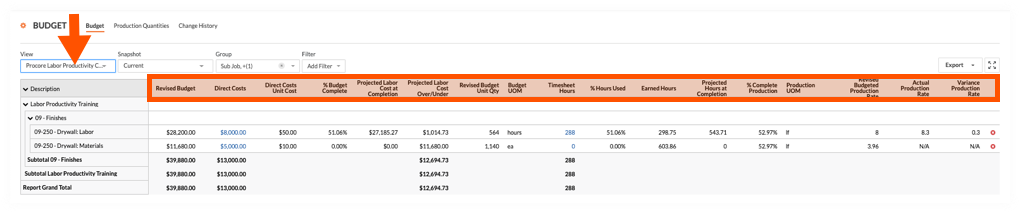
Procore labour productivity cost budget view in the Budget tool
The illustration below shows you the recommended layout for the 'Procore labour productivity cost' budget view, as it will look when applied to your project's Budget tool.
Default columns
The following table details the default columns provided with the 'Procore labour productivity cost' budget view. In the Description column, the following symbols represent the operator for a calculation:
Add (+)
Subtract (-)
Multiply (*)
Divide (/)
Column name | Column type | Column format | Column description | Column configuration |
|---|---|---|---|---|
Revised budget | Calculated | currency | Shows the original budget amount, plus the budget change amount, plus the approved COs amount. | Original budget add (+) budget changes add (+) approved COs |
Direct Costs | Source | currency | Shows the direct cost amount. | Source Category: direct cost Source: direct cost Source Filtering: status = Pending, Revise and Resubmit, Approved |
Direct cost unit cost | Source | Number | Shows the actual cost per unit for direct cost. | Direct cost divide (/) direct cost unit quantity |
% Budget complete | Calculated | Percent | Shows how much of the current Budget amount for the budget line item is estimated to be used based on the real-time labour hours and actual labour cost. | Estimated cost w/ timesheet hours divide (/) revised Budget |
Projected labour cost at completion | Calculated | currency | Shows the projected labour cost at completion for the budget line item. | Projected hours at completion multiply (*) direct cost unit cost |
Projected labour cost over/under | Calculated | Current | Shows the revised budget minus the projected labour cost at completion. | Revised Budget subtract (-) project labour cost at completion |
Revised Budget unit quantity | Calculated | Number | Shows the budget production quantity plus the approved COs production quantity. | Budget unit quantity add (+) approved VAR units |
Budget UoM | Standard | N/A | Shows the Unit of Measure (UoM) for the budget line item. | N/A |
Timesheet hours 1 | Source | Number | Shows all timecard entry hours. You can optionally apply status filters to narrow the data in the view. | Source category: timecard entry hours source: timecard entry hours filtering: none |
% hours used | Calculated | Percent | Shows how much of the current Budget unit quantity (labour hours) have been used based on time submitted in Procore. | Timesheet hours divide (/) revised Budget unit quantity |
Earned hours | Calculated | Number | Shows the number of labour hours earned (merited) based on the work produced to date for that cost code. | Revised Budget unit quantity multiply (*) % complete production |
Projected hours at completion | Calculated | Number | Shows the estimated labour hours needed to complete production for the cost code based on the work produced to date. | Timesheet hours divide (/) % complete production |
% complete production | Calculated | Percent | Shows the percentage of the production quantity has been installed to date of the current Budget production quantity for the cost code. | Actual quantity installed divide (/) revised Budget production quantity |
Production UoM | Source | N/A | Shows the UoM for the budget production quantity (i.e., for the cost code on the line item). | Source category: Production UoM source: Budget production UoM source filtering: n/a |
Revised Budget production rate | Calculated | Number | Shows the actual Budget production rate based on labour hours and installed quantity to date. | Revised Budget production quantity divide (/) revised Budget unit quantity |
Actual production rate | Calculated | Number | Shows the actual Budget production rate based on labour hours and installed quantity to date. | Actual quantity installed divide (/) timesheet hours |
Variance production rate | Calculated | Number | Shows the difference between the current Budget production rate and the actual production rate. A positive number indicates you are performing faster than expected. A negative number indicates you are performing slower than expected. | Actual production rate subtract (-) revised Budget production rate |
1 The 'Labour productivity cost' budget view is only available to customers using Procore's Resource tracking tools. However, the 'Timesheet hours' column can be added to other budget views. To learn how to add the column, see Can we import our third-party timecard entries to work with the 'Timesheet hours' column in Procore's Budget tool?