Level tenders
Tender levelling
Click the tender form name.
Click the Tender levelling tab.
Click the Levelled tenders view.
Take any of the following actions:
Edit base tender line items
Click a field you want to edit in the 'Base tender' section.
The menu options adjust based on the 'Response field type' selected on the tender form.
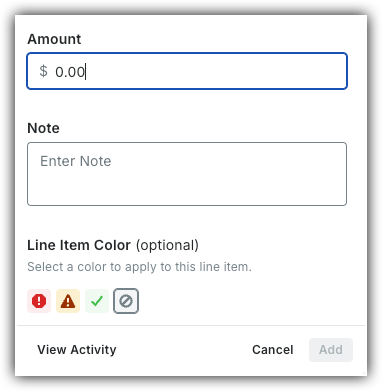
Amount:
Show/hide menu options
Amount: Enter a new number here to manually adjust the tender-levelling total. This overrides the calculated total without changing the company's original submission.
Note: Type clarification details, internal reminders or justification text in this box to explain your levelling adjustments.
Line item colour: Choose a colour to highlight or categorise this line item. Select the remove
 icon to clear it.
View activity: Click this button to open a history log that displays all previous changes, timestamp and user actions for that line item.
This button becomes active once history is available.
Include/exclude:
Show/hide menu options
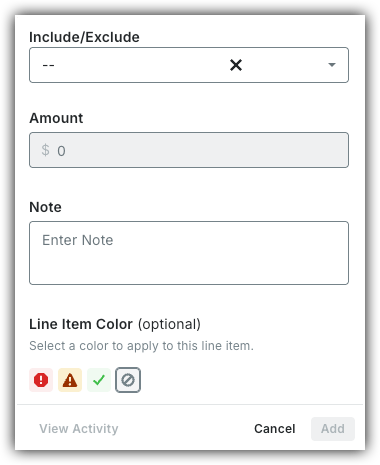
Include/Exclude: Decide whether a line item is active or inactive in the levelling process.
Include: Includes the line item's value in levelling calculations.
Exclude: Excludes the line item's value from levelling calculations but keeps the original submission data.
Amount: Enter a new number here to manually adjust the tender-levelling total. This overrides the calculated total without changing the company's original submission.
Note: Type clarification details, internal reminders or justification text in this box to explain your levelling adjustments.
Line item colour: Choose a colour to highlight or categorise this line item. Select the remove
icon to clear it.View activity: Click this button to open a history log that displays all previous changes, timestamp and user actions for that line item.
This button becomes active once history is available.
Unit quantity:
Show/hide menu options
Quantity: Enter a number to manually change the total units for a line item.
Unit cost: Enter the specific cost per individual item, hour or unit of measurement.
Unit type: Select a predetermined unit of measurement from the drop-down menu to clarify how the quantity is measured.
Total: The system automatically calculates this value by multiplying the quantity by the unit cost.
Note: Type clarification details, internal reminders or justification text in this box to explain your levelling adjustments.
Line item colour: Choose a colour to highlight or categorise this line item. Select the remove
icon to clear it.View activity: Click this button to open a history log that displays all previous changes, timestamp and user actions for that line item.
This button becomes active once history is available.
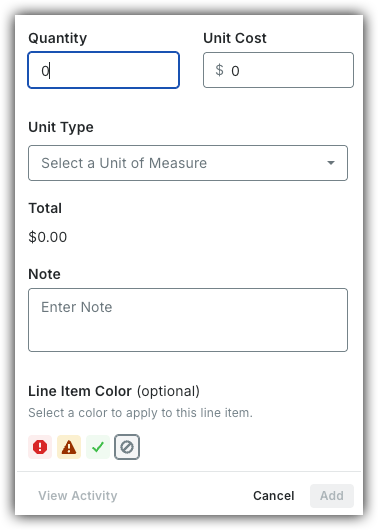
Click Add to save changes.


Add private line item
Click the Add
 icon.
See Create a tender form to learn how to add sections and line items.
When finished, click Save.
Alternates
Move the toggles
 ON to show alternates.
OR
Move the toggles OFF to hide alternates.