Update items in the cost catalogue
Background
When you export item and parts from the cost Catalogue tool in Procore, a Microsoft® Excel file containing the item is downloaded to your computer. Procore also allows for materials to be imported back into the cost catalogue. See Import cost catalogue items.
Things to Consider
Required User Permissions
'Standard' or 'admin' level permissions to the Company level cost Catalogue tool.
Additional information
Out of the box cost catalogue items marked with a lock icon are not editable.
Steps
Update a specific catalogue item
Navigate to the cost Catalogue tool in Procore.
Locate the cost catalogue you want to update.
Click the vertical ellipsis
 and select Export parts.
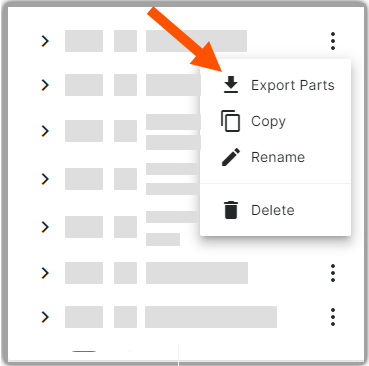
The cost catalogue information will automatically download to your computer as an editable Excel file (.xlsx).Make any necessary edits, then Save the Excel file.
Click the vertical ellipsis
icon in the upper right corner.Click Import catalogue items.
Click Import from Excel file.
Select the file you edited and click Open.
Click Upload.
Import finished successfully banner will be displayed on completion.
Update custom catalogue items
Navigate to the cost Catalogue tool in Procore.
Click the vertical ellipsis
icon in the upper right corner and select Export custom catalogue items.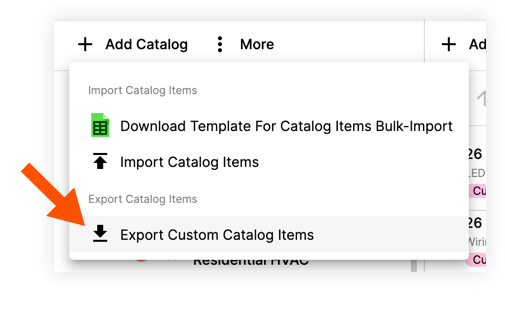
The custom cost catalogue information will automatically download to your computer as an editable Excel file (.xlsx).Make any necessary edits, then Save the Excel file.
Click the vertical ellipsis
icon in the upper right corner.Click Import catalogue items.
Click Import from Excel file.
Select the file you edited and click Open.
Click Upload.
Import finished successfully banner will be displayed on completion.
See Also
Loading related articles...