Issue partial payments for subcontractor payment applications in Disbursements

 General availability in select markets (United States)

Flag Us Procore Pay is available in the United States. It is designed for main contractors and owner-builders who act as their own main contractors on a job. Procore Pay extends the payment application management functionality in the Procore web application to handle the payment process between main and specialty contractors.
Overview

To issue a partial payment for a payment application in a new or 'draft' disbursement.

Background

Partial payment help payors with Procore Pay manage cash flow across their construction projects. This strategy lets them strategically distribute funds in alignment with their payment flows and work progress. Partial payment are essential for paying subcontractors for completed portions of work or upon materials delivery, even if the scope isn't yet finished. This ensures subcontractors receive timely compensation while allowing main contractors to manage their expenditures responsibly.

Things to Consider

  • Required User Permissions

    • Updated partial payment amount must be less than or equal to the amount due on the payment application.

Prerequisites

Steps

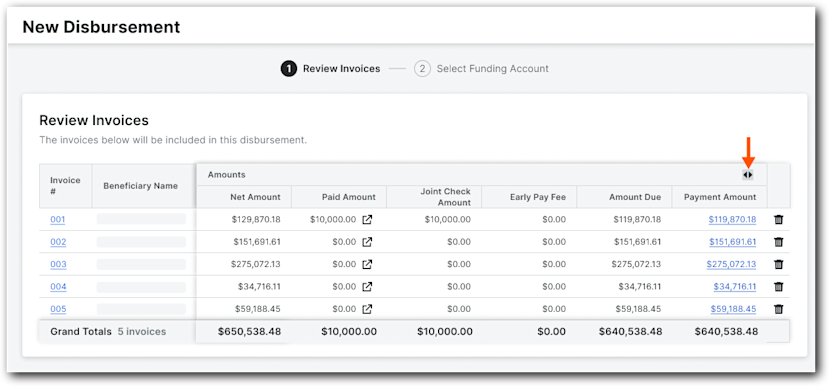
  1. In the Review payment applications card, confirm the list of payment applications to be added to the disbursement.

  2. Expand the Amounts column group to review the Net amount, Paid amount, Joint check amount, Early pay fee, Amount due and payment amount for each payment application.

    Expand Amounts

  3. (Optional) To issue a partial payment, click the payment amount link.
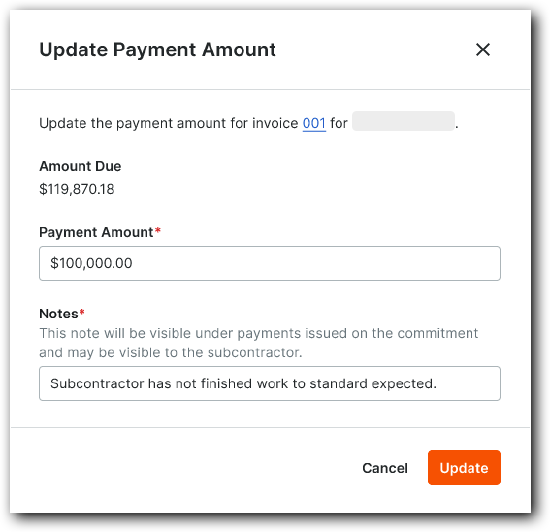
    This opens the update payment amount window.

     Tip

    Want to learn more about partial payment? See About partial payment with Procore Pay

  4. Do the following:

    Ad 4nxfsxagbojnc83nnswe13oh Twjyttifmfwplpd8 Ujcswpfj05klhhjocpxcq8jeppuhdq5w82gmhwygqdr Bwtjfii6r7qpuqcxrayor2tc6eisg5ewyduap9w521dpyz Pnugkeyoemi 0vigirxiacruub6b034

    • Enter an updated amount in the payment amount box. Entries must be less than or equal to the amount due of the payment application.

    • Enter relevant information about the updated payment in the Notes box.

    • Click Update.

Procore updates the payment amount for the payment application.

See Also

Loading related articles...