View Specifications (iOS)

Beta - Diseño de varias columnas para iPad

Ahora está disponible un nuevo diseño de dos y tres columnas para iPads, lo que facilita la navegación por diferentes herramientas. El diseño de dos columnas funciona con todas las herramientas, mientras que el diseño de tres columnas es para documentos, planos, formularios y especificaciones. Los administradores de la compañía pueden habilitar la versión beta de la experiencia de tableta multicolumna (iOS) en Procore Explore.
Things to Consider

  • Required User Permissions:

    • 'Standard' or 'Admin' level permissions on the project's Specifications tool.

  • Additional Information:

    • Este activo o ítem se puede ver o editar en modo sin conexión si se vio y almacenó en caché previamente en su dispositivo móvil. Las tareas realizadas en modo fuera de línea se sincronizan con Procore una vez que se restablece la conexión de red.

Steps

  1. Navigate to the project's Specifications tool using the Procore app on an iOS mobile device.

  2. Tap the division you want to view specifications for.

  3. Tap the specification section you want to view.

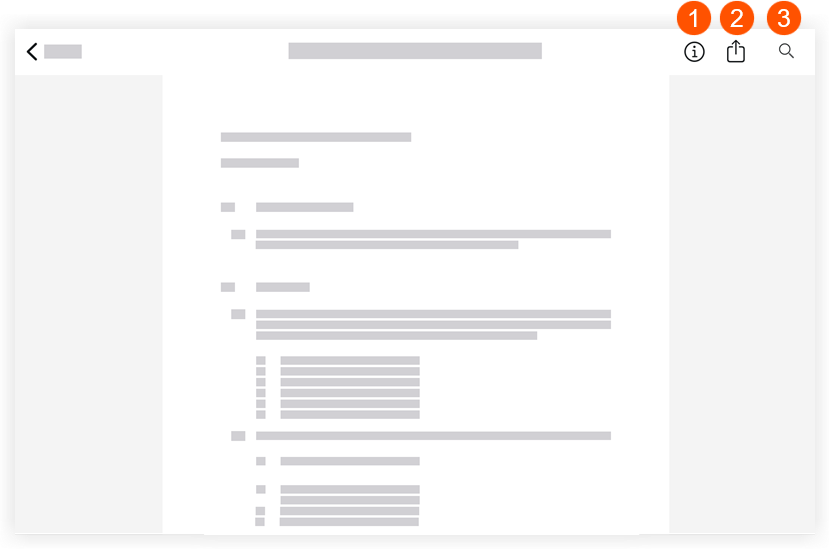
  4. Swipe through the specification section by swiping up on your iOS device, or view the information explained below.
    specifications-ios.png

1

Tap information to display information about the spec section you're viewing. Tap it again to hide the information. This information includes the following:

  • Revision number: This number denotes the most recent to oldest revision issues for a particular spec section. Spec sections are usually ordered numerically and/or alphabetically.

  • Issued Date: This is the date the spec section was issued to the GC.

  • Received Date: This is the date the GC received the spec section.

  • Set: This is the set into which the spec section displayed was uploaded.

2

Tap the Share to email the spec section to another member of the project's Directory. See Email Specifications (iOS).

3

Tap Search to search the current specification section for key words. See Search Contextually within Specifications (iOS).

See Also

Loading related articles...