View the Company Cost Code Segment Settings
Antecedentes
Siga los pasos a continuación siempre que desee ver la configuración del segmento "Código de coste" en la WBS de su empresa. Recuerde que "Código de coste" es un segmento predeterminado y su configuración no se puede editar a nivel de proyecto. Sin embargo, puede añadir, editar y eliminar elementos de segmento tanto a nivel de proyecto.
Temas a considerar
Permisos de usuario necesarios:
Permisos de nivel "Administrador" en la herramienta Administrador de nivel de empresa.
Información adicional:
La configuración del segmento "Código de coste" no se puede editar en el nivel de proyecto.
Sin embargo, puede añadir, editar y eliminar elementos de segmento tanto en el nivel de proyecto.
Limitaciones:
For customers using the Company level ERP Integrations tool
The default segments in WBS are compatible with Procore's ERP Integrations tool. However, some integrations do NOT yet support custom segments.For customers who have independently developed or purchased a third-party solution to integrate with Procore
To take advantage of the custom segment capabilities associated with WBS, any existing API integrations that you have independently developed or purchased to interact with Procore must be updated to support Procore's new WBS API.
Prerequisites
Steps
Navigate to the Company level Admin tool.
Under 'Company Settings', click the Work Breakdown Structure link.
In the 'Segments' table, click the 'Cost Codes' segment.
Above the 'Cost Codes' table, click Configure Settings
 icon.
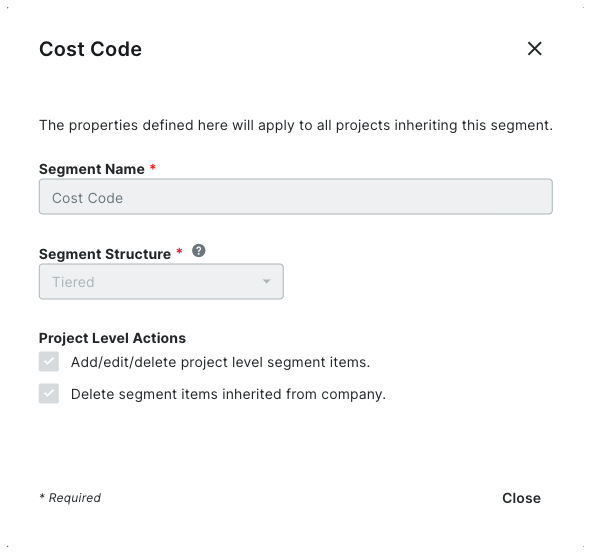
icon.In the 'Segment Settings' dialog box, you can view its settings. All settings are grayed out to indicate they cannot be edited.
 Note
NoteThe 'Cost Code' segment is a default segment. You cannot edit any of its settings

Click Close.