Exporter des fichiers Revit® vers l’outil Documents
Vous pouvez exporter des fichiers d’Autodesk® Revit® vers Procore à l’aide du plug-in Procore BIM. Cela permet aux utilisateurs de charger les versions actuelles du modèle directement dans l’outil Documents sans quitter l’environnement Revit®. Vous pouvez également utiliser ce processus pour exporter des fichiers à partir d’AutoCAD®.
Éléments à prendre en compte
Autorisations utilisateur requises :
Autorisations de niveau « Standard » ou « Admin » dans l’outil Documents du projet.
Informations complémentaires :
Exportations AutoCAD® .dwg fichiers nativement et n’exporte pas le .rvt Fichiers.
Les exportations de fichiers se comportent différemment selon le type de fichier sélectionné :
.dwg natif ou .rvt : Exporte l’intégralité du fichier.
.ifc ou .nwc : Respecte la vue 3D active
Escalier
Ouvrez Revit® sur votre ordinateur Windows®.
Dans Revit®, accédez à une vue 3D et cliquez sur l’onglet Procore pour accéder à la Procore BIM Plug-in.
Cliquez sur le bouton Exporter pour ouvrir la fenêtre Exporter sous .
En bas de la fenêtre, procédez comme suit :
Saisissez un nom de fichier.
Sélectionnez le format de fichier souhaité dans le menu Type de fichier :
Fichier de projet Revit (RVT)
Fichier IFC (IFC)
Fichier de cache Navisworks (NWC)
Si vous choisissez le type de fichier IFC ou NWC, vous disposez d’options de paramètres supplémentaires.Afficher/Masquer les détails
Lors de l’exportation d’un fichier IFC ou NWC, vous pouvez spécifier ces paramètres supplémentaires :
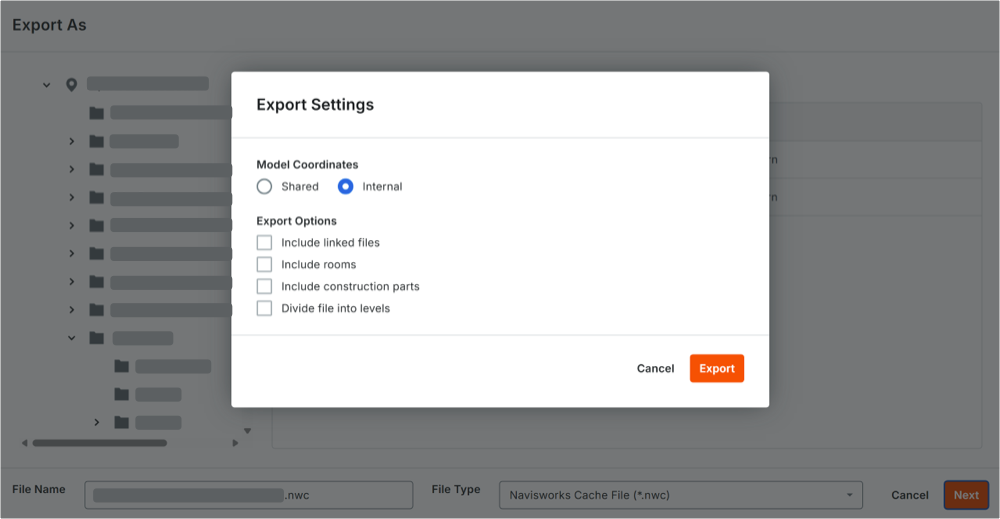
Sous Coordination de la maquette, sélectionnez la manière dont les données de positionnement de votre maquette doivent être traitées :
Partagé: sélectionnez cette option si votre projet Revit® utilise un système de coordonnées partagé sur plusieurs fichiers.
Interne: sélectionnez cette option pour utiliser le point d’origine natif de la maquette.
Sous Options d’exportation, cochez les cases pour spécifier les données supplémentaires à inclure :
Inclure les fichiers liés: inclut la géométrie des maquettes liées.
Inclure les pièces: inclut les données spatiales et les données de pièce.
Inclure les éléments de construction: préserve les éléments de construction divisés.
Diviser le fichier en niveaux: sépare et organise la structure de la maquette en fonction de la hauteur des étages.
Procore mémorise vos préférences et applique automatiquement ces paramètres à votre prochaine exportation. Vous pouvez les modifier selon vos besoins.
Cliquez sur Exporter.