Ce site Web n'est pas encore complètement disponible dans votre langue
La seule page du site de support V2 disponible dans vos paramètres régionaux est celle de la bibliothèque vidéo. Le lancement complet du site Web arrivera prochainement.
Vous recherchez d'autres contenus ? Retournez sur le site de support V1.
Manuels de produits populaires
Les manuels de produits les plus utilisés sur le chantier
Pour revenir à l’ancien Accueil de projet, les administrateurs Procore peuvent accéder à l’outil Accueil entreprise Portefeuille / ProcoreAccueil, cliquer sur Gérer les paramètres et désactiver Aperçu du projetbascule.
Cependant, plus tard cette année, il sera au coucher du soleil et ne sera plus disponible. Si votre entreprise est revenue à l’ancienne expérience projet Accueil, les administrateurs Procore peuvent réactiver l’Aperçu du projet en activant Aperçu du projet bascule ACTIVÉ.
Découvrez quelles autorisations d’utilisateur sont nécessaires pour effectuer les actions décrites dans cet outil.
Important
Certaines actions ayant un impact sur cet outil sont effectuées dans d’autres outils Procore.
| | L’action est disponible sur l’application Web, iOS et/ou Android de Procore.
Les utilisateurs peuvent effectuer l’action avec ce niveau d’autorisation.
Les utilisateurs peuvent effectuer cette action avec ce niveau d’autorisation ET une ou plusieurs exigences supplémentaires, telles que des autorisations granulaires.
Note
Les utilisateurs disposant de l’autorisation « Admin » sur l’outil Accueil du projet peuvent envoyer des annonces depuis l’application mobile de Procore sur iOS et Android. Voir Annonces.
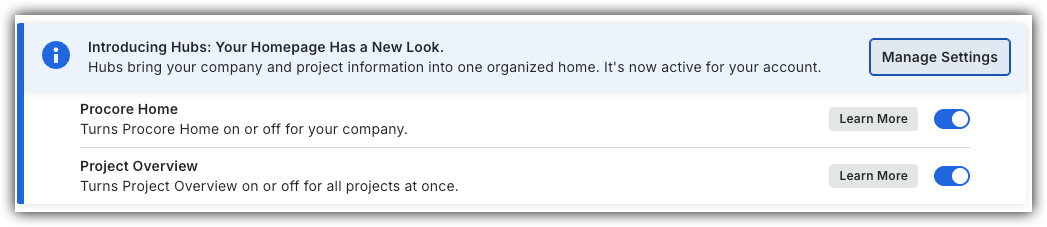
 bascule.
 ACTIVÉ.
 Les utilisateurs peuvent effectuer l’action avec ce niveau d’autorisation.
 Les utilisateurs peuvent effectuer cette action avec ce niveau d’autorisation ET une ou plusieurs exigences supplémentaires, telles que