Export an Owner Invoice (Legacy)
Legacy Content
This page details the legacy owner invoice experience. A modernized experience is also available.
This page details the legacy owner invoice experience. A modernized experience is also available.
Vous pouvez exporter une facture au maître d’ouvrage au format CSV ou PDF. Vous avez également la possibilité de télécharger la facture et les pièces jointes dans un fichier PDF.
Autorisations utilisateur requises :
Autorisations de niveau Admin dans l’outil Contrats principaux au niveau projet.
Formats de fichiers pris en charge :
Le fichier CSV
PDF avec pièces jointes
Limitations:
L’option PDF avec pièces jointes n’est pas disponible lors de l’utilisation de Procore avec DocuSign©.
Navigate to the project's Prime Contracts tool.
Locate the contract to open.
How to find a contract? Use the Search and Select a Column to Group features to quickly find the contract.
Click the appropriate Number link to open the contract.
Click the Invoices tab.
Locate the invoice to open in the Invoices (Payment Applications) tab.
Click the Invoice # link to open it.
In the invoice, click the Export button and choose one of these options from the drop-down menu:
PDF
If you chose this option, Procore exports the data to the PDF file format and downloads it to your computer.
PDF with Attachments
If you choose this option, mark the checkboxes that you want to apply under 'Select, Order, and Download Files'. This option is NOT available when using the Procore + DocuSign©integration. 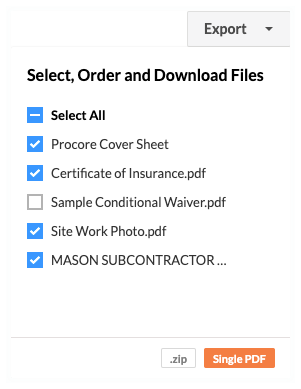
Then click one of these buttons:
.ZIP. Click this button to download the PDF to a ZIP file.
Single PDF. Click this button to export the single PDF. Procore emails the PDF file to your user account's email address.
Attachments must be in the PDF file format to be included in the Single PDF. If users have added attachments in other file formats (such as DOC, JPG, PNG, and so on), Procore will exclude them from the Single PDF output.
CSV
If you choose this option, Procore exports the data to the CSV file format and downloads it to your computer.
Loading related articles...