The erpsupport@procore.com email address will be retired on April 8, 2026. We recommend using our enhanced Webform, Phone, or Chat for faster support on new requests.
Enable Sub-Tier Waivers on Subcontractor Invoices as an Invoice Administrator
General Availability in Select Markets (United States)
Procore Pay is available in the United States. It is designed for General Contractors and Owner-Builders who act as their own General Contractors on a job. Procore Pay extends the Invoice Management functionality in the Procore web application to handle the payment process between general and specialty contractors.
Background
An
Un administrateur des factures est une personne ou un groupe de personnes responsable de la collecte, de la vérification et de la création des factures dans Procore. Un administrateur des factures peut être toute personne de votre organisation (par exemple, un chef de projet, un comptable ou une équipe de comptables) qui a reçu les autorisations appropriées pour gérer les factures relatives à vos contrats et/ou financements.
can show or hide the 'Sub-Tiers' card on the 'Lien Rights' tab on the subcontractor invoices in a Procore project. The 'Sub-Tiers' card lets an invoice administrator and/or
Un contact de facturation est une personne qui s'assure qu'une facture est soumise à un sous-traitant en amont pour paiement. Dans Procore, un contact de facturation est toujours un employé de l'« entreprise sous-traitante » désignée sur un bon de commande ou un contrat de sous-traitance. L'entreprise sous-traitante est la partie responsable de l'exécution des travaux et/ou de la fourniture des matériaux pour un projet. Pour les clients aux États-Unis utilisant l'outil Facturations proportionnelles de Procore, ce terme est synonyme de « contact de facturation proportionnelle ».
add billing data for each
In Procore Pay, the term sub-tier subcontractor refers to any subcontractor or specialty contractor who performs work for a first-tier subcontractor. For example, if a first-tier subcontractor hires a supplier, that supplier is considered a sub-tier subcontractor. If the sub-tier supplier also hires a supplier, the third-tier supplier is also considered a sub-tier subcontractor. Also called a sub-tier.
on an invoice. See Add Sub-Tiers to a Project Invoice. To clarify data entry guidelines, you can also add instructions. For example, you can add instructions indiciating that you are collecting waivers from sub-tiers that billed over $10,000 on the current invoice. Once enabled on a project, an
Un contact de facturation est une personne qui s'assure qu'une facture est soumise à un sous-traitant en amont pour paiement. Dans Procore, un contact de facturation est toujours un employé de l'« entreprise sous-traitante » désignée sur un bon de commande ou un contrat de sous-traitance. L'entreprise sous-traitante est la partie responsable de l'exécution des travaux et/ou de la fourniture des matériaux pour un projet. Pour les clients aux États-Unis utilisant l'outil Facturations proportionnelles de Procore, ce terme est synonyme de « contact de facturation proportionnelle ».
can also sub-tier billing data, upload signed sub-tier lien waivers and submit them to invoice administrators for review in a subcontractor invoice.
Pointe
A sub-tier is any subcontractor (for example, a subcontractor, supplier, or vendor) who furnishes materials, supplies, or services connected to the first-tier subcontractor's obligations on a commitment. In Procore Pay, a first-tier subcontractor is the 'Contract Company' who enters into a commitment contract with a General Contractor. Both first-tier and sub-tier contractors might hire additional sub-tiers (for example, third-tier, fourth-tier, and so on).
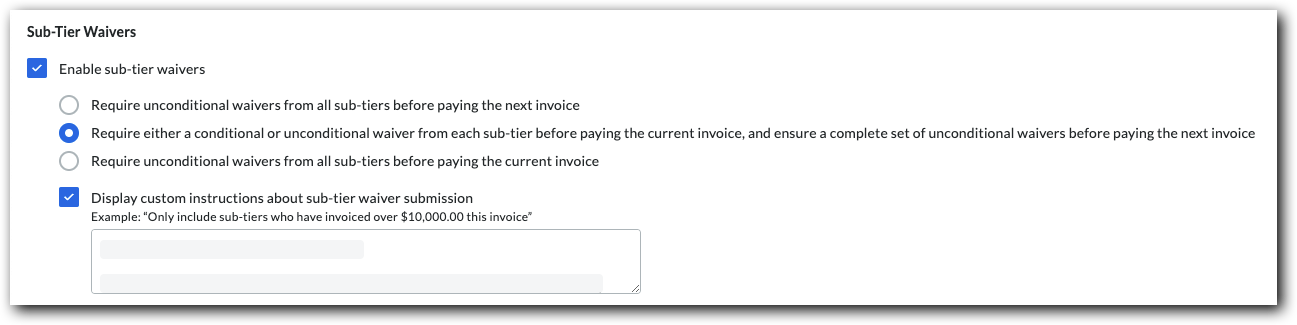
Mark the Enable Sub-Tier Waivers check box to show the 'Sub-Tiers' card on the 'Lien Rights' tab of the project's subcontractor invoices. Clear the checkbox to hide the sub-tier card.
Under the How should sub-tier waivers be collected on this project? section, you have these options to collect signed waivers from sub-tier contractors:
Require unconditional waivers from all sub-tiers before paying the next invoice Most payors collect unconditional waivers for the previous invoice before paying the next invoice.
Require either a conditional or unconditional waiver from each sub-tier before paying the current invoice, and ensure a complete set of unconditional waivers before paying the next invoice Some payors collect either a conditional or unconditional waiver before paying the current invoice. They also ensure a complete set of unconditional waivers are collected for the previous invoice, before paying the next invoice.
Require unconditional waivers from all sub-tiers before paying the current invoice Some payors collect only unconditional sub-tier waivers before paying the current invoice.
Mark the Display Custom Instructions About Sub-Tier Waiver Submission checkbox to type a custom instruction message about sub-tier waiver submissions in the Enter Custom Instructions box.
Exemple
Si vous souhaitez uniquement collecter les signatures de renonciation de sous-niveau des sous-traitants de sous-niveau qui ont facturé plus d’un certain montant (par exemple, 10 000,00 $), Saisissez les directives et le montant dans la zone de texte. Si vous avez besoin de signatures notariées sur les renonciations de sous-niveau, incluez-le dans les directives.
La zone « Directives de [nom de l’entrepreneur général] » sur la carte des sous-niveaux. Si vous n’êtes PAS tenu de collecter les informations de renonciation sur une facture, la carte « Informations de sous-niveau pour cette facture » apparaît sur la facture. Si vous devez collecter des renonciations pour la facture actuelle ou pour une facture précédente, le(s) nom(s) de carte(s) correspondent(ont) aux exigences de recouvrement des renonciations du projet définies dans l’outil Facturation par un
Un administrateur des factures est une personne ou un groupe de personnes responsable de la collecte, de la vérification et de la création des factures dans Procore. Un administrateur des factures peut être toute personne de votre organisation (par exemple, un chef de projet, un comptable ou une équipe de comptables) qui a reçu les autorisations appropriées pour gérer les factures relatives à vos contrats et/ou financements.
. Voir Activer les dérogations de sous-niveau sur les factures de sous-traitant en tant qu’administrateur des factures.
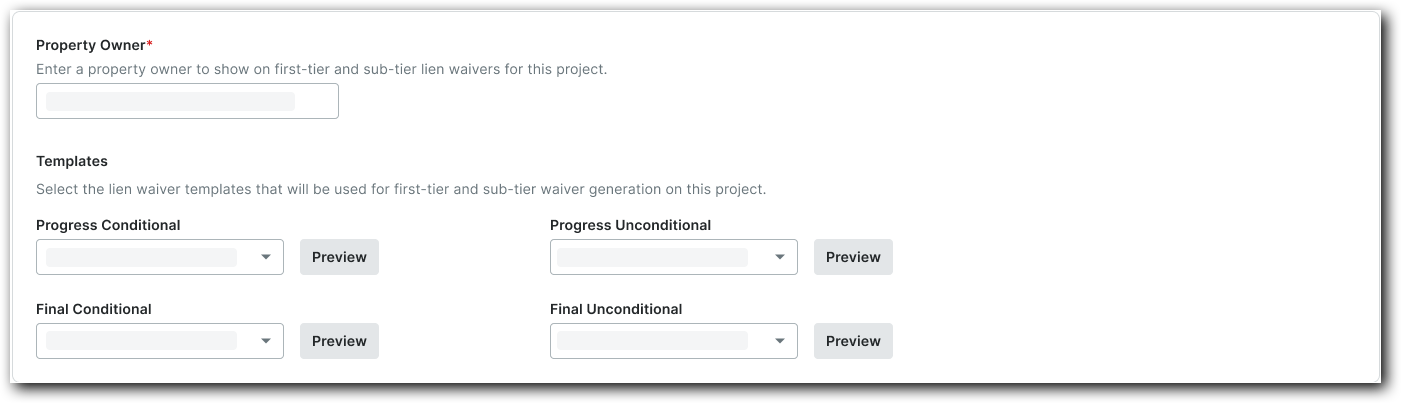
Under Property Owner, type the property owner's name. Your entry appears on this project's first- and sub-tier lien waivers.
Under Templates, select the desired lien waiver template for each lien waiver type from the drop-down lists.
 Procore Pay is available in the United States. It is designed for General Contractors and Owner-Builders who act as their own General Contractors on a job. Procore Pay extends the Invoice Management functionality in the Procore web application to handle the payment process between general and specialty contractors.
 icon.
icon.