Create a Bid Template
Background
Creating bid templates helps your organization maintain consistency across project procurement cycles. Instead of configuring bid packages, submission rules, and boilerplate instructions from scratch for every new project, you can establish a standard template framework at the Company level. This saves administrative setup time and ensures all project teams gather information uniformly.
Things to Consider
Required User Permissions on the company's Bidding tool.
Additional Information:
Bid templates can only be created with Base Bid and Alternates scope.
Bid Templates can only utilize cost codes from the Company level of Procore. Project specific cost codes need to be added at the project level.
Each bid template must have a unique name.
You can add bidders to the template from your company directory only. The Procore Construction Network (PCN) is not supported here.
Prerequisites
Bid templates must be created within an existing Template Collection.
Steps
Navigate to the company's Bidding Templates tool.
Select the Template Collections tab.
Click the name of Template Collection where the Template will be created. See Create a Template Collection for Bidding.
Create a New Template
Click Create.
Click New.
Enter or select a Name for the Bid Template.
Add Sections (Optional) Show/Hide Fields
Click Add Section.
Enter a name for the section.
To add a line item for the section, click the Add Line Item menu.
OR
Click the plus icon on the same row as the bid form.
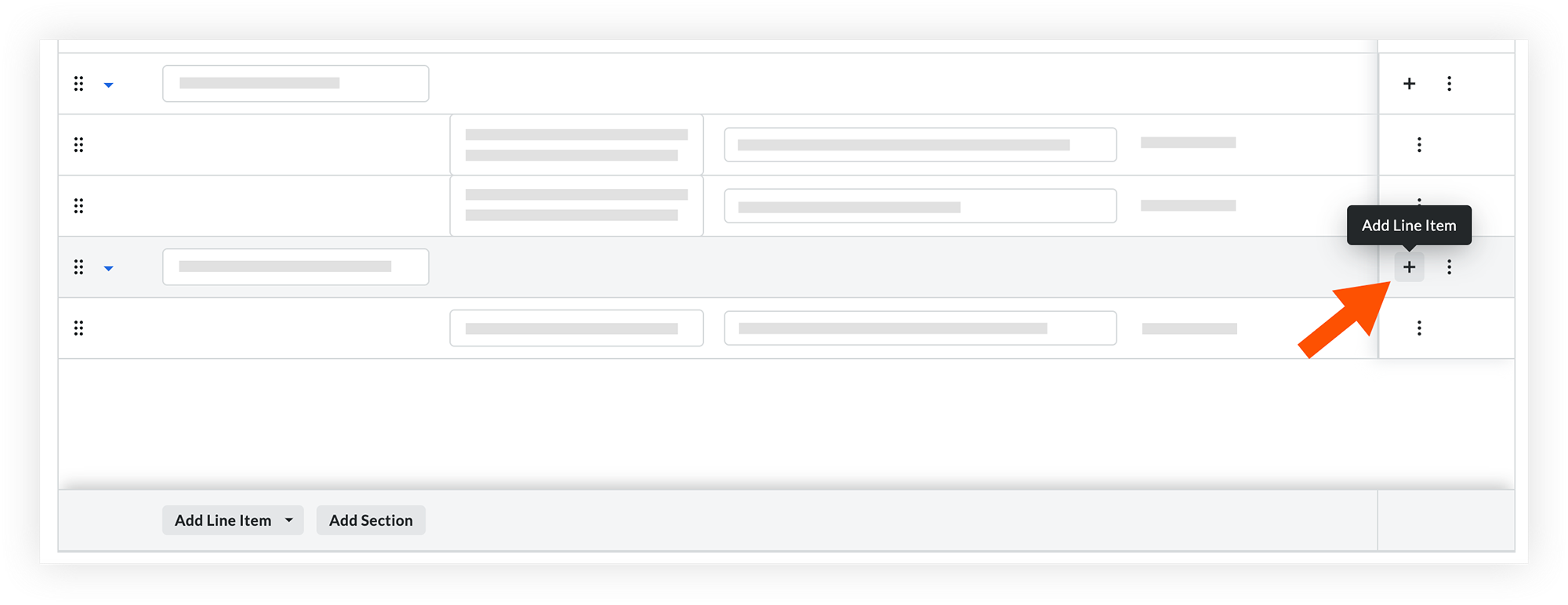
Continue adding sections and line items as necessary.
Optional: To reorder sections or line items, click and drag over the grip
 icon and drop it in a new area.
Optional: If you need to delete a section, click the vertical ellipsis
 icon and select Delete. This will delete the section and all of its line items.

Add Bidders (Optional) Show/Hide Fields
Click + Add Bidders.
To narrow the list of companies, use the following search and filter tools:
Search: Search by email address, vendor name, address, or company details.
If you are searching for a specific user, they must be designated as a Bid Contact to show in the search results.
Filter:
Click the All Filters
 icon.
Select one or more filters to apply:
Show Selected Only: Move the toggle ON
 to show your selected bidders.
Cost Codes: Select one or more cost codes to filter for bidders associated with specific types of work.
Trades: Select all trades that apply.
Country: Select a country.
Minimum Average Rating: Select a star rating to filter for bidders who meet your company's minimum performance standards.
Union Member: Move the toggle ON
to filter for vendors who are members of a labor union.Authorized Bidders Only: Move the toggle ON
to to display only those vendors officially authorized to bid by your organization.Qualification Status: Select a qualification status.
Business Classifications: Select all Business Classifications that apply.
To remove filters:
Click the x on an individual filter to clear it.
Click Clear All Filters to clear all filters.
Optional: Click the Company name to view it's details.
Mark the checkbox for the companies you want to add to the bid form.
Click Add Bidders.
Click Create.