Accept or Reject a Company for Export to ERP

ERP DOCUMENTATION

Each Procore-built ERP integration offers its own unique feature set. Your integration might not support the action described on this page.

To learn about your integration and its supported features, see Which ERP integrations are supported by Procore?

Background

After sending a company record to your ERP Integrations tool, a designated accounting approver has the option to accept or reject it for export to your ERP system.

Things to Consider

  • Required User Permissions:

    • 'Standard' or 'Admin' on the company's ERP Integrations tool.
      AND

    • The person's account must be granted the 'Can Push to Accounting' privilege in the Company Directory. See Grant Accounting Approver Privileges.

Steps

  1. Navigate to the company's ERP Integrations tool.

  2. Click Companies.

  3. Under Filters, click Ready to Export.
    Notes:

    • This page only lists active company records. Inactive companies cannot be exported to an integrated ERP system.

    • If a company record is not listed here, check to see if it is inactive. See Deactivate a Company in the Company Directory.

  4. Review the companies in the list. Then do the following:

    • Accept the Company

    • Reject the Company

Accept the Company

  1. Locate the company record to export in the 'Companies Only in Procore' list. To view the company record, click the company name hyperlink.

    注意事项
    • 如果要导出的公司记录未列出,请检查该记录是否在 Procore 中标记为非活动。

    • 此页面仅列出 Procore 中的活动公司记录。

    • 标记为非活动的公司记录无法导出到 。请参阅停用项目目录中的公司。

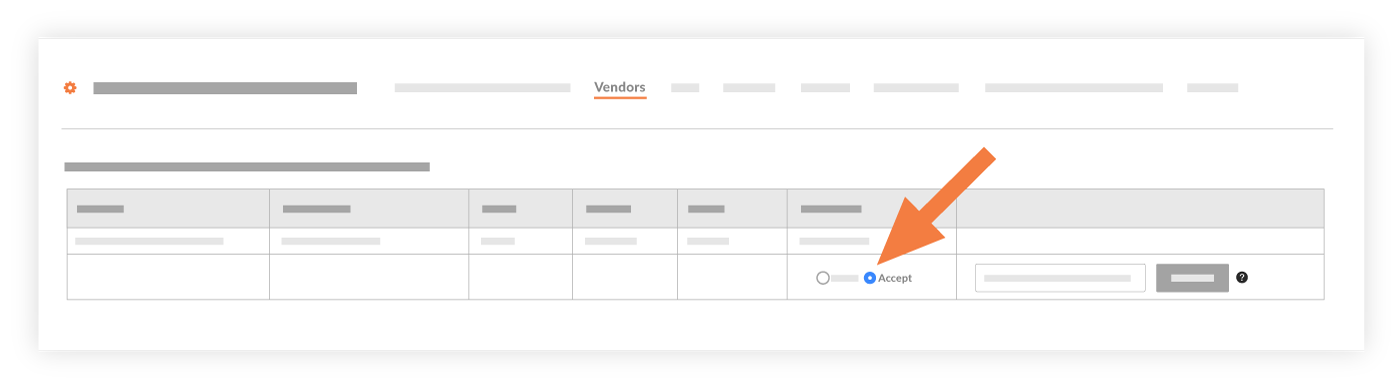
  2. Choose Accept.
    Accept Company Export To Integration

  3. In the Company Type drop-down list, select the company type. For example, if the record is for a subcontractor, select sub.

  4. Select the company type from the Company Type drop-down list.

  5. Enter the Company ID from your ERP.

    注意事项
    • 必须在此字段中输入唯一的ERP公司 ID。

    • 在你的ERP系统中,会使用你公司建立的编号系统为新记录分配唯一的公司编号。一些公司输入序列中的下一个可用数字,而其他公司则使用字母字符来表示客户名称(例如,All Star Concore= ASC)。

    • 如果 Procore 中的ERP公司 ID 条目已分配给ERP系统中的某条记录,则集成将不会导出该记录。

  6. Click Export.
    This exports the company record to the integrated ERP system. A message appears to show you the export status, which can take a few minutes.

    提示
    • 要确认导出成功,请登录ERP系统并验证记录是否按预期显示。

    • 如果记录导出失败,请点击导出失败以查看列表中的失败项。然后,按照以下步骤拒绝公司。

Reject the Company

  1. Locate the desired company in the 'Companies Only in Procore' list.

  2. Choose Reject.
    Reject Company Export To Integration

  3. Provide a reason for the rejection in the Enter a Comment box.

  4. Click Reject.
    This rejects the company record. It is not imported into the integrated ERP system. The system returns the record to an editable state in both the Company and Project Directory tools.

See Also

Loading related articles...