Clear a Model from Memory
When you clear a model from memory, you free up system resources on your computer without deleting the actual model from the project. This helps optimize your computer's performance when working with large or multiple files.
Things to Consider
Steps
Navigate to the project's Models tool.
In the dashboard, find the model's tile.
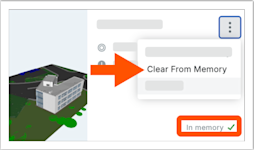
NoteIf the tile says "In memory", you previously loaded it to your computer and can clear it.
On the model's tile, click the vertical ellipsis  icon and choose Clear from Memory.