Does a payment application contact need an 'Invite to Bill' to submit a payment application?
Answer
No. A payment application contact has several options for creating a payment application.
There are two ways to respond to an 'Invite to Bill' as a payment application contact: (1) from the 'Invite to Bill' email or (2) from the upstream collaborator's Project level commitment tool. Use the second option when you know you have payment application contact permission but the 'Invite to Bill' is missing or lost.
When responding to an invite, you can accept or decline it as follows:
To respond to an 'Invite to Bill' email: Show/Hide
Open your email inbox.
Look for the email message with the subject line, " "Project name: User name has invited you to bill."
Open the 'Invite to bill'.
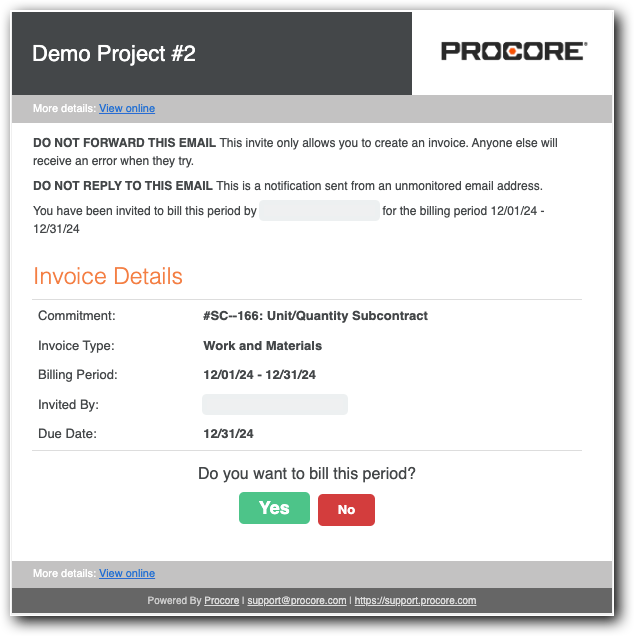
Review the payment application details:
Commitment. Shows the commitment number and name.
Payment application type. Shows the payment application type. See Configure setting: Payment Applications.
Valuation period. The date range for the Open valuation period.
Invited by. The first and last name of the sender. Typically, this is the payment application administrator.
Due date. The date your payment application is due. Payment application contacts cannot create or submit a payment application in the Procore project after this date.
Click one of these buttons to respond to the Do you want to bill this period? Prompt:
Yes. Accept the invite and submit a payment application. This changes the payment application status to Accepted. Continue with the steps in Submit a new payment application as a payment application contact.
No. Decline the invite if you don't want to submit a payment application for the Open valuation period. This changes the payment application status to Declined.
To respond to an 'Invite to bill' in the commitment tool: Show/Hide
Navigate to the project's Commitments tool.
Locate the commitment to which you were added as a payment application contact.
Under Do you want to bill this period?, indicate your intent to submit a payment application by clicking the Yes button.

Click the Post response button.
Can't find your 'Invite to Bill' or uncertain if one was sent? A payment application contact always has sufficient permission to create a new payment application for an open valuation period in the upstream collaborator's Procore project. See Create a new payment application as a payment application contact.
How is the payment application contact role assigned to user?
To add a payment application contact, an authorized user for the company managing the commitment in the Procore project must:
Add the subcontract company to the company Directory. The subcontract company corresponds to the 'contract company' on a commitment. See Add a company to the company Directory. The user who will be the payment application contact must be added to the company. See Add users to the company.
NotesOptional. You can select one (1) user to be the default payment application contact in a company record. See Add a company to the Company Directory.