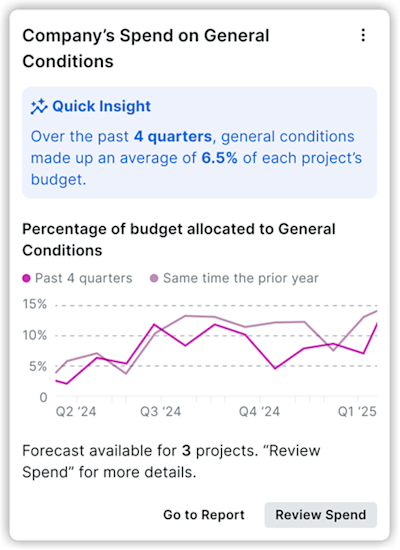
Spend on general conditions
This Company level Insights tool provides a real-time view of a specific project's spending on general conditions against its allocated Budget.
Quick insight: Provides critical benchmark information such as, "General conditions account for approximately 6.5% of the total budget."
General Conditions Budget: Displays the Budget, Spent and Remaining core financial figures.
Burn rate chart: Visually represents the project's spending trend over time, showing project spend, forecasted spend and past performance benchmarks. Hovering over the chart displays detailed metric for specific periods.
Actions:
Review spend: Directs you to a tear sheet with a detailed breakdown of spending.
Review Budget: Links to the project's Budget tool.
How this insight is calculated: This insight calculates spend from the project’s direct costs and commitment payment applications and only includes costs recorded against the cost codes configured as general conditions. Each cost is assigned to a month using the following date fields:
Direct costs - Uses the Date field on the direct cost. If the Date field is blank, the insight uses the date the direct cost was created in Procore.
Commitment payment applications - Uses the Billing date field on the payment application. If the Billing date field is blank, the insight uses the Period end date. If both are blank, the insight uses the date the payment application was created in Procore.
Note:: If your ERP integration has transaction syncing enabled, commitment payment applications are automatically synced to Procore as direct costs. To avoid counting the same cost twice, this insight only calculates spend from direct cost.