Add a variation for an estimate
Background
If you need to add a variation for an estimate, you can create a variation within the Estimating tab. After the variation has been approved, you can choose to have it shown on the tender sheet. In addition, you can send it to the project's change event tool.
Things to Consider
Required user permissions for the Tender Board tool.
Required user permissions for the Estimating tool.
Required user permissions for the Portfolio Planning tool.
You can automatically add a variation to the project's change event tool by clicking Send VAR to change event from the Actions menu.
Variations can be shown on the tender.
Steps
Navigate to the Tender Board or Portfolio Planning tool and select the project.
OR
Navigate to the project's Estimating tool.Click the Estimating tab.
Click the estimate selection menu.
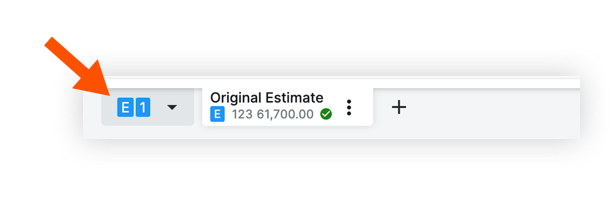
In the variations section, click the plus
 icon.
This automatically adds a variation to the estimate.Adjust line items for the variation as necessary.
To approve the variation, click the vertical ellipsis
 icon on the variation tab and select Approved.
Note: You can also rename or copy the variation from this menu if needed.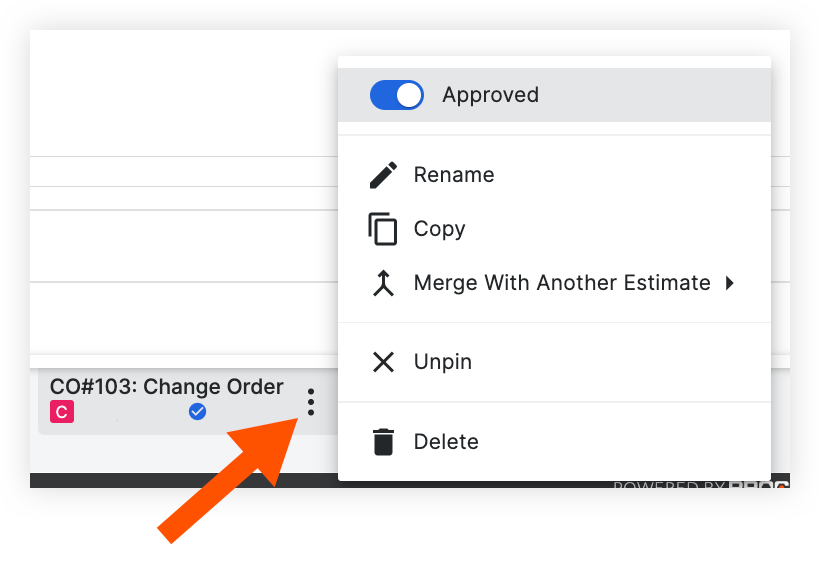


Next Steps
To send the variation to the change event tool in Procore, see Send variations to the change event tool.
To show the variation on the tender proposal, see Generate a tender proposal.
See Also
Loading related articles...