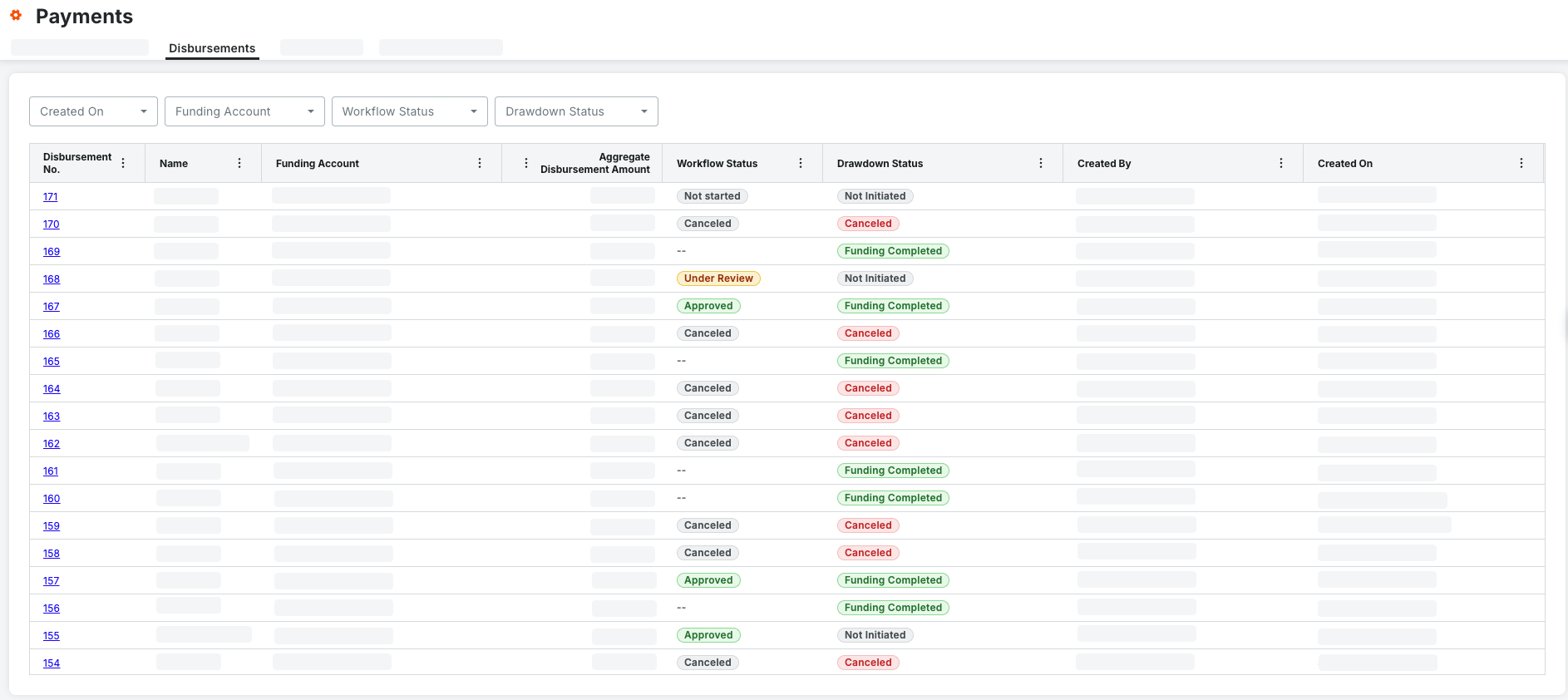
In these examples, the Start workflow and Show/hide workflow buttons only appear if your company implements a payment workflow. See Best practices for creating a payment workflow.
Before a disbursement is authorised, the General tab contains the Disbursement details, Included payment applications and Removed payment applications cards (only when payment applications are removed. See Remove subcontractor payment applications from disbursements as a payor).
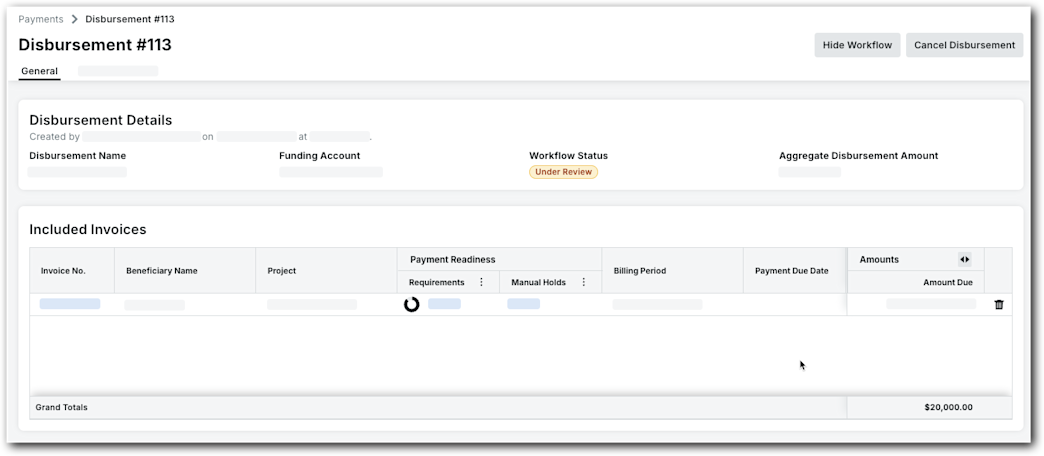
The Disbursement Detailscard includes this information:
Field | Description |
|---|
Disbursement name | Shows the name assigned to the disbursement. |
Funding account | Shows the bank account funding the disbursement. |
Workflow status (Only appears if your company implements a payment workflow. See Best practices for creating a payment workflow) | Shows the current approval status of the disbursement. To learn about status, see What are the default workflow status for disbursements in Procore Pay's custom payment workflow? |
Aggregate disbursement amount | Shows the total sum of all payment application payment for the disbursement. |
The included payment applications card includes this information:
Field | Description |
|---|
Payment application No. | Click the hyperlink to open each payment application in the Project level Payment Applications tool. |
Beneficiary name | Shows the beneficiary's name for each payment application. |
Project | Shows the project name for each payment application. |
Payment readiness (requirements & manual holds) | Shows the payment requirements and manual holds. See Manage payment requirements as a payor. |
Valuation period | Shows the valuation period for the included payment applications. |
Payment due date | Shows the payment due date for the included payment applications. |
Amounts (amount due) | Shows the amount due for each payment application. |
If payment applications are removed from a disbursement by a payment admin or payment disburser, they appear in the Removed payment applications card. Once removed, authorised users can add the payment application to a different disbursement. See Remove subcontractor payment applications from disbursements as a payor.

The removed payment applications card includes this information:
Field | Description |
|---|
Payment application No. | Click the hyperlink to open each payment application in the Project level Payment Applications tool. |
Beneficiary name | Shows the beneficiary's name for each payment application. |
Project | Shows the project name for each payment application. |
Reason for removal | Shows the reason entered at the time of removal. See Remove subcontractor payment applications from disbursements as a payor. |
Removed by | Shows the name of the payment admin or payment disburser who performed the removal. |
Removed on | Shows the date and time of the removal action. |
Amount due | Shows the amount due for each payment application. |
After a disbursement is authorised, the General tab contains the disbursement details, drawdown and payment cards.
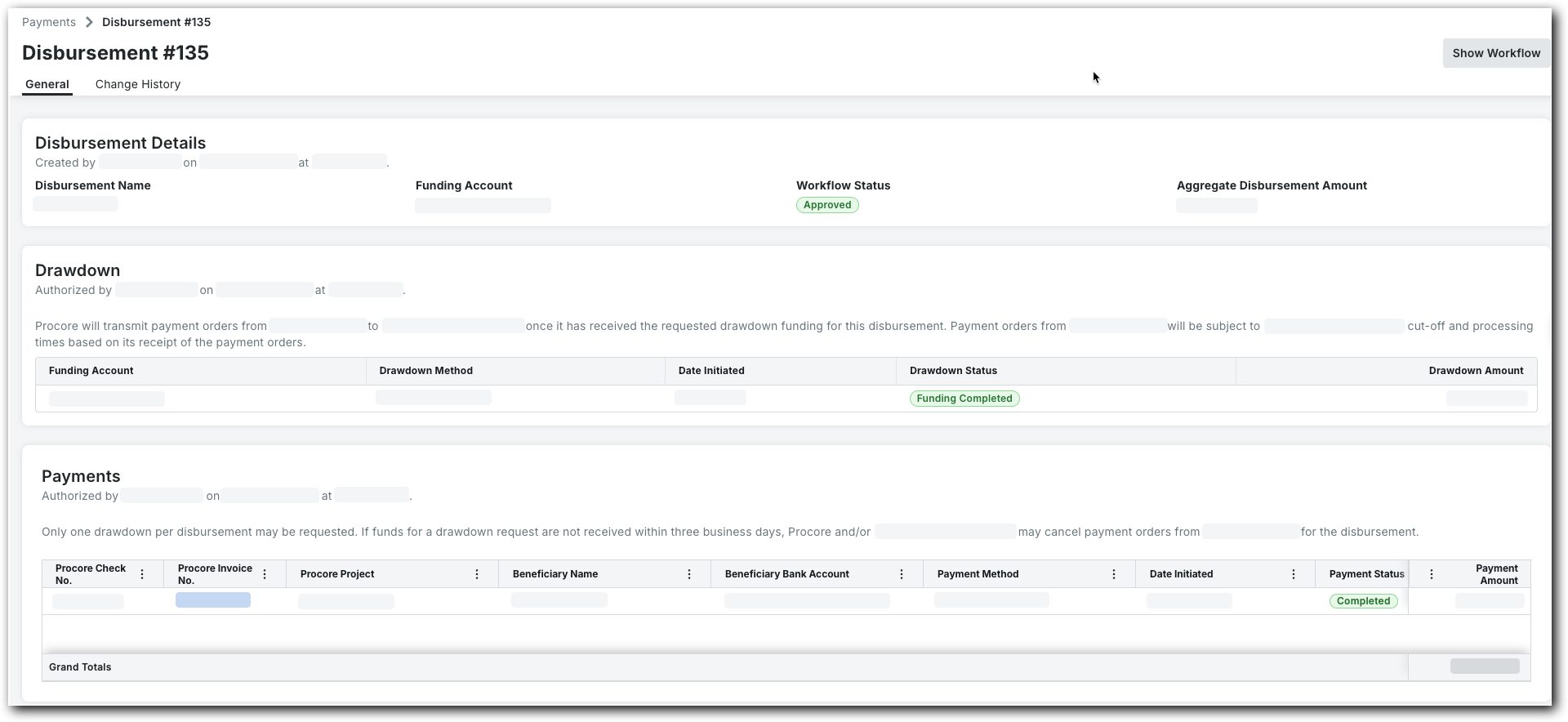
The Disbursement Detailscard includes this information:
Field | Description |
|---|
Disbursement name | Shows the name assigned to the disbursement. |
Funding account | Shows the bank account funding the disbursement. |
Workflow status (Only appears if your company implements a payment workflow. See Best practices for creating a payment workflow) | Shows the current approval status of the disbursement. To learn about status, see What are the default workflow status for disbursements in Procore Pay's custom payment workflow? |
Aggregate disbursement amount | Shows the total sum of all payment application payment for the disbursement. |
The Drawdown card includes this information:
Field | Description |
|---|
Funding account | Shows the funding account for the drawdown. |
Drawdown method | Shows the method used to obtain the drawdown. |
Date Initiated | Shows the date the drawdown request was started. |
Drawdown status | Shows the status of the drawdown request. See What are the default drawdown status in Procore Pay? |
Drawdown amount | Shows the total pound amount of the drawdown. |
The payment card includes this information:
Field | Description |
|---|
Procore check no. | Shows the check number for the payment application payment. |
Procore payment application No. | Shows the Procore project's payment application number associated with the payment. |
Procore project | Shows the name of the Procore project associated with the payment application. |
Beneficiary name | Shows the beneficiary of the payment. This is the 'contract company' named in the commitment. |
Beneficiary bank account | Shows the beneficiary's bank account information. |
Payment method | Shows the payment method. |
Date Initiated | Shows the date the payment order was started. |
Payment status | Shows the status of the payment order. See What are the default payment status in Procore Pay? |
Payment amount | Shows the total pound amount of the payment application payment. |
If payment applications are removed from a disbursement by a payment admin or payment disburser, they appear in the Removed payment applications card. Once removed, authorised users can add the payment application to a different disbursement. See Remove subcontractor payment applications from disbursements as a payor.
The removed payment applications card includes this information:
Field | Description |
|---|
Payment application No. | Click the hyperlink to open each payment application in the Project level Payment Applications tool. |
Beneficiary name | Shows the beneficiary's name for each payment application. |
Project | Shows the project name for each payment application. |
Reason for removal | Shows the reason entered at the time of removal. See Remove subcontractor payment applications from disbursements as a payor. |
Removed by | Shows the name of the payment admin or payment disburser who performed the removal. |
Removed on | Shows the date and time of the removal action. |
Amount due | Shows the amount due for each payment application. |
 Procore Pay is available in the United States. It is designed for main contractors and owner-builders who act as their own main contractors on a job. Procore Pay extends the payment application management functionality in the Procore web application to handle the payment process between main and specialty contractors.