How does Procore automatically complete amounts on an owner invoice? (Beta)
Procore can be configured to use terminology specific to General Contractors, Owners, or Specialty Contractors. Learn how to apply the dictionary options.
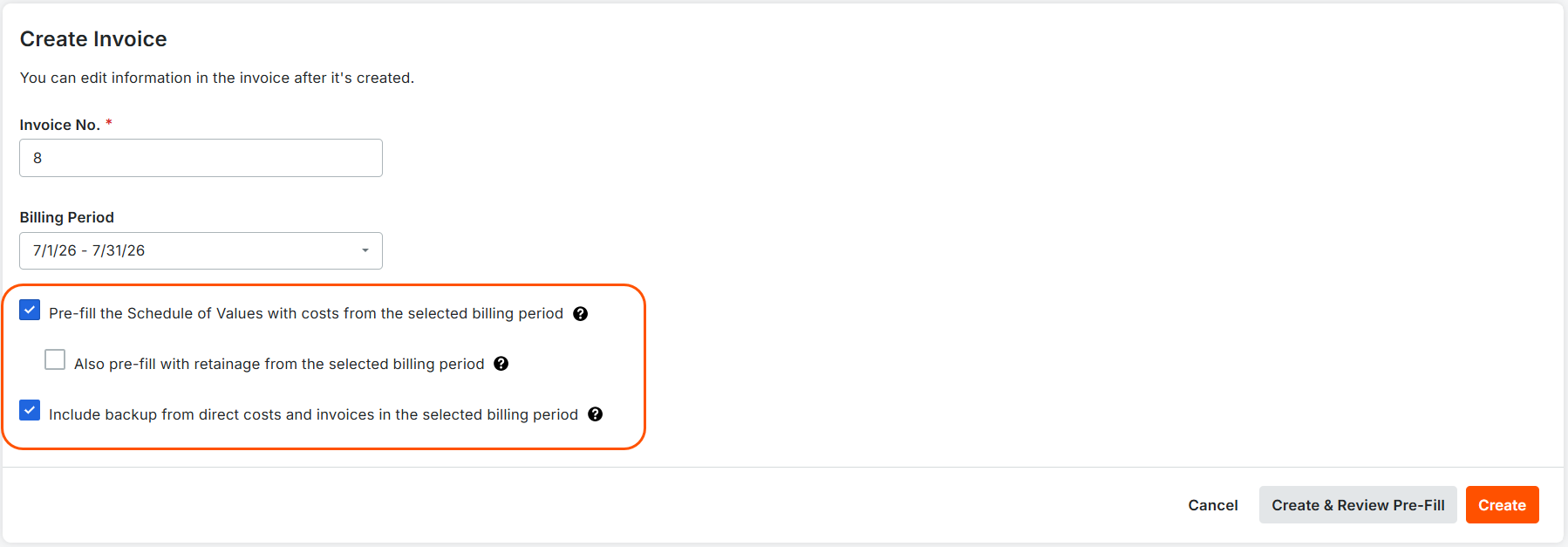
Mark one or more checkboxes to turn a prefill option ON when creating owner invoices in the Prime Contracts tool. These options allow Procore to automatically complete amounts on the owner invoice using data from eligible budget code line items on subcontractor invoices, direct costs, and commitment change orders in the approved statuses.
Prefill options are only available when creating owner invoices. Procore does not allow users to prefill invoices after clicking Create.

This page details the Modernized Experience. If your account is still using the Legacy UI, please refer to the image below for the corresponding layout.
This table describes the prefill options for owner invoices.
Checkbox | Mark the checkbox to turn ON and... | Remove the checkbox to turn OFF... |
|---|---|---|
Pre-fill the Schedule of Values with costs from the selected billing period | Populate the line items in the schedule of values with eligible costs from corresponding budget codes on Approved subcontractor invoices, direct costs, and commitment change orders for the same billing period as the owner invoice. Notes:
| Procore does NOT populate the schedule of values with costs. Users must manually enter the schedule of values data. |
Also pre-fill with retainage from the selected billing period | This feature is only available when you turn on Populate the Schedule of Values with Costs from the Selected Billing Period. Populates the Work Retainage this Period ($), Materials Retainage ($), and Total Retainage Released ($) columns in the Schedule of Values (SOV) with calculated retainage values from eligible subcontractor invoices in the Approved status. Note:
| Procore does NOT populate the schedule with calculated retainage values from eligible subcontractor invoices in the Approved status. |
Include backup from direct costs and invoices in the selected billing period | Populates the invoice's Attachments card with these sections: Uploaded Attachments, Attachments from Subcontractor Invoices, and Attachments from Direct Costs. It also:
| Procore does NOT include an invoice backup. Instead, the invoice includes the Uploaded Attachments card to add attachments. |
Loading related articles...