Open 2D Drawings in Your Document Repository from Model Manager

Procore Model Manager - Beta Access & Feedback

The Model Manager (Beta) features and documentation are subject to change without notice. Please be aware that this content is restricted to beta participants and requires a direct link to access.

  • To learn about the beta program, see the Beta Participant Guide.

  • To access the beta and provide feedback Show/Hide Details

    • How to Access: Participating companies must sign the Procore Beta Agreement. Once signed, your Procore Administrator coordinates with your Procore point of contact to enable Model Manager (Beta) on specific Procore projects.

    • How to Provide Feedback During Beta: Contact your dedicated Beta program lead.

    • How to report critical issues: Report breaking changes to Procore Customer Support. For general feedback or non-critical issues, contact your Beta program lead or Procore point of contact.


Currently, only Admin permissions are available. Procore will add more permission levels later.

Open 2D drawings directly from a 3D model to quickly reference associated sheets in your project's document repository (Document Management or Documents/Drawings). This option streamlines your workflow by eliminating the need to manually search in another Procore tool for the corresponding 2D drawing sheet.

Things to Consider

Prerequisites

  • Your Procore user account must have sufficient permission to access your project's chosen document repository.

Steps

  1. Navigate to the Model Manager (Beta) tool.

  2. Open a model.

  3. Click 2D Sheets .

  4. In the 2D Sheets panel, find the drawing to open.

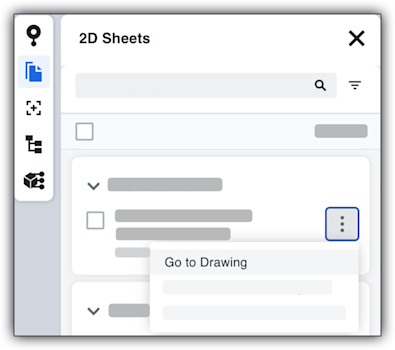
  5. Click the drawing tile's More Icon Vertical Ellipsis menu and choose Go to Drawing. This image shows the Go to Drawing menu option in the More menu of a 2D sheet in the left toolbar of the viewer in the Model Manager tool.

Note

Procore automatically launches the Document Management or Drawings tool so you can view the drawing. You must have sufficient permissions to that tool.


Windows is a registered trademark of Microsoft Corporation in the United States and other countries. Google Chrome, Android, and Google Play are trademarks of Google LLC. iPhone, iPad, and App Store are trademarks or service marks of Apple Inc., registered in the U.S. and other countries and regions. iOS is a trademark or registered trademark of Cisco in the U.S. and other countries and is used under license by Apple Inc. Autodesk, AutoCAD, Civil 3D, Navisworks, and Revit are registered trademarks or trademarks of Autodesk, Inc., and/or its subsidiaries and/or affiliates in the USA and other countries. All other trademarks are the property of their respective owners.