About Portfolio Management Enhancements
When enrolled in the Portfolio Management Enhancements beta, your Procore Home provides high-level insight across your projects, eliminating the need to drill into individual projects. The tabs in your Company Home include:
The Portfolio tool - Besides listing all your projects, it now includes saved views, inline and bulk editing, and project favorites.
Procore Home - New hubs experience - We're releasing hubs that are tailored to your role so all your most useful Procore data is right at your fingertips. For example, click the 'Cost Management' tab to view aggregated financial data for efficient tracking.
Portfolio Hub Page
The 'Portfolio' tab gives you visibility to the projects you have access to within the account.
Project List Hub Card
Bulk Editing
Edit metadata for multiple concept and standard projects.
Note: This action requires 'Admin' level permissions to the project's Admin tool, or 'Read Only' or 'Standard' level permissions to the project's Admin tool with the ' Update General Settings' granular permission.
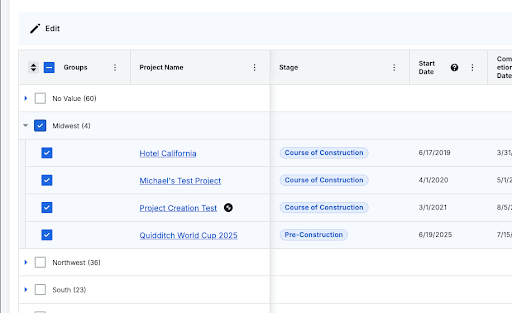
Bulk Edit with Grouped Tables: Checkboxes for bulk editing now work correctly when the Project List is grouped. Previously the grouped headers didn’t have checkboxes.

'Export' Button Relocation
The export function is now in the overflow menu on the project list card.
Filter and group projects by custom fields
Use your company's custom fields to locate and group projects.
Inline Editing
Edit metadata from the list view, without opening the project.
Note: This action requires 'Admin' level permissions to the project's Admin tool, or 'Read Only' or 'Standard' level permissions to the project's Admin tool with the ' Update General Settings' granular permission.
Map (Closed Beta)
Switch to the Map
 view to see projects that have their addresses or latitude/longitude coordinates listed in the 'General' section of the project's Admin tool.
Displays active projects as geographic pins or thumbnails on an interactive map. Users can filter mapped projects using standard project attributes (such as stage, department, or custom fields) and select any map pin to view project details directly or zoom in to a specific project.
Note: Reach out to your Procore point of contact for more information.
New Columns
Data such as 'Project Dates' now appears in a column in your list of projects, as well as the new 'Priority' and 'Estimated budget' columns.
Project Details Tearsheet
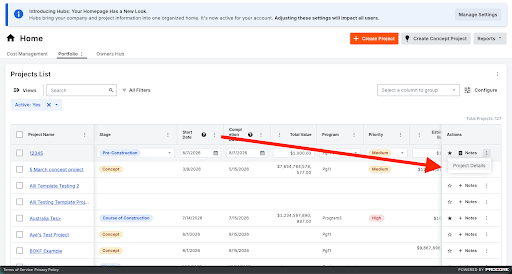
Open, view, and edit project details from a side panel without leaving the Project List, including a read-only mode for users without edit access. The overflow menu.

Project Favorites
Identify your frequently accessed projects for easier access. From the project list view, click the
 star icon to filter by 'Favorites.' You can also save this view for quick access to your favorite projects later. This functionality is accessed by clicking the star icon next to a project name in the table view.
Saved Views
Click the
 Views button to use or create saved views that quickly narrow down your project list without having to adjust filters
Create a New Saved View. Show / Hide Steps
Click the Views
icon.Configure your view.
Column Data
Click the table settings
 icon to configure what data is displayed in the table.
Move the toggles
 ON or
ON or  OFF to show or hide a column.
Column Order
Click and hold the column header. Then move it to the desired location using a drag and drop operation.
Column Sort
Click the column. Click again to switch between ascending or descending order:
 Ascending
 Descending
Filters
Click the filter
 icon and select your preferred filters.
Group
Click the Select a Column to Group dropdown menu.
Select how to group projects.
Pinning and Sizing
Click the vertical ellipsis
 for the column. Then select from the following options:
Pin Column: Click to pin the column to a specific side or remove the pin.
Pin Left
Pin Right
No Pin
Autosize This Column: Click to automatically adjust the size of this column.
Autosize All Columns: Click to automatically adjust the size of all column.
Reset Columns: Click to reset the columns to the default settings.
Click Create.
Enter the Name and Description.
Note: By default, users can only save personal views. However, users with 'Admin' access to the Portfolio tool can save 'Company Views' that are visible to all Portfolio tool users.Click Create.

Expanded "Most Recent Note" modal
Click on the Most Recent Note cell in the table to see the full note. This should show a tooltip as well but that is broken and will be fixed soon.
Project List Data Entry
Corrected validation on Square Feet and Total Value fields so they no longer accept out of range, negative, or non-numeric input. Fixed date fields shifting by one day and start dates being set two days ahead after inline edits.
Cost Management Hub Page - Closed Beta
The 'Cost Management' tab gives you financial information across your entire portfolio of projects.
Financial Scorecard - Closed Beta
The Financial Scorecard combines budget snapshot data across projects, providing a high level summary of financial health and historical cost trends without requiring you to open individual project budgets.
This provides a high level summary of your financial status and historical costs without forcing you to dig into individual project budgets. Because this card pulls data directly from project budget snapshots, it displays a summary of past snapshots rather than a live financial look; if you haven't created any snapshots, the card will appear blank.
Within the Financial Scorecard, you can switch budget views to see different aggregated data, or click the hyperlink to open the full Project Status Snapshots to drill into details and apply filters.
There are now color-coded (red/green) percentage indicators display variance shifts across selected periods directly on the scorecard, derived from the Variance field of budget snapshot comparisons.
Change Events Hub Card
This chart tracks the financial exposure of your active projects by displaying the latest costs across all open and pending change events.
Each bar breaks down the latest cost and event count by change type. Click any bar to drill down into a list of projects driving those specific changes. This helps you instantly spot which projects pose the highest potential cost increases and jump directly into them.
Owners Hub Page - Coming Soon
My Open Items Hub Card
Review your open items across projects, such as submittals, RFIs, and inspections. Users can filter the card by project, item type, or due date. Click any item to view its details or move the item along in the workflow.
Project Breakdown Hub Card
A new chart counts your projects by whatever attribute you select, like program, stage, or department. This is a quick way to see where projects stand in development or how many sit within a specific program. By bringing these pie charts into the Portfolio Management experience, you can easily track percentage breakdowns across your portfolio.
Favorited Insights Hub Card
Customize high-level performance trends and metrics to fit your needs.
Assets by Status Hub Card
Review the Status of your Assets by selecting one or more "Asset Types" and filtering the included Projects based on various project attributes. The chart will display a breakdown/count of Assets in each status to give you visibility into how those Assets are progressing.
Project Dates Variance Hub Card
This card is designed for you to visualize your 'Project Dates' so you can instantly spot off-track projects and milestones. By clearly displaying milestone health, it helps you identify negative trends early and take action. For more information see View the Project Dates Variance Hub Card and Update Project Milestone Dates in the Project Dates Variance Hub Card.
Other Portfolio Enhancements
Concept projects: This new project type lets you capture early ideas, estimated budgets, and key documents in Procore before a project gets funded. For more information, see What are Concept Projects?
New fields: View and sort your projects based on new information.
Priority Status: Identify the proposed project as low, medium, or high priority.
Estimated Budget: Approximate the cost of the proposed project.
See Also
Loading related articles...