Enable Sub-Tier Waivers on Subcontractor Invoices as an Invoice Administrator
General Availability in Select Markets (United States)
Procore Pay is available in the United States. It is designed for General Contractors and Owner-Builders who act as their own General Contractors on a job. Procore Pay extends the Invoice Management functionality in the Procore web application to handle the payment process between general and specialty contractors.
Background
An
An Invoice Administrator is a person or group of people responsible for collecting, reviewing, and creating invoices in Procore. An invoice administrator can be any person in your organization (for example, a project manager, an accountant, or a team of bookkeepers) who have been granted the appropriate permissions to manage invoices on your contracts and/or fundings.
can show or hide the 'Sub-Tiers' card on the 'Lien Rights' tab on the subcontractor invoices in a Procore project. The 'Sub-Tiers' card lets an invoice administrator and/or
An Invoice Contact is a person who ensures that an invoice is submitted to an upstream contractor for payment. In Procore, an invoice contact is always an employee of the designated 'Contract Company' on a purchase order or subcontract. The contract company is the party responsible for performing work and/or supplying materials for a project. For customers in the United States using Procore's Progress Billings tool, this term is synonymous with progress billing contact.
add billing data for each
In Procore Pay, the term sub-tier subcontractor refers to any subcontractor or specialty contractor who performs work for a first-tier subcontractor. For example, if a first-tier subcontractor hires a supplier, that supplier is considered a sub-tier subcontractor. If the sub-tier supplier also hires a supplier, the third-tier supplier is also considered a sub-tier subcontractor. Also called a sub-tier.
on an invoice. See Add Sub-Tiers to a Project Invoice. To clarify data entry guidelines, you can also add instructions. For example, you can add instructions indiciating that you are collecting waivers from sub-tiers that billed over $10,000 on the current invoice. Once enabled on a project, an
An Invoice Contact is a person who ensures that an invoice is submitted to an upstream contractor for payment. In Procore, an invoice contact is always an employee of the designated 'Contract Company' on a purchase order or subcontract. The contract company is the party responsible for performing work and/or supplying materials for a project. For customers in the United States using Procore's Progress Billings tool, this term is synonymous with progress billing contact.
can also sub-tier billing data, upload signed sub-tier lien waivers and submit them to invoice administrators for review in a subcontractor invoice.
Tip
A sub-tier is any subcontractor (for example, a subcontractor, supplier, or vendor) who furnishes materials, supplies, or services connected to the first-tier subcontractor's obligations on a commitment. In Procore Pay, a first-tier subcontractor is the 'Contract Company' who enters into a commitment contract with a General Contractor. Both first-tier and sub-tier contractors might hire additional sub-tiers (for example, third-tier, fourth-tier, and so on).
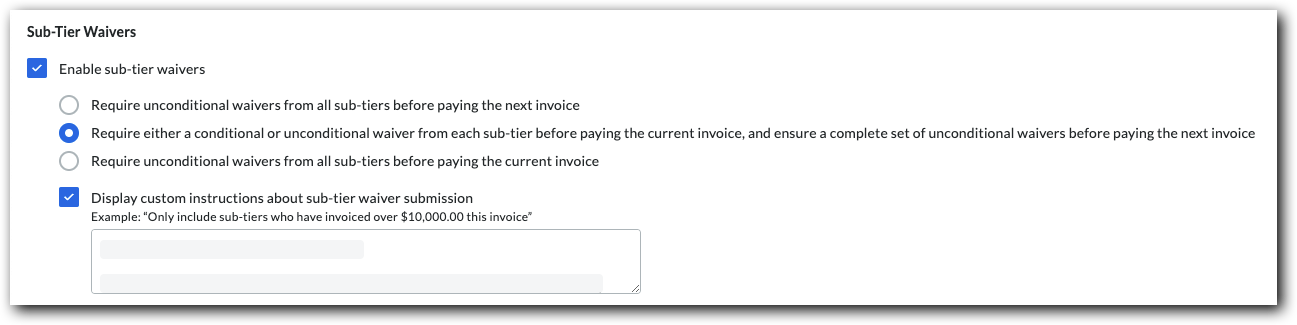
Mark the Enable Sub-Tier Waivers check box to show the 'Sub-Tiers' card on the 'Lien Rights' tab of the project's subcontractor invoices. Clear the checkbox to hide the sub-tier card.
Under the How should sub-tier waivers be collected on this project? section, you have these options to collect signed waivers from sub-tier contractors:
Require unconditional waivers from all sub-tiers before paying the next invoice Most payors collect unconditional waivers for the previous invoice before paying the next invoice.
Require either a conditional or unconditional waiver from each sub-tier before paying the current invoice, and ensure a complete set of unconditional waivers before paying the next invoice Some payors collect either a conditional or unconditional waiver before paying the current invoice. They also ensure a complete set of unconditional waivers are collected for the previous invoice, before paying the next invoice.
Require unconditional waivers from all sub-tiers before paying the current invoice Some payors collect only unconditional sub-tier waivers before paying the current invoice.
Require collection of extended sub-tier information for use on sworn statement or contractor affidavits This setting ensures that comprehensive data regarding sub-tier subcontractors is collected for use on legal documents like sworn statements.
When an
An Invoice Contact is a person who ensures that an invoice is submitted to an upstream contractor for payment. In Procore, an invoice contact is always an employee of the designated 'Contract Company' on a purchase order or subcontract. The contract company is the party responsible for performing work and/or supplying materials for a project. For customers in the United States using Procore's Progress Billings tool, this term is synonymous with progress billing contact.
adds a new sub-tier to a subcontractor invoice, they are required to complete nearly all information fields for that sub-tier, including Company Name, Address, Phone, Kind of Work, and Estimated Contract Amount.
When a Commitment Admin adds a sub-tier to a commitment, the requirement is restricted to the Company Name and Estimated Contract Amount only.
Important!
If a sub-tier is pre-added by a Commitment Admin with only minimal information, the first-tier subcontractor is not subsequently required to provide the missing extended details during invoice submission.
Mark the Display Custom Instructions About Sub-Tier Waiver Submission checkbox to type a custom instruction message about sub-tier waiver submissions in the Enter Custom Instructions box.
Example
If you only want to collect sub-tier waiver signatures from sub-tier subcontractors who invoiced over a certain amount (for example,$10,000.00), type the instructions and the amount in the text box. If you require notarized signatures on sub-tier waivers, include that in the instructions.
The 'Instructions from [General Contractor Name]' area on the sub-tiers card. If you are NOT required to collect waiver information on an invoice, the 'Sub-Tier Information for This Invoice' card appears on the invoice. If you are required to collect waivers for the current invoice or a previous invoice, the card name(s) match the project's waiver collection requirements set on the Invoicing tool by an
An Invoice Administrator is a person or group of people responsible for collecting, reviewing, and creating invoices in Procore. An invoice administrator can be any person in your organization (for example, a project manager, an accountant, or a team of bookkeepers) who have been granted the appropriate permissions to manage invoices on your contracts and/or fundings.
. See Enable Sub-Tier Waivers on Subcontractor Invoices as an Invoice Administrator.
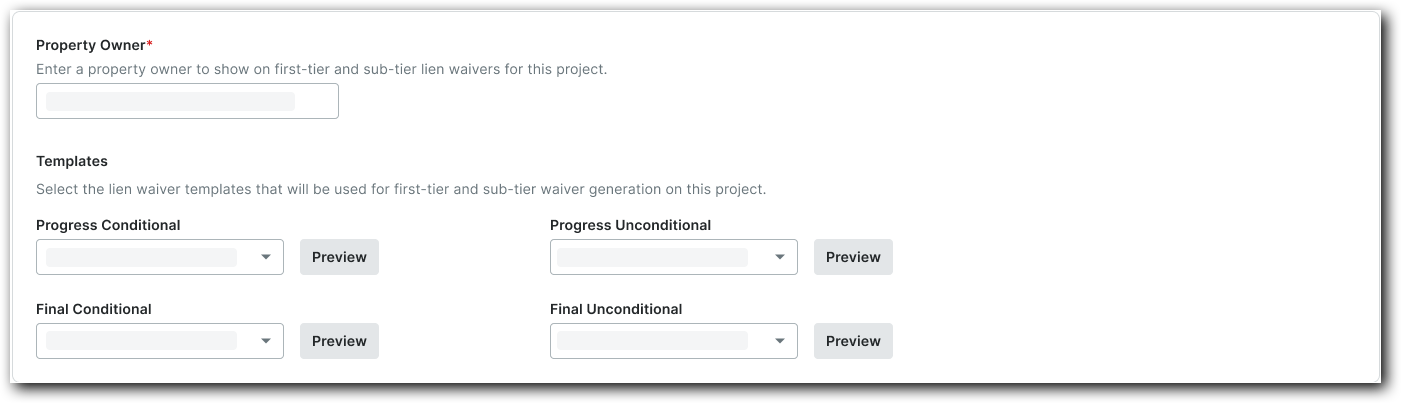
Under Property Owner, type the property owner's name. Your entry appears on this project's first- and sub-tier lien waivers.
Under Templates, select the desired lien waiver template for each lien waiver type from the drop-down lists.