Visão geral
Construction teams build by location (floor, zone, pipeline segment, or tract), but location data has historically been hard to visualize and disconnected from the work happening on site. The standalone Locations tool brings location management into a dedicated tool with its own permissions, so teams know what's happening and where on every project.
Key Features
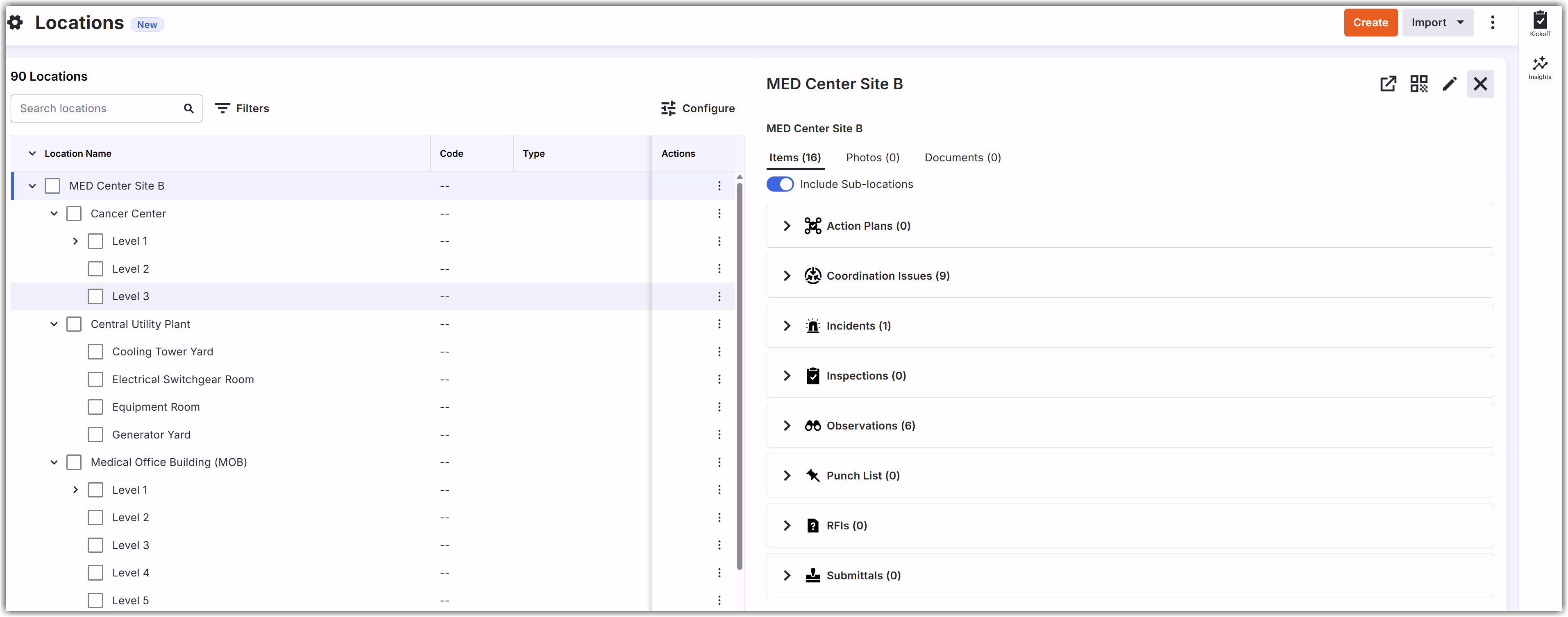
Location Details: Select any location to see its associated items in one place, including Action Plans, Coordination Issues, Incidents, Inspections, Observations, PDM (tagged documents), Photos, Punch List, RFIs, and Submittals. See View Location Details and Associated Tool Items for more information.
Location Mapping: Draw locations as points, paths, or polygons on the project map. This requires a package that includes the Maps tool.
Granular Permissions for Secure Access Control:
Teams can configure fine-grained access control across key location actions:Create Locations: Create new location entities (Web, iOS, Android).
Import Locations: Import location from external sources such as Revit (Web).
Edit Locations: Reparent, merge, edit, and perform bulk edits or deletions (Web).
Delete Locations: Delete individual location items (Web).
Add Location Geometry: Draw, add, or remove physical geometry on the project map (Web) for rich visual context.
Print QR Codes: Generate and print QR codes directly for physical jobsite posting (Web).
Export Locations: Export location hierarchies and data (Web).
Benefits
The Locations tool gives project teams a single place to find, track, and act on project records tied to physical jobsite spaces, such as a floor, zone, pipeline segment, or tract.
The Locations tool lets teams draw locations as points, paths, or polygons on an interactive map, so a location is more than a name in a list. Mapped locations appear on the Project Map alongside other pinned items, giving teams a clear view of where each location is on the jobsite.
Location-specific permissions control who can create, edit, map, or delete locations, so every team works from one consistent location hierarchy instead of second-guessing which location is which.